idea-manager
officialAI-powered idea & task manager for developers. Brainstorm → structured tasks → AI agent execution. CodeMirror editor with slash commands, MCP Server, Claude/Gemini/Codex support. Local-first SQLite, cross-PC Git sync.
IM (Idea Manager)
v1.8+ users:
im startnow auto-updates on boot. If you’re on an older version, runnpm install -g idea-manager@latestonce — after that, every future release is applied automatically.
Turn free-form brainstorming into structured task trees with AI-generated prompts.
A local-first task management tool for developers. Organize ideas into workspaces and projects, refine prompts for each task, and hand them off to AI agents. Built-in MCP Server enables autonomous AI agent execution. Cross-PC sync via Git.
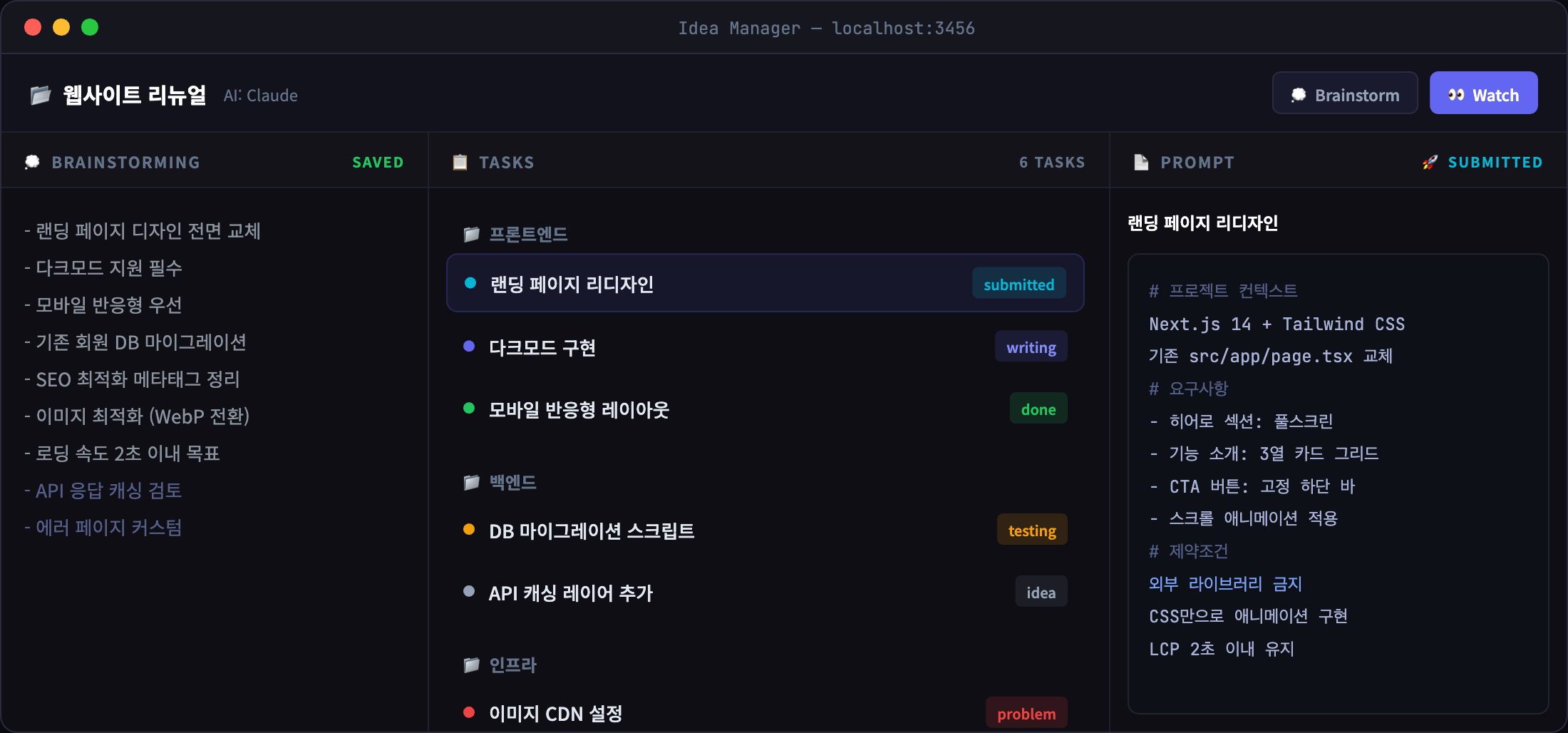
Quick Start
npm install -g idea-manager
im start
Opens a native-like app window (Chrome/Edge --app mode). First run builds automatically. From v1.8.0, im start checks npm on boot and auto-upgrades when a newer version is available (IM_NO_AUTO_UPDATE=1 to opt out).
Core Workflow
Brainstorming → Projects / Tasks → Prompts → AI Agent ExecutionHierarchy
Workspace
├── Project A
│   ├── Task 1  →  Prompt
│   ├── Task 2  →  Prompt
│   └── Task 3  →  Prompt
└── Project B
    ├── Task 4  →  Prompt
    └── Task 5  →  Prompt
Task Status Flow
💡 Idea → 🔥 Doing → ✅ Done
                      🔴 Problem
Legacy statuses (Writing, Submitted, Testing) remain available and are shown as a dashed badge on pre-v1.6 tasks.
CLI Commands
| Command | Description |
|---|---|
im start | Start web UI (port 3456) |
im start -p 4000 | Custom port |
im mcp | Start MCP server (stdio) |
im watch | Auto-execute submitted tasks via AI CLI |
im sync init | Initialize cross-PC sync |
im sync push | Export data + push to Git |
im sync pull | Pull + import data |
im sync | Show sync status |
Features
Multi-Agent Support
Choose your AI CLI per project:
| Agent | CLI | Description |
|---|---|---|
| Claude | claude | Anthropic Claude Code CLI |
| Gemini | gemini | Google Gemini CLI |
| Codex | codex | OpenAI Codex CLI |
Select from the project header dropdown. Used for Watch mode and AI Chat.
Cross-PC Sync
Sync your data across machines via a private Git repository.
# First machine
im sync init          # Create/connect a Git repo
im sync push          # Export + push

# Other machines
im sync init          # Same repo URL
im sync pull          # Pull + import
Supports auto repo creation with GitHub CLI (gh).
MCP Server
Expose tasks to external AI agents via Model Context Protocol.
Claude Desktop (claude_desktop_config.json):
{
  "mcpServers": {
    "idea-manager": {
      "command": "npx",
      "args": ["-y", "idea-manager", "mcp"]
    }
  }
}
Claude Code:
claude mcp add idea-manager -- npx -y idea-manager mcpMCP Tools
| Tool | Description |
|---|---|
list-projects | List all projects |
get-project-context | Full sub-project + task tree |
get-next-task | Next submitted task to execute |
get-task-prompt | Get prompt for a task |
update-status | Change task status |
report-completion | Report task done |
Watch Mode
Auto-execute submitted tasks with real-time streaming output:
im watch                          # All watch-enabled projects
im watch --project <id>           # Specific project
im watch --interval 30 --dry-run  # Preview mode
Note-Centric Editor (v1.6)
The task detail replaces the old separate “description + prompt” pair with a single rich Markdown note.
- CodeMirror Editor — Markdown syntax highlighting with distinct styling for headings, list markers (
-,1.), code, links, and quotes. GFM enabled (task checkboxes, strikethrough, tables). - ⌘K AI Command Palette — Refine the selection or continue at cursor without leaving the note:
- 이어서 써줘 (continue) · 이 부분 정리해줘 (tidy) · 할 일로 쪼개줘 (split into tasks) · 질문으로 바꿔줘 (to questions) · 요약해줘 (summarize) · Custom prompt
- Result is inserted inline. Cancel mid-run; Undo within 30s of applying.
- Runs on Sonnet without project context for ~7s typical latency.
- Context-Aware Autocomplete — Ghost text suggests multi-word phrases (up to 3 tokens). Corpus pulls from the current note, sibling tasks in the same project, and the project’s brainstorm. Phrases sharing vocabulary with the current note are boosted, so related terms surface first.
Tabaccepts,Escdismisses. - List Auto-Continue — Enter continues bullets/numbers/checkboxes; Enter on an empty item exits the list.
- Copy as Prompt — One-click copy of the whole note formatted for pasting into Claude Code / another agent.
Workspace
- 3-Panel Layout — Brainstorming | Project Tree | Task Detail (drag to resize)
- Tab-based Navigation — Multiple projects open simultaneously
- File Tree Drawer — Browse linked project directories
- Brainstorming Panel — Free-form notes with inline AI memos
- Auto Distribute — AI analyzes brainstorming and distributes tasks to sub-projects with preview/edit modal
- Note Assistant — Per-task AI chat (formerly “AI Chat”) for refining the note, with one-click insert into the note
- Quick Memo — Global scratchpad on dashboard for free-form notes (auto-saved)
- Morning Notifications — Daily macOS notification at 9 AM with today’s tasks summary
- Dashboard — Active / All / Today / Archive views
- Keyboard Shortcuts —
Bbrainstorm,Nproject,Ttask,⌘KAI command palette,⌘1/2/3/4status (Idea/Doing/Done/Problem)
Data
- Local-first — All data in
~/.idea-manager/data/(SQLite via sql.js) - Zero native deps — Pure JavaScript, no C++ build tools needed
- Auto backup — Database backed up before each sync pull
- App mode — Opens in Chrome/Edge without address bar
Tech Stack
| Area | Technology |
|---|---|
| Frontend | Next.js 16, React 19, TypeScript, Tailwind CSS 4 |
| Backend | Next.js API Routes |
| Database | SQLite (sql.js, pure JS) |
| AI | Claude / Gemini / Codex CLI |
| MCP | Model Context Protocol (stdio) |
| CLI | Commander.js |
Requirements
- Node.js 18+
- AI CLI (optional) — Claude CLI, Gemini CLI, or Codex CLI for AI features. Core task management works without it.
Troubleshooting
im command not found after install
Add npm’s global bin directory to your PATH:
# Check the path
npm prefix -g
# Add to shell profile (~/.zshrc or ~/.bashrc)
export PATH="$(npm prefix -g)/bin:$PATH"
Port already in use
# Kill the process using the port
lsof -t -i :3456 | xargs kill -9    # macOS/Linux
netstat -ano | findstr :3456          # Windows (then taskkill /PID <pid> /F)
Changelog
v1.6.0
- ⌘K AI Command Palette — Inline refine/continue/summarize/split commands, result inserted at cursor. Cancel + 30s Undo. Runs on Sonnet with lean context (~7s vs 90s previously).
- CodeMirror Note Editor — Replaces textarea with a full Markdown editor: syntax highlighting, GFM task lists / strikethrough / tables, list auto-continue, ghost-text autocomplete.
- Context-Aware Autocomplete — Multi-word phrase suggestions drawn from the current note + sibling tasks + brainstorm. Shared-vocabulary boost surfaces topically related completions first.
doingstatus — Simplified default flow (Idea → Doing → Done). Legacy statuses preserved with a dashed badge.- Task archive & tags —
is_archivedandtagscolumns with Archive dashboard tab. - Legacy prompt merge — Existing
task_promptsare one-time merged into the note description with a<!-- legacy-prompt -->marker. - Note Assistant — Per-task AI chat repositioned around note refinement, with one-click insert.
- Runtime:
RunAgentOptions.modeloverride, CodeMirror-aware global-shortcut filter.
v1.3.0
- Task Archive — Delete → Archive/Delete choice; archived tasks preserved with prompts and conversations
- Archive tab — Dashboard tab to browse, restore, or permanently delete archived tasks
- DB Sync UI — Dashboard Sync button with Git push/pull modal (init, push, pull)
- Gemini model fix — Switch from gemini-3-flash-preview to gemini-2.5-flash (stable, better rate limits)
- Claude model upgrade — Default model changed to Opus
- Auto Distribute improvements — Better JSON parsing, error details in modal
- Chat cwd fix — AI chat now runs in project’s linked directory
v1.2.0
- Auto Distribute — AI-powered brainstorming to task distribution with preview/edit modal
- Quick Memo — Global scratchpad on dashboard (auto-saved to DB)
- Chat state indicators — Loading/done badges on tasks in project tree (persists until task opened)
- Chat isolation fix — Switching tasks no longer mixes AI responses between tasks
- Morning scheduler — Daily 9 AM macOS notification with today’s tasks summary
- Gemini JSON parsing — Fix raw JSON display in Gemini chat responses
- Resizable description — Task description textarea is now vertically resizable
v1.1.7
- Fix: write DB to disk immediately instead of delayed save
License
MIT