@kernlang/mcp-server
officialKERN MCP server — compile, review, and analyze .kern files via MCP
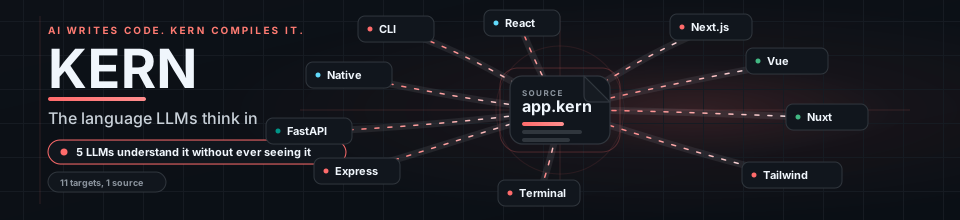



Built for humans and AI. 192-line spec. 13 compile targets. 233 review rules.
LLMs write .kern in up to 85% fewer tokens. 7 LLMs verified.
kernlang.dev • MCP • Review • Playground • Docs • For LLMs
Install
npm install -g @kernlang/clikern compile src/ --target=nextjs --watch --facades --index # One command — compile, watch, facades, barrel
kern review src/ --recursive # Static analysis (233 rules, taint tracking)
kern init --template=fullstack my-app # Scaffold fullstack app (Next.js + Express + MCP)
kern init --mcp # Scaffold an MCP server with security guards
kern import src/ --outdir=kern/ # TypeScript → .kern
kern schema --json # Full schema for LLM consumptionWhat is KERN?
KERN is a structural language with five capabilities: Compile, Review, Evolve, Infer, and MCP Security.
Write .kern once, compile to 13 targets. Or skip .kern entirely and use kern review to scan your existing TypeScript and Python for security bugs, unguarded effects, flaky tests, and prompt injection — 233 AST-based rules that catch what ESLint misses.
Compilation Targets
| Tier | Targets | Status |
|---|---|---|
| Tier 1 (supported) | Next.js, Web (React), Tailwind, Express, MCP, CLI, Ink | Full schemas, deterministic output, golden examples |
| Tier 2 (stable) | Vue, Nuxt, FastAPI | Working, tested, production-ready |
| Tier 3 (experimental) | React Native, Terminal | Functional, limited test coverage |
Tiers are tracked per compile target, not per npm package. For example, @kernlang/terminal contains two separate targets: --target=terminal (pure ANSI/Node.js output) and --target=ink (React + Ink TSX output).
For detailed examples, interactive demos, and the full rule reference, visit kernlang.dev.
Quick Example
7 lines of .kern:
machine name=Order initial=pending
  transition from=pending to=confirmed event=confirm
  transition from=confirmed to=shipped event=ship
  transition from=shipped to=delivered event=deliver
Compiles to 140+ lines of typed TypeScript — enums, transition functions, exhaustive checks, error classes.
5-Minute Quickstart
Build a fullstack Todo app (Next.js + Express + MCP) from scratch:
# 1. Install
npm install -g @kernlang/cli

# 2. Scaffold
kern init --template=fullstack my-todo-app
cd my-todo-app

# 3. Compile everything
kern compile models.kern                           # shared types
kern compile api.kern --target=express              # backend API
kern compile frontend.kern --target=nextjs          # Next.js frontend
kern compile mcp-server.kern --target=mcp           # AI agent tools

# 4. Run
cd generated/api && npx tsx server.ts               # API on :3001
Available templates: fullstack, nextjs, express, file-tools, api-gateway, database-tools
See examples/starter/fullstack/ for the generated files.
kern review
Static analysis with taint tracking, concept-level checks, and OWASP LLM01 coverage. No AI needed.
kern review src/ --recursive            # Full scan
kern review src/ --enforce --min-coverage=80  # CI gate
kern review --diff origin/main          # Only changed files
kern review src/ --lint                 # KERN + ESLint + tsc unified
kern review src/ --llm                  # AI review (see below)
233 rules across base, security, framework, performance, test-quality, null-safety, dead-logic, concept, and taint-aware analysis layers.
Recent coverage includes broadly reusable Next.js, React, Storybook, and Playwright checks: App Router body parsing, cache and header hazards, client-boundary env exposure, cookie hardening, SWR invalidation drift, browser storage parsing, client-side redirect sinks, wildcard postMessage, legacy React lifecycles, effect cleanup mistakes, timer cleanup drift, stale .length/.size hook deps, props-array mutation in render, focused tests, fixed Playwright sleeps, brittle networkidle waits, non-deterministic stories, and unmocked Storybook network calls.
AI-Assisted Review (--llm)
--llm translates your code to KERN IR — a compressed semantic representation that strips framework sugar and gives raw meaning. Two modes:
Inside an AI CLI (Claude Code, Codex, Cursor) — no env vars needed:
kern review src/ --llm # Outputs KERN IR + findings + taint for the AI to reviewCI/CD pipeline — set both env vars to call an LLM API directly:
KERN_LLM_API_KEY=sk-... KERN_LLM_MODEL=gpt-4o kern review src/ --llmNo hardcoded model — you choose via KERN_LLM_MODEL. Files are batched by token size, not count.
Full rule reference: kernlang.dev/review
MCP Server Security
Scan MCP servers for vulnerabilities. 12 rules mapped to the OWASP MCP Top 10. Plus live server inspection and tool pinning.
npx kern-mcp-security ./src/server.tsAvailable as: VS Code Extension | CLI (npx kern-mcp-security) | GitHub Action (see CI/CD below)
MCP Server
KERN ships its own MCP server. AI agents can compile, review, inspect, and self-correct .kern files via the Model Context Protocol.
npx @kernlang/mcp-server # Start locally (stdio)Or use the hosted endpoint — no install required:
https://kernlang.dev/api/mcp # Streamable HTTP — point any MCP client hereClaude Desktop — add to claude_desktop_config.json:
{
  "mcpServers": {
    "kern": { "command": "npx", "args": ["@kernlang/mcp-server"] }
  }
}
Claude Code:
claude mcp add kern -- npx @kernlang/mcp-server16 tools including compile, compile-json, compile-and-review, review, review-kern, review-mcp-server, inspect-mcp-servers, verify-tool-pins, audit-mcp-config, generate-security-tests, parse, decompile, validate, list-targets, list-nodes, schema
3 resources: kern://spec, kern://targets, kern://examples/{category}
1 prompt: write-kern (system prompt with full language spec)
Self-correction loop: schema → write .kern → compile-json → fix from diagnostics → done. Zero human intervention.
Full setup guide: kernlang.dev/mcp
Build MCP Servers from .kern
30 lines of .kern generates a production MCP server with auto-injected security guards:
kern init --mcp                                   # Scaffold with templates
kern compile server.kern --target=mcp --watch      # Compile + hot reload
Templates: file-tools, api-gateway, database-tools
CI/CD
KERN Review — GitHub Action
Drop this into .github/workflows/kern-review.yml to run kern review on every push and PR:
name: KERN Review

on:
  push:
    branches: [main, dev]
  pull_request:
    branches: [main]

jobs:
  review:
    runs-on: ubuntu-latest
    steps:
      - uses: actions/checkout@v6

      - uses: actions/setup-node@v6
        with:
          node-version: '22'

      - name: Activate pnpm
        run: |
          corepack enable
          corepack prepare pnpm@10.32.1 --activate
          pnpm --version

      - run: pnpm install --frozen-lockfile --ignore-scripts
      - run: pnpm build

      - name: KERN Review
        run: npx @kernlang/cli review src/ --recursive

      # Optional: enforce minimum coverage
      # - name: KERN Review (enforced)
      #   run: npx @kernlang/cli review src/ --recursive --enforce --min-coverage=80

      # Optional: LLM-assisted review (set secrets in repo settings)
      # - name: KERN Review (AI)
      #   run: npx @kernlang/cli review src/ --recursive --llm
      #   env:
      #     KERN_LLM_API_KEY: ${{ secrets.KERN_LLM_API_KEY }}
      #     KERN_LLM_MODEL: ${{ vars.KERN_LLM_MODEL }}
MCP Security — GitHub Action
Drop this into .github/workflows/mcp-security.yml for MCP server scanning with SARIF upload and PR comments:
name: MCP Security
on:
push:
branches: [main, dev]
pull_request:
branches: [main]
permissions:
contents: read
security-events: write
pull-requests: write
jobs:
scan:
runs-on: ubuntu-latest
steps:
- uses: actions/checkout@v4
- uses: actions/setup-node@v4
with:
node-version: '20'
- name: Install KERN MCP Security
run: npm install -g @kernlang/review-mcp@latest
- name: Scan MCP server code
id: scan
run: |
kern-mcp-security --format json --output kern-mcp-security.json . || true
kern-mcp-security --format sarif --output kern-mcp-security.sarif . || true
RESULT=$(kern-mcp-security --quiet . 2>&1) || true
GRADE=$(echo "$RESULT" | head -1 | awk '{print $1}')
SCORE=$(echo "$RESULT" | head -1 | awk '{print $2}')
echo "grade=$GRADE" >> $GITHUB_OUTPUT
echo "score=$SCORE" >> $GITHUB_OUTPUT
echo "MCP Security Score: $GRADE ($SCORE/100)"
- name: Verify tool pinning lockfile
run: |
if [ -f .kern-mcp-lock.json ]; then
kern-mcp-security --verify . || echo "::warning::Tool pinning drift detected"
else
echo "No .kern-mcp-lock.json found — run 'npx kern-mcp-security --lock .' to generate one"
fi
- name: Upload SARIF to Code Scanning
if: always() && hashFiles('kern-mcp-security.sarif') != ''
uses: github/codeql-action/upload-sarif@v3
with:
sarif_file: kern-mcp-security.sarif
category: kern-mcp-security
continue-on-error: true
- name: Post PR comment
if: github.event_name == 'pull_request' && always()
uses: actions/github-script@v7
with:
script: |
const fs = require('fs');
let report;
try {
report = JSON.parse(fs.readFileSync('kern-mcp-security.json', 'utf-8'));
} catch { return; }
const { grade, total } = report.score;
const color = { A: '22c55e', B: '84cc16', C: 'f97316', D: 'f59e0b', F: 'ef4444' }[grade];
const badge = `-${color})`;
let body = `## KERN MCP Security Report\n\n${badge}\n\n`;
body += `| Metric | Score |\n|--------|-------|\n`;
body += `| Guard Coverage | ${report.score.guardCoverage}% |\n`;
body += `| Input Validation | ${report.score.inputValidation}% |\n`;
body += `| Rule Compliance | ${report.score.ruleCompliance}% |\n`;
body += `| Auth Posture | ${report.score.authPosture}% |\n\n`;
body += `**${report.findingsCount} finding(s)**\n\n`;
body += `> Scanned by [KERN MCP Security](https://kernlang.dev/review)`;
const { data: comments } = await github.rest.issues.listComments({
owner: context.repo.owner, repo: context.repo.repo,
issue_number: context.issue.number,
});
const existing = comments.find(c => c.body?.includes('KERN MCP Security Report'));
if (existing) {
await github.rest.issues.updateComment({
owner: context.repo.owner, repo: context.repo.repo,
comment_id: existing.id, body,
});
} else {
await github.rest.issues.createComment({
owner: context.repo.owner, repo: context.repo.repo,
issue_number: context.issue.number, body,
});
}
- name: Enforce score threshold
if: always()
run: |
SCORE="${{ steps.scan.outputs.score }}"
THRESHOLD=60
if [ -n "$SCORE" ] && [ "$SCORE" -lt "$THRESHOLD" ] 2>/dev/null; then
echo "::error::MCP Security score $SCORE is below threshold $THRESHOLD"
exit 1
fiKERN Compile + Validate — GitHub Action
Drop this into .github/workflows/kern-compile.yml to validate .kern files compile correctly on every PR:
name: KERN Compile

on:
  push:
    branches: [main, dev]
  pull_request:
    branches: [main]

jobs:
  compile:
    runs-on: ubuntu-latest
    steps:
      - uses: actions/checkout@v6

      - uses: actions/setup-node@v6
        with:
          node-version: '22'

      - name: Activate pnpm
        run: |
          corepack enable
          corepack prepare pnpm@10.32.1 --activate
          pnpm --version

      - run: pnpm install --frozen-lockfile --ignore-scripts
      - run: pnpm build

      - name: Validate .kern files
        run: npx @kernlang/cli compile src/ --target=nextjs --json

      - name: Type-check generated output
        run: npx tsc --noEmit
Release Process
Use the built-in release workflows in this order:
- Run
Release Preflightfrommainwith a plain semver like3.2.4. - Wait for the preflight run to pass build, test, and
pnpm publish --dry-run. - Publish a GitHub Release with a lowercase tag like
v3.2.4. - Let
Version & Publishpublish to npm and sync versions back todev.
Contributor architecture guide: docs/architecture.md
Ecosystem
| Package | What it does |
|---|---|
| @kernlang/cli | CLI — compile, review, evolve, dev |
| @kernlang/core | Parser, codegen, types — the compiler engine |
| @kernlang/test | Native KERN structural test runner |
| @kernlang/review | 231 rules, taint tracking, OWASP LLM01, concept model |
| @kernlang/review-mcp | MCP security scanner (12 rules, OWASP MCP Top 10) |
| @kernlang/react | Next.js, Tailwind, Web transpilers |
| @kernlang/vue | Vue 3 SFC, Nuxt 3 transpilers |
| @kernlang/native | React Native transpiler |
| @kernlang/express | Express backend + WebSocket transpiler |
| @kernlang/python | Python backend codegen (FastAPI router target + WebSocket) |
| @kernlang/mcp | MCP server transpiler — .kern to secure MCP servers |
| @kernlang/mcp-server | KERN’s own MCP server — compile, review, parse via MCP |
| @kernlang/terminal | ANSI terminal + Ink transpilers |
| @kernlang/evolve | Self-extending template system |
| @kernlang/review-python | Python review support (FastAPI, Django) |
| @kernlang/playground | Interactive compiler UI |
| @kernlang/metrics | Language coverage analysis |
| @kernlang/protocol | AI draft communication protocol |
VS Code Extensions
- Kern MCP Security — MCP security scanner with inline findings, Security Score, autofixes (Open VSX)
- Kern Sight — Review findings as inline diagnostics, sidebar panel, .kern syntax highlighting
License
Dual-licensed: AGPL-3.0 + Commercial.
| Use case | License | Cost |
|---|---|---|
| Personal projects | AGPL-3.0 | Free |
| Open-source projects | AGPL-3.0 | Free |
| Education & research | AGPL-3.0 | Free |
| Internal company tools (not distributed) | AGPL-3.0 | Free |
| Commercial products & SaaS | Commercial license | Contact us |
Why AGPL? AGPL means if you use KERN in a product you distribute or serve to users, you must open-source your modifications. If you don’t want that obligation, the commercial license gives you full freedom to use KERN in proprietary products without disclosure.
What the commercial license includes:
- Use KERN in closed-source products and SaaS
- No obligation to open-source your code
- Priority support and issue resolution
- License for your entire engineering team
Contact: hello@kernlang.dev — we respond within 24 hours.
Copyright (c) 2026 KERNlang