claude-alloy
github14-agent orchestration harness for Claude Code — pure config, no runtime, no wrapper
Claude Alloy
A mixture stronger than its parts.


Quick Start • Agents • Install • Dev Guide • Contributing
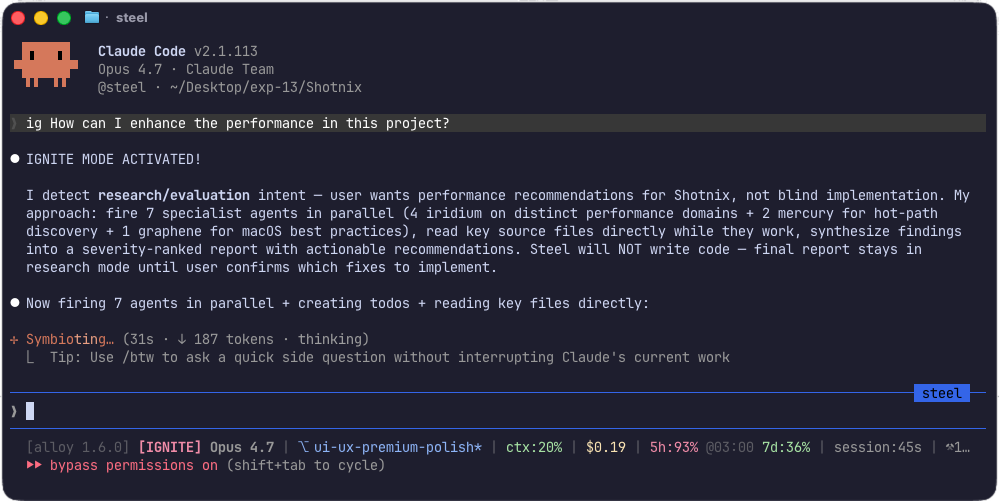
ig activates IGNITE mode — steel verbalizes intent, fires specialists in parallel, and the HUD tracks context / cost / quota live.
Claude Code with a team.
Fourteen specialist agents. Model-tiered (Opus/Sonnet/Haiku) so you stop overpaying for searches. Zero runtime. One config overlay. One command to activate, one to remove.
Steel holds the structure. Tungsten doesn’t melt under pressure. Mercury moves fast. Graphene conducts everything.
alloyThat’s it. 14 agents, 23 hooks, 10 skills, 15 commands + HUD statusline. Globally active. Open Claude Code in any directory and go.
If this saves you time, give it a ⭐ — that's how I know to keep building.
unalloyBack to vanilla Claude. Your original settings restored exactly.
The Agents
| Agent | Model | Role | Why the name |
|---|---|---|---|
| steel | opus | Main orchestrator. Plans, delegates, verifies. | The alloy that holds everything together. |
| tungsten | opus | Autonomous execution. Won’t stop until done. | Highest melting point of any metal. |
| quartz | opus | Architecture consultant. Read-only. | Crystal clear — sees through problems. |
| carbon | sonnet | Strategic planner. Interview-first. | Foundation element — basis of all structure. |
| gauge | sonnet | Code and plan reviewer. Pass/fail. | Measures precisely. No ambiguity. |
| graphene | sonnet | External docs and research. | One atom thick. Conducts everything. |
| prism | sonnet | Finds hidden ambiguities before planning. | Splits light to reveal all angles. |
| spectrum | sonnet | Image, PDF, diagram analysis. | Full range of vision. |
| mercury | haiku | Fast codebase search. Cheap to fire. | Quicksilver — everywhere at once. |
| sentinel | opus | Security reviewer. CWE Top 25, secrets, injection. Read-only. | The watchman. Never sleeps. |
| titanium | sonnet | Context recovery. Rebuilds state from previous sessions. | Highest strength-to-weight ratio. Lightweight but recovers everything. |
| iridium | sonnet | Performance reviewer. Finds O(n²), memory leaks, N+1 queries. | Densest natural element. Catches the heaviest problems. |
| cobalt | sonnet | Dependency expert. CVEs, outdated packages, supply chain risks. | Essential trace element. Small but critical to the whole. |
| flint | sonnet | Test engineer. Coverage gaps, flaky tests, missing edge cases. | Strikes sparks. Finds what breaks. |
Model tiering is intentional. Opus handles orchestration and judgment. Sonnet handles research and analysis. Haiku handles grep. You pay for thinking, not searching.
What Makes claude-alloy Different
- Pure config, no runtime. No plugin system, no daemon, no background process. Just markdown agent definitions, shell hooks, and a
settings.json. If you can read bash, you can audit every line of it. - Deliberate model tiering. Opus for orchestration and judgment. Sonnet for research and implementation. Haiku for grep. You pay for thinking, not searching.
- Multiple install modes. Global toggle via
activate.sh/deactivate.sh, per-project drop-in, plugin-style, or global command — pick what fits your workflow. - Fully reversible.
/unalloyrestores your previous Claude Code config exactly. No lock-in, no residue. - Adaptive routing, not a linear pipeline. Steel routes tasks by what they need (FAST, RESEARCH, PLAN, BUILD, SECURITY, etc.) rather than forcing every task through a fixed sequence or spawning agents without a clear purpose.
Requirements
- Claude Code — Anthropic’s CLI agent (
npm install -g @anthropic-ai/claude-code) - Claude Pro/Max subscription or Anthropic API key — Max recommended for multi-agent workloads
bash(4.0+),jq,git
Token usage: claude-alloy routes Opus for orchestration, Sonnet for implementation, and Haiku for search — so you pay for thinking, not searching. Multi-agent tasks (especially
igmode) use more tokens than single-agent Claude Code. Claude Max 5x/20x with higher rate limits is strongly recommended. API users can expect roughly 2-3x typical token usage on complex tasks.
Quick Start
Simple (recommended)
One-time alias setup:
git clone https://github.com/OMARVII/claude-alloy.git
cd claude-alloy
bash setup-aliases.sh
source ~/.zshrc  # or ~/.bashrc
Then, anywhere:
alloy     # 14 agents active globally
unalloy      # back to vanilla Claude
Then inside Claude, type ig (or /ignite) for maximum effort mode — all agents fire in parallel, nothing ships half-done.
Plugin (Claude Code marketplace)
Status: Plugin metadata is included, but global toggle or per-project install remains recommended for the full hook/settings experience. Claude Code plugin-scoped agents have stricter limits than files installed into
~/.claudeor a project.claude/directory.
# Local plugin testing (clone first)
claude --plugin-dir /path/to/claude-alloy
Per-project (teams)
# Install into a specific project only
bash install.sh --project /path/to/project

# Or set up the global /alloy-init command, then use it in any project
bash setup-global.sh
# In Claude Code:
/alloy-init
After install, see docs/mcp-config.md to enable MCP schema pinning for subagents (
cp .mcp.json.example .mcp.json).
What You Get
.claude/
├── agents/               14 agents (steel, tungsten, quartz, mercury, graphene, carbon, prism, gauge, spectrum, sentinel, titanium, iridium, cobalt, flint)
├── skills/               10 skills (git-master, frontend-ui-ux, dev-browser, code-review, review-work, ai-slop-remover, tdd-workflow, verification-loop, pipeline, hyperplan)
├── commands/             15 commands (/ignite, /ig, /loop, /halt, /alloy, /unalloy, /handoff, /refactor, /init-deep, /start-work, /status, /wiki-update, /notify-setup, /learn, /assess)
├── alloy-hooks/          23 hooks (all automatic, listed below) + statusline HUD
├── wiki/                 project wiki (architecture, conventions, decisions)
├── agent-memory/         14 memory files (generated at install — agents learn across sessions)
├── settings.json         hook config + env vars
└── CLAUDE.md             injected context for all agents
Hooks (all automatic)
| Hook | When | What it does |
|---|---|---|
| write-guard | Before Write | Blocks overwriting existing files — use Edit instead |
| branch-guard | Before Write/Edit | Blocks edits on main/master; allows docs (warn), ALLOY_BRANCH_GUARD=off|warn, or .claude/branch-guard.off marker |
| comment-checker | After Write/Edit | Warns about AI slop comments |
| edit-ledger | After Write/Edit/MultiEdit/NotebookEdit | Records implementation edits for IGNITE review enforcement |
| typecheck | After .ts/.tsx edits | Runs tsc --noEmit, reports errors |
| auto-install | After package.json/requirements.txt/pyproject.toml | Installs dependencies (lifecycle scripts disabled for safety) |
| agent-reminder | After 5 direct searches | Suggests mercury/graphene when research has become broad |
| agent-count | After Agent/Task dispatch | Records spawned agents for IGNITE enforcement |
| lint | After Write/Edit | Runs ESLint/Biome/Prettier, reports errors |
| skill-reminder | After 12 direct tool calls | Suggests relevant skills or agents if the task has expanded |
| todo-enforcer | Before stopping | Reminds about incomplete todos (blocks once, then allows) |
| loop-stop | Before stopping | Keeps working if /loop is active |
| session-notify | On stop | Desktop notification when session ends |
| pre-compact | Before compaction | Saves critical context before memory compaction |
| subagent-start | On subagent start | Tracks agent activity and delegation |
| subagent-stop | On subagent stop | Verifies agent deliverables and results |
| rate-limit-resume | On stop failure | Auto-resumes on rate limit (up to 3x) |
| session-start | On session start | Injects wiki context into session |
| session-end | On session end | Nudges wiki update if session was productive |
| ignite-detector | On user prompt | Detects ig/ignite keywords, sets IGNITE session flag |
| ignite-stop-gate | Before stopping | Blocks exit if IGNITE protocol wasn’t followed (6+ agents, graphene, review) |
| context-pressure | After any tool | Advisory warnings at ~70% / ~85% context usage (100 / 140 tool calls) |
| statusline | Persistent HUD | HUD: model, ctx%, session duration, tool count, cwd (via settings.json statusLine) |
Commands
| Command | What it does |
|---|---|
/ignite (or just ig) | Maximum effort mode. 6+ agents fire in parallel, todos tracked obsessively, manual QA before completion. The signature move. |
/loop | Autonomous loop — agent works until task is 100% complete (see commands/loop.md for /loop vs Claude Code’s native /goal) |
/halt | Stop the loop |
/alloy | Show all agents, skills, commands, hooks |
/unalloy | Remove claude-alloy from current project |
/handoff | Create context summary for session continuation |
/refactor | Safe refactoring with LSP diagnostics |
/init-deep | Generate hierarchical CLAUDE.md files |
/start-work | Execute a plan from carbon |
/status | Show loop state, pending todos, branch, recent activity |
/wiki-update | Update project wiki with session learnings |
/notify-setup | Configure desktop, Slack, and Discord notifications |
/learn | Extract reusable patterns from the current session into skills |
/assess | Scan project health — rate Claude Code maturity 0–10 and suggest next steps |
How It Works
Steel doesn’t follow a fixed pipeline. It routes adaptively:
                ┌─ FAST: handle directly
                │
User → steel ──├─ RESEARCH: mercury ×N + graphene ×N (parallel)
   ↑            │     └─ prism checks INLINE as results arrive
   │ titanium   ├─ PLAN: carbon (only when 3+ files)
   │ (auto)     │     └─ gauge reviews only if carbon flags uncertainty
                ├─ BUILD: tungsten (autonomous, circuit breaker)
                │     └─ review gate (automatic, based on what changed):
                │           sentinel · iridium · cobalt · flint
                └─ CONSULT: quartz (on-demand, never in pipeline)
What makes this different: prism runs inline (not as a separate step), gauge is optional (not a required gate), and after every build a review gate fires the matching reviewers — sentinel (security), iridium (performance), cobalt (dependencies), flint (tests) — based on what changed. quartz is never in a pipeline (only when stuck). No fixed sequence and no agent spawn without a reason — steel adapts per task.
Default mode is precision-routed — agents fire when uncertainty, risk, or scale makes them valuable. ig is the explicit opt-in for full parallelism.
Type ig (or /ignite) for maximum effort: 6+ agents fired in parallel, todos tracked obsessively, manual QA before every completion claim. Two letters. Full team engaged.
Install Modes
| Method | Command | Who it’s for |
|---|---|---|
| Global toggle | alloy / unalloy | Most users — instant, reversible |
| Plugin | claude plugin add claude-alloy | Marketplace users (metadata included; full hook install still recommended) |
| Per-project | bash install.sh --project . | Teams — committed to version control |
| Global command | bash setup-global.sh then /alloy-init | One command per project |
| Ephemeral | claude --plugin-url <release-zip-url> | Try a release for one session — nothing written to disk |
alloy merges with your existing Claude settings. Your custom permissions, model preferences, and plugins are preserved. unalloy restores them exactly.
Try it ephemerally (no install)
Run claude with the --plugin-url flag to load claude-alloy for a single session without writing anything to disk:
claude --plugin-url https://github.com/OMARVII/claude-alloy/releases/download/v1.7.1/claude-alloy.zipThe plugin is unpacked, used for the session, and discarded on exit. Useful for testing a release candidate or trying alloy on a one-off task without committing to a full install. The --plugin-url flag is documented at https://code.claude.com/docs/en/cli-reference.
Uninstall
| What to remove | Command |
|---|---|
| Deactivate (keep files) | unalloy |
| Remove aliases | bash setup-aliases.sh --uninstall |
| Remove global command | bash setup-global.sh --uninstall |
| Remove per-project install | bash install.sh --uninstall |
| Remove everything | All of the above |
Updating
TL;DR —
cd /path/to/claude-alloy && git pull. Global symlink installs update instantly. Copy-mode and per-project installs need one extra step: runalloyorbash install.sh --project .again.
Global install (alloy/unalloy)
Global installs (alloy) use symlinks by default on macOS and Linux. This means git pull in the claude-alloy repo updates all agents, skills, commands, and hooks immediately — no re-activation required.
cd /path/to/claude-alloy
git pull                 # symlink mode: changes are live immediately
If you prefer explicit control:
alloy --update           # pull latest + re-activate in one step
alloy --check            # run health checks (alloy doctor)
alloy --version          # show installed version
To disable auto-update on activation:
export ALLOY_AUTO_UPDATE=0   # env var (per-session)
touch ~/.claude/.alloy-no-update  # persistent opt-out
On WSL/Windows or filesystems that don’t support symlinks, alloy automatically falls back to copy mode. In copy mode, run alloy after git pull to apply updates.
Per-project update
Per-project installs always use copies (not symlinks), so updates require re-running the installer:
cd /path/to/claude-alloy
git pull
bash install.sh --project /path/to/your/project
Global command update (/alloy-init)
If you used setup-global.sh + /alloy-init to install projects, update the cached payload first:
cd /path/to/claude-alloy
git pull
bash setup-global.sh         # refreshes ~/.claude/alloy-dist/
Then re-run /alloy-init inside each project in Claude Code to apply the update.
Troubleshooting
| Symptom | Cause | Fix |
|---|---|---|
| Broken symlinks after moving the clone | Symlinks point to old repo path | Run alloy again from the new location |
git pull fails with diverged error | Local commits on main branch | cd /path/to/claude-alloy && git pull --rebase origin main |
| WSL uses copy mode instead of symlinks | NTFS/drvfs doesn’t support real symlinks | Expected behavior — run alloy after git pull |
Stale /alloy-init payloads | setup-global.sh payload outdated | Run bash setup-global.sh again |
| Hooks firing twice after update | Duplicate hook entries in settings.json | Run unalloy && alloy to regenerate clean settings |
Development Guide
Adding a New Agent
- Create
agents/my-agent.md:
---
name: my-agent
description: "What this agent does."
model: sonnet
tools:
  - Read
  - Grep
  - Bash
maxTurns: 20
memory: project
---

Your system prompt here.- Create
agent-memory/my-agent/MEMORY.md - Add the name to
AGENTSininstall.sh - Add to the roster in
CLAUDE.md - Add to
/alloyreference card - Test:
bash install.sh --project ~/test-project
Adding a New Skill
- Create
skills/my-skill/SKILL.md:
---
name: my-skill
description: "When to auto-load this skill."
---

Skill instructions here.- Add to
SKILLSininstall.sh - Add to
CLAUDE.mdskills table
Adding a New Hook
- Create
hooks/my-hook.sh:
#!/usr/bin/env bash
set -u
INPUT=$(cat)

# Require jq for JSON parsing
command -v jq &>/dev/null || exit 0

# Your logic here

# Output for PostToolUse hooks (non-blocking feedback):
# jq -n --arg msg "Your message" '{"hookSpecificOutput":{"hookEventName":"PostToolUse","additionalContext":$msg}}'

# Exit codes: 0 = continue, 2 = block (with stderr message)
exit 0
chmod +x hooks/my-hook.sh- Add to
settings.jsonunder the appropriate event - Add to
HOOKSininstall.sh
Hook Events
| Event | When | Can Block? |
|---|---|---|
PreToolUse | Before tool execution | Yes |
PostToolUse | After tool execution | No |
Stop | Before session stops | Yes |
PreCompact | Before memory compaction | No |
SubagentStart | When a subagent is spawned | No |
SubagentStop | When a subagent completes | No |
StopFailure | When session stops due to error | No |
SessionStart | When a session starts/resumes | No |
SessionEnd | When a session ends | No |
UserPromptSubmit | When user submits a prompt | No |
Environment Variables
Harness config (set in settings.json)
| Variable | Value | Why |
|---|---|---|
BASH_DEFAULT_TIMEOUT_MS | 420000 (7 min) | Prevents timeout on long builds and test suites |
BASH_MAX_TIMEOUT_MS | 420000 (7 min) | Same |
CLAUDE_CODE_DISABLE_GIT_INSTRUCTIONS | 1 | Removes built-in git workflow instructions and git status snapshot from system prompt — saves tokens (alloy provides its own via CLAUDE.md) |
Opt-in hook gates (set in your shell rc — off by default since v1.6.1)
Two hooks can execute project-local code and are therefore disabled unless you explicitly opt in. See SECURITY.md for the full threat model.
| Variable | Enables | What it does |
|---|---|---|
ALLOY_AUTO_LINT=1 | hooks/lint.sh, hooks/typecheck.sh | Runs npx --no-install for eslint / biome / prettier / tsc after file edits. Off by default — npx resolves binaries from node_modules/.bin/ in the project you opened, which is a code-execution surface in untrusted repos. |
ALLOY_AUTO_INSTALL=1 | hooks/auto-install.sh | Runs npm install --ignore-scripts / pip install --no-deps --only-binary=:all: after manifest edits. Off by default — dependency names written into package.json / requirements.txt by the agent could be typosquats. Editable pip installs (pip install -e .) are never run automatically even when this is set. |
ALLOY_AUTO_UPDATE=0 | self-update.sh | Set to 0 to disable the weekly self-update check (default: enabled, checks at most once per 7 days; only pulls if origin remote is exactly OMARVII/claude-alloy). |
ALLOY_BROWSER=1 | /dev-browser skill | Enables Playwright MCP browser automation. Requires @playwright/mcp to be installed. |
ALLOY_IGNITE_TTL=7200 | hooks/ignite-stop-gate.sh, hooks/pre-compact.sh | Seconds of freshness for the ignite-active-${SESSION_ID} marker. Default 7200 (2h). The stop-gate and pre-compact hooks treat the marker as expired once the mtime is older than this and stop enforcing IGNITE-specific behavior. Bump for very long runs; lower for short, scripted IGNITE bursts. |
ALLOY_TUNGSTEN_TTL=1800 | hooks/pre-compact.sh | Seconds of freshness for the tungsten-active-${SESSION_ID} marker that pre-compact reads. Default 1800 (30m) — matches the typical tungsten work window. Tungsten dispatches longer than this fall through to advisory mode (compaction allowed). Raise if a tungsten run typically exceeds 30m on your hardware. |
ALLOY_DEBUG=1 | All hooks emitting [alloy] traces | Set to 1 to emit per-hook stderr diagnostics — useful for diagnosing missed subagent counts, stale tungsten markers, or stop-gate false positives. Off by default to keep production output clean. |
Optional: MCP Tool Search opt-in (power-user tip)
If you’ve added many MCP servers and your context fills up fast, Claude Code has a deferred-loading feature called Tool Search that loads MCP tool schemas only when needed. Anthropic’s docs claim over 85% MCP schema reduction when active.
Default behavior: Claude Code tries to auto-activate Tool Search when MCP tools exceed ~10% of context. Most users with a small MCP set don’t need to do anything.
Force-enable (recommended only if you have 10+ MCP servers):
# Add to ~/.zshrc or ~/.bash_profile
export ENABLE_TOOL_SEARCH=true
Caveats:
- Auto-activation has known reliability bugs — the env var is the workaround.
- The env var is silently ignored on Windows Desktop. macOS/Linux CLI works.
- Adds a search round-trip per request — only worth it when MCP schemas are actually large.
- Requires Sonnet 4+, Opus 4+, or Haiku 4.5+.
claude-alloy ships only 3 always-on MCP servers (context7, grep_app, websearch), so most users won’t need this. Power users adding Linear/Notion/Slack/HubSpot/etc. on top will see the biggest benefit.
Inspecting the installed plugin
Once claude-alloy is installed as a plugin, two CLI commands surface what the harness registered:
claude plugin list       # show installed plugins, versions, source marketplace, enable status
claude plugin validate   # verify plugin.json, skill/agent/command frontmatter, hooks/hooks.json
claude plugin list is the fastest way to confirm claude-alloy is loaded and at the expected version. claude plugin validate is the right command to run after editing a local copy — it catches manifest typos before they bite at runtime. The /plugin slash-command opens an interactive equivalent with a tab for runtime errors. See Plugins reference for the full subcommand list.
Platform Support
| Platform | Status | Notes |
|---|---|---|
| macOS | Full support | Tested on macOS 14+ |
| Linux | Full support | Ubuntu, Debian, Fedora, Arch |
| Windows | Via WSL | Claude Code requires WSL on Windows — our scripts work inside WSL |
# Install jq (required for hooks):
brew install jq        # macOS
sudo apt install jq    # Ubuntu/Debian
sudo dnf install jq    # Fedora
Architecture Decisions
| Decision | Rationale |
|---|---|
| Claude-only models | Opus/Sonnet/Haiku tiering. One provider, no API key juggling. |
| Per-project install | Each project opts in. Nothing polluted globally (unless you want it with alloy). |
| Shell hooks | Claude Code hooks are external processes. Shell is universal, zero dependencies except jq. |
| 14 agents, not 30+ | Curated over comprehensive. Every agent earns its slot. No bloat. |
| Block-once todo enforcer | Reminds the agent once, then lets you stop. Smart, not annoying. |
| Agent memory files | Agents learn across sessions. Preferences, patterns, edge cases persist. |
Contributing
See CONTRIBUTING.md for how to add agents, skills, hooks, and submit PRs.
Agents follow the material/metal naming convention — the name should reflect the agent’s core property.
Security
See SECURITY.md for the security policy, known considerations, and how to report vulnerabilities.
Changelog
See CHANGELOG.md for release history. Current version: 1.7.1.