claude-smart
githubA Claude Code plugin that makes Claude Code self-improve — learning from your corrections, not just remembering them (also support codex now)
claude-smart
A self-improvement plugin for Claude Code and Codex that turns interactions into durable skills they follow in future sessions.






Quick Start • How It Works • Commands • Dashboard • Configuration • Troubleshooting • License
claude-smart learns from your corrections and from what's already working — so the assistant stops repeating mistakes and reuses proven paths. Project-specific skills capture repo-local rules, and shared skills roll up durable patterns for reuse across projects.
vs claude-mem: ~3× better at turning your corrections into rules Claude follows, ~50% more of your guidance is retained. Read the benchmark →
Quick Start
Claude Code
npx claude-smart install # or: uvx claude-smart installThen restart Claude Code.
Requires Node.js (for npx) or uv (for uvx) to already exist.
Alternatively, install via Claude Code’s plugin marketplace:
claude plugin marketplace add ReflexioAI/claude-smart
claude plugin install claude-smart@reflexioai
To uninstall:
npx claude-smart uninstall # or: uvx claude-smart uninstallOr, if installed via the plugin marketplace:
claude plugin uninstall claude-smart@reflexioaiCodex
npx claude-smart install --host codexThen fully quit and reopen Codex so hooks reload.
Requires the codex CLI on PATH and Node.js (for npx).
To uninstall:
npx claude-smart uninstall --host codexRestart Codex after uninstalling. The uninstaller stops local claude-smart services and removes plugin/cache/config state; learned data under ~/.reflexio/ and ~/.claude-smart/ is preserved and shared with Claude Code, so you can switch between hosts without losing skills or preferences.
Developing the plugin itself? See DEVELOPER.md for what the installer does, manual toggles via /plugins, and clone-based development.
Not supported: Claude Code Cowork, claude.ai/code web, or remote Codex environments without local plugin hooks — they run outside your local machine, so the local backend/dashboard and
~/.reflexio/aren’t reachable.
Why Learning, Not Memory
Most memory tools just record. Claude remembers what happened, but doesn’t change what it does next.
claude-smart focuses on learning instead.
Four things this changes:
-
💡 Stop repeating the same mistakes: Produces actionable skills Claude can follow next time; memory only records what happened.
Example: a deploy fails after Claude bumps
prismafrom 5.x to 6.0; you tell it to roll back because 6.0 breaks nested writes in your order flow.
Memory: “deploy broke after prisma bump; user rolled back”
Learning: “treat major-version bumps of ORMs/DB drivers as breaking — verify with integration tests, not just unit tests” -
🚀 Start from the optimized path: Records and optimizes the steps that worked so Claude can reuse them, instead of re-exploring each session.
Example: Claude spends several iterations trying to start the local dev environment before discovering that this repo requires
pnpm dev:allinstead of the usualnpm run dev.
Memory: “user mentioned thatnpm run devdid not work”
Learning: “for this repo, always usepnpm dev:allto start the full local stack —npm run devonly starts the frontend and causes missing service errors”Instead of re-exploring, Claude Code starts from the proven path—reducing planning steps, latency, and token usage.
-
🌐 Project-specific and shared skills: Session memory disappears with the conversation. Project-specific skills preserve repo-local rules, while shared skills roll up patterns that should transfer across projects. Preferences stay scoped to the current project so per-repo preferences don’t leak across projects.
-
🪶 Better context without prompt bloat: Distilled, deduplicated skills stay in dozens of tokens—not thousands—even as the project grows.
Demo
https://github.com/user-attachments/assets/ed84d73a-d5b7-4a0d-ab2c-f2c060c3f276
Key Features
- 🧠 Learn, don’t just remember — Corrections become structured, deduplicated rules, not transcript replays.
- ⚡ Fully automatic learning — Every user turn, tool call, and assistant response is captured via lifecycle hooks and extracted into rules without you running anything.
- 📈 Continuously self-tuning, not just append-on-conflict — Existing rules are continuously refined, not just appended to. Wording gets clearer, when-to-apply triggers tighten or broaden as evidence accumulates, near-duplicates merge, stale rules are superseded, and dead ones are archived. The library gets sharper, not just bigger.
e.g. correct the same
npm test --rungotcha twice → consolidated into one rule. New evidence shows it applies tovitesttoo → scope broadened. Switch policy topnpm test→ old rule archived, new one supersedes it. - 🔌 No external API call — semantic search runs on an in-process ONNX embedder (all-MiniLM-L6-v2), and all data (preferences, skills, interaction buffers) is stored locally on your machine (
~/.reflexio/and~/.claude-smart/). - 🔎 Hybrid search — Skills and preferences are indexed with vector + BM25 search for fast, robust retrieval.
- 🧪 Offline resilience — If the reflexio backend is down, hooks buffer to disk; the next successful publish drains them.
- 🧰 Manual correction marker —
/claude-smart:learnin Claude Code, orbash ~/.reflexio/plugin-root/scripts/cli.sh learnin Codex, flags the last turn as a correction so the extractor weights it heavily.
Dashboard
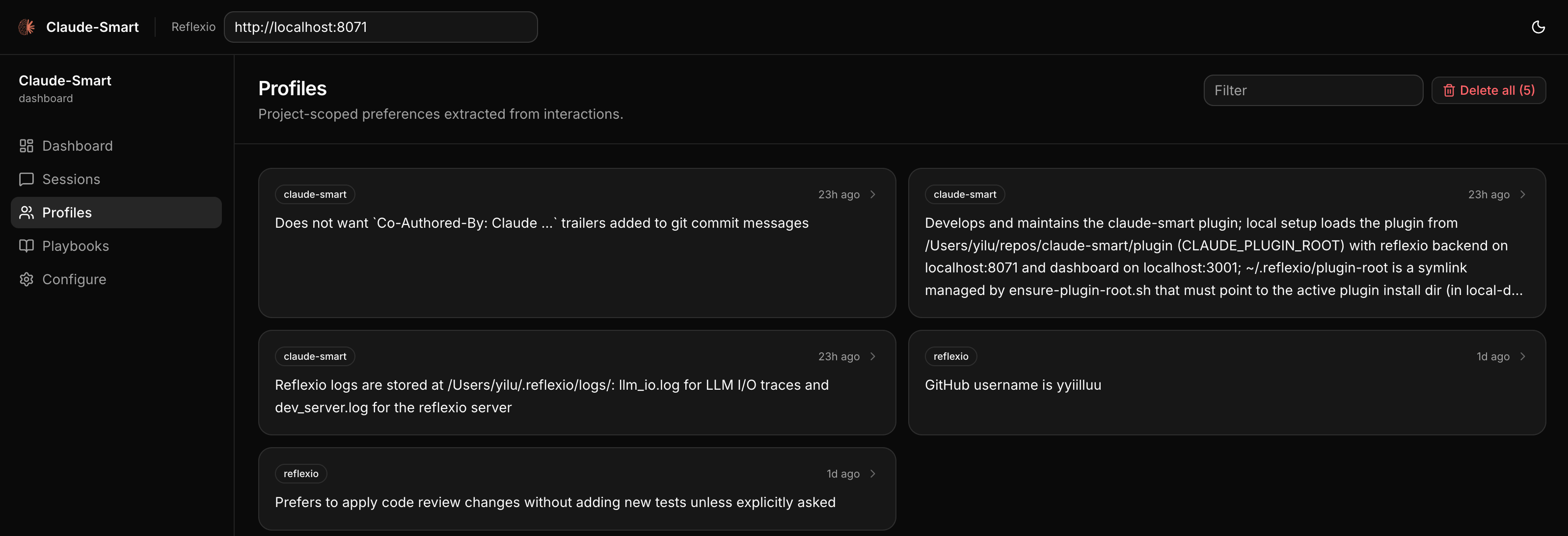
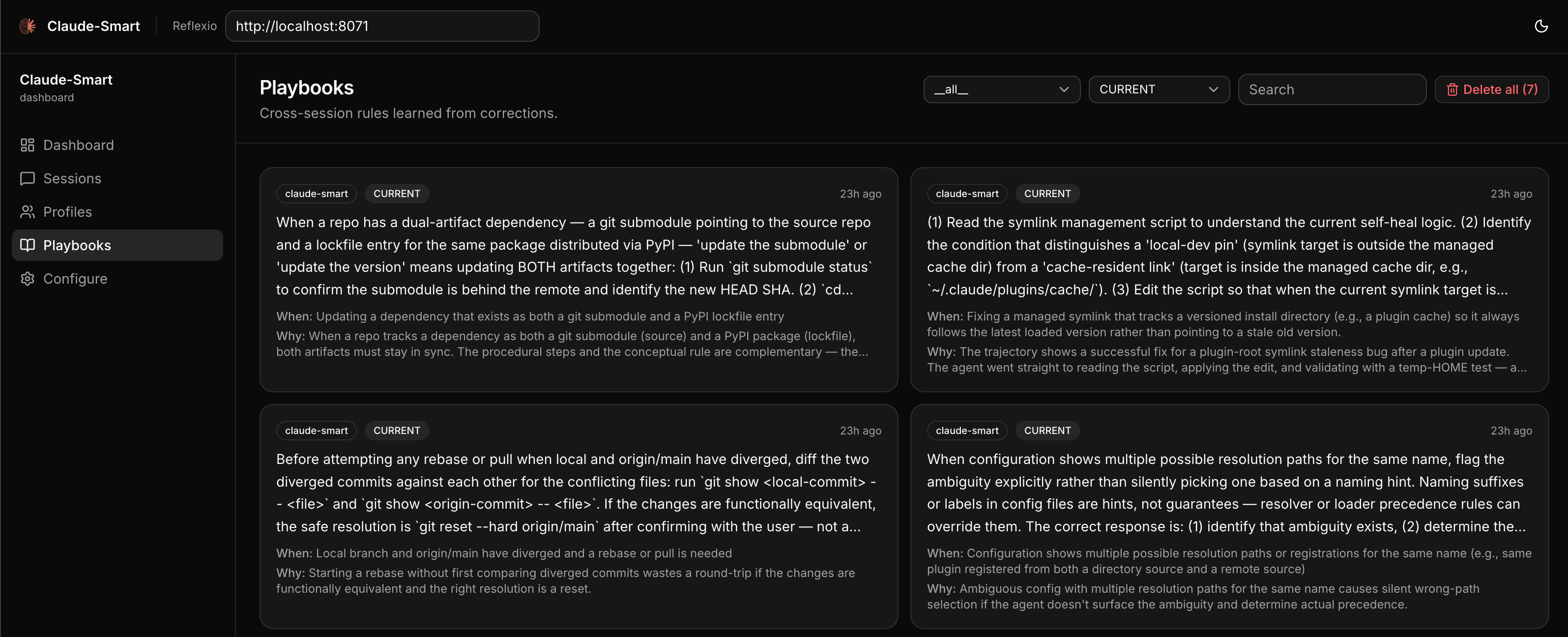
A web UI for browsing session histories, inspecting preferences, and editing project-specific and shared skills. The dashboard auto-starts alongside the backend, so you can open http://localhost:3001 directly. Or run /claude-smart:dashboard in Claude Code to open it in your browser. In Codex, run bash ~/.reflexio/plugin-root/scripts/dashboard-open.sh.
How It Works
claude-smart builds three artifacts as you work and injects the relevant ones into Claude Code or Codex:
- Preferences (project-scoped) — how you work in this specific repo (stack, role, small quirks). e.g. “uses pnpm, not npm”; “prefers terse answers”; “backend engineer — explain frontend with backend analogues.”
- Project-specific skills — durable rules with triggers and rationales learned from corrections in a project. e.g. “always pass
--runtonpm test— watch mode hangs CI.” - Shared skills — optimized rollups of project-specific skills that should transfer across projects. e.g. “use real Postgres for integration tests — mocks once hid a broken migration.”
Skills clean themselves up: correct the same thing twice and they merge; change your mind and the old one is archived.
Under the hood: hooks watch your turns, tool calls, and assistant replies, auto-flagging corrections (or anything you flag with /claude-smart:learn). At session end (or on /claude-smart:learn), reflexio — the self-improving engine that powers claude-smart — extracts preferences and project-specific skills, then rolls durable patterns into shared skills. On each new user prompt, claude-smart searches for matching context and injects only the relevant hits. Run /claude-smart:show or the equivalent CLI command to audit the current learned state. Everything runs on your machine.
Citations. At the end of a reply, the assistant may append a short marker:
✨ 2 claude-smart learnings applied [cs:s1-252,p1-5aed]That signals a preference (p…) or skill (s…) materially shaped the reply.
Open the session’s detail page in the dashboard to see the exact cited item.
See ARCHITECTURE.md for hooks, data flow, and reflexio details.
Commands
Claude Code installs these as plugin slash commands. Codex does not currently support plugin-provided slash commands, so claude-smart ships a Codex skill that maps requests like “claude-smart show” or “run claude-smart learn” to the equivalent action.
| Claude Code | Codex request | What it does |
|---|---|---|
/claude-smart:dashboard | open claude-smart dashboard | Open the dashboard in your browser, auto-starting the reflexio backend and dashboard services if they aren’t already running. |
/claude-smart:show | claude-smart show | Print current project-specific skills, shared skills, and the current project’s preferences so you can audit learned state manually. |
/claude-smart:learn [note] | claude-smart learn with note "optional note" | Flag the most recent turn as a correction (for cases the automatic heuristic missed) and force reflexio to run extraction now on the session’s unpublished interactions. The optional note becomes the correction description the extractor sees. |
/claude-smart:restart | restart claude-smart | Restart the reflexio backend and dashboard to pick up new changes (e.g. after upgrading the plugin or editing local reflexio code). |
/claude-smart:clear-all | clear all claude-smart learnings | Destructive. Delete all reflexio interactions, preferences, and skills. Use when you want to wipe learned state and start fresh. |
Configuration
Advanced users can tune claude-smart via environment variables — see DEVELOPER.md for the full list.
Where data lives
| Path | What |
|---|---|
~/.reflexio/data/reflexio.db | Source of truth for learned preferences, skills, interactions, full-text indexes, and embedding tables (plus .db-shm / .db-wal WAL sidecars). Inspect with sqlite3. |
~/.reflexio/.env | Provider config — CLAUDE_SMART_USE_LOCAL_CLI, CLAUDE_SMART_USE_LOCAL_EMBEDDING, any optional API keys. |
.claude/settings.local.json or ~/.claude/settings.json | Claude Code hook environment, such as CLAUDE_SMART_ENABLE_OPTIMIZER; use project-local settings for one repo or user settings for all projects. |
~/.codex/config.toml | Codex plugin state, hook feature flags, and per-hook trust entries after claude-smart install --host codex. |
~/.codex/plugins/cache/reflexioai/claude-smart/<version>/ | Codex’s cached install of the claude-smart plugin from the ReflexioAI marketplace. |
~/.reflexio/plugin-root | Self-healed symlink to the active plugin dir (managed by ensure-plugin-root.sh — written on install, refreshed each SessionStart). Claude Code slash commands and Codex shell-command helpers resolve through it, so don’t delete it; if you do, the next session will recreate it. |
~/.claude-smart/sessions/{session_id}.jsonl | Per-session buffer. User turns, assistant turns, tool invocations, {"published_up_to": N} watermarks. Safe to inspect and safe to delete — everything past the latest watermark has already been written to reflexio’s DB. |
~/.claude-smart/node/current/ | Private Node.js/npm runtime used by hooks and the dashboard after install. |
~/.cache/chroma/onnx_models/all-MiniLM-L6-v2/ | Cached ONNX weights (~86 MB, downloaded once). Delete to force a re-download. |
For troubleshooting, see TROUBLESHOOTING.md.
License
This project is licensed under the Apache License 2.0. Reflexio is a separate Apache 2.0 project consumed as the reflexio-ai Python package. Claude Code is Anthropic’s and not covered by this license.
See the LICENSE file for details.
Support
- Discord: join the community at discord.gg/7fnCxahase.
- Issues: open one on GitHub describing the symptom and include the reflexio backend log (
~/.claude-smart/backend.log) and the relevant lines of~/.claude-smart/sessions/{session_id}.jsonl.
Built on reflexio · Runs on Claude Code and Codex · Written in Python 3.12+