@eforge-build/client
officialShared types, route constants, and daemon client helpers consumed by the eforge CLI, Claude Code plugin, and Pi extension.
eforge


Public docs: https://eforge.build/docs - Getting started, concepts, configuration, and the canonical reference docs for users and agents. Agent-readable artifacts at /llms.txt.
eforge is an open source build-engine kernel surrounded by extensible workflow power. Normalized build source goes in; reviewed, validated code comes out. The small kernel consumes normalized build source, orchestrates dependency-aware branch and worktree execution, runs conservative build/review/validation gates, emits typed events, and leaves input authoring surfaces and richer workflow UX to optional extensions, eforge-playbooks, session plans, wrapper apps, and host integrations. The build phase runs in the background while you plan the next thing.
Drive eforge from Pi, Claude Code, or the CLI. Pipeline stages delegate to either pi-agent-core or the Claude Agent SDK - the interface you drive, the input surface you author in, and the harness that executes are independent. Pi is the recommended eforge execution harness for new users: provider-flexible, local, inspectable agent orchestration where runtime choice, cost, and token efficiency stay visible. The Anthropic Claude Agent SDK remains supported as an Anthropic-specific secondary path for users who intentionally choose it.
Harness engineering - the discipline of designing everything around an LLM that makes it a reliable system - applies at two levels here: each pipeline stage delegates to a harness for its agent loop, and the pipeline itself is a higher-order harness across planning, building, review, and validation.
The name: eforge means extensible forge - a small, durable kernel for shaping code from plans, with extension surfaces around it.
Status: This is a young project moving fast. Used daily to build real features (including itself), but expect rough edges - bugs are likely, change is expected, and YMMV. Source is public so you can read, learn from, and fork it. Not accepting issues or PRs at this time.
What is eforge?
eforge applies build-system thinking to agentic code generation. Traditional build systems transform source code into artifacts; eforge transforms normalized build source into reviewed, validated source changes.
The durable center is the build-engine kernel: normalized build-source intake, dependency-aware branch/worktree orchestration, the build execution loop, conservative gates, typed failure/recovery dispatch, and baseline console observability/control. Input authoring surfaces live outside that kernel. A CLI prompt, rough notes, a session plan, a playbook, a wrapper app artifact, and a PRD file all normalize before the engine sees them.
The key quality insight: a single AI agent writing and reviewing its own code will almost always approve it. Quality requires separation of concerns - distinct agents for planning, building, reviewing, and evaluating. Each piece below is either a guide (steering agents before they act) or a sensor (verifying what they produced) - the two control types that organize harness engineering.
- Spec-driven (guide) - Input is a requirement, not a code edit. The system decides how to implement it.
- Multi-stage pipeline (structure) - Planning, implementation, review, and validation are separate stages with separate agents, not one conversation.
- Blind review (sensor) - The reviewer operates without builder context (see below).
- Dependency-aware orchestration (structure) - Large work decomposes into modules with a dependency graph. Plans build in parallel across isolated git worktrees, merging in topological order.
- Adaptive complexity (guide) - The system assesses scope and selects the right workflow: a one-file fix doesn’t need architecture review, and a cross-cutting refactor shouldn’t skip it.
Use Cases
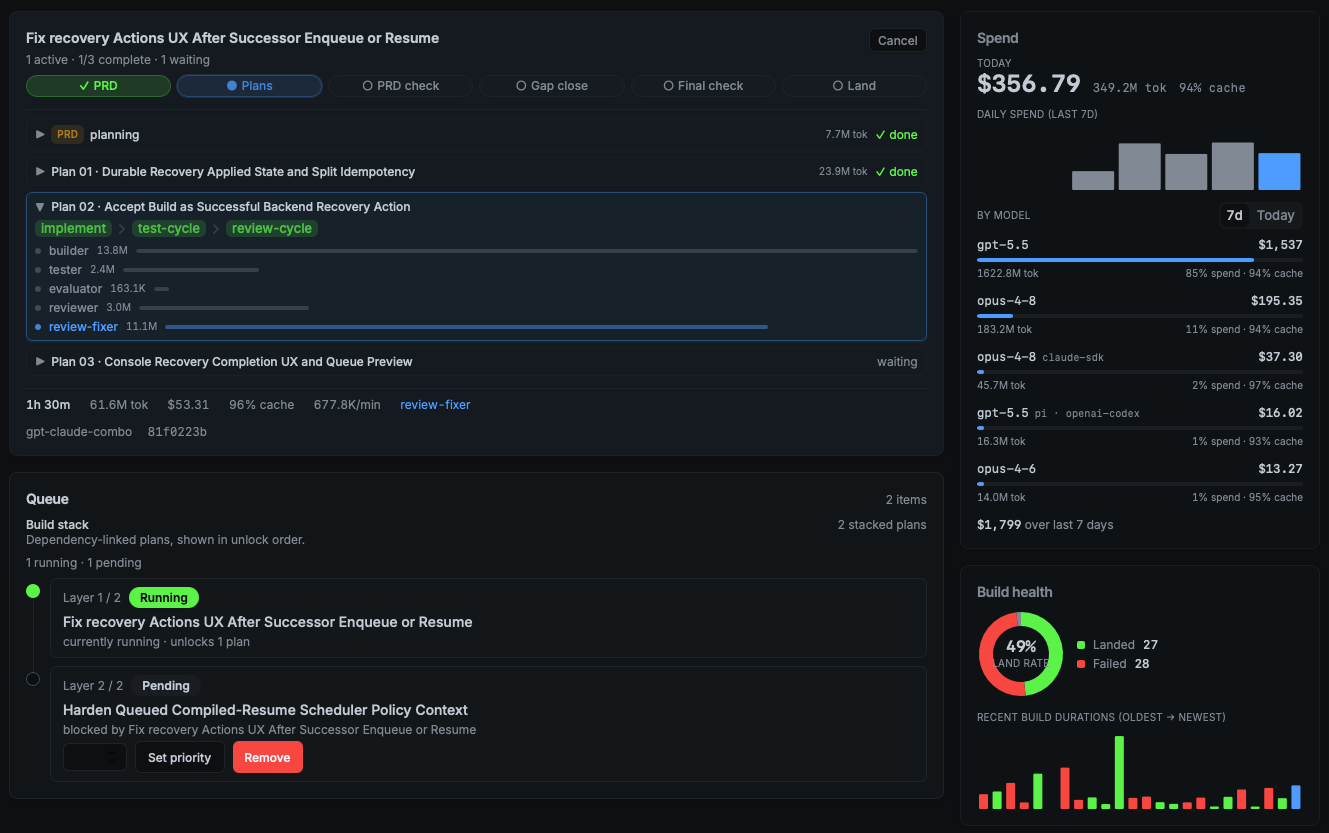
Describe a feature directly with /eforge:build, point the CLI at a PRD/file, or hand off build source prepared by an optional workflow surface. A daemon picks up the normalized source and runs planning, building, blind review, and validation autonomously. A web monitor (port assigned deterministically per project in the 4567-4667 range) tracks progress, cost, and token usage in real time. The active dashboard is Eforge Console, served at /console/; root UI requests on the same port redirect to Console. Console is also the rich runtime-control surface for held queue rows, scheduler pause/resume, preview-first cascade remove/cancel, durable failed-enqueue attention with confirmed re-enqueue, and failed-build recovery guidance.
Because the coding agent you drive from and the agent library eforge delegates to are independent, a few ways this plays out:
- Plan and execute in Pi. Drive eforge from Pi and delegate to pi-agent-core across OpenAI, Anthropic, OpenRouter, local models, and more.
- Use Claude Code as the host surface. Drive eforge from Claude Code while choosing the execution harness separately in your active profile.
- Mix planning and build runtimes. Plan in Pi with one provider, then execute specific tiers through another provider or through the Anthropic-specific Claude Agent SDK when that API-priced tradeoff makes sense.
- Run builds on local models when API spend matters. Switch to a profile that delegates to a local model like Qwen 3.6 27B via pi-agent-core - work keeps moving with no per-token API cost.
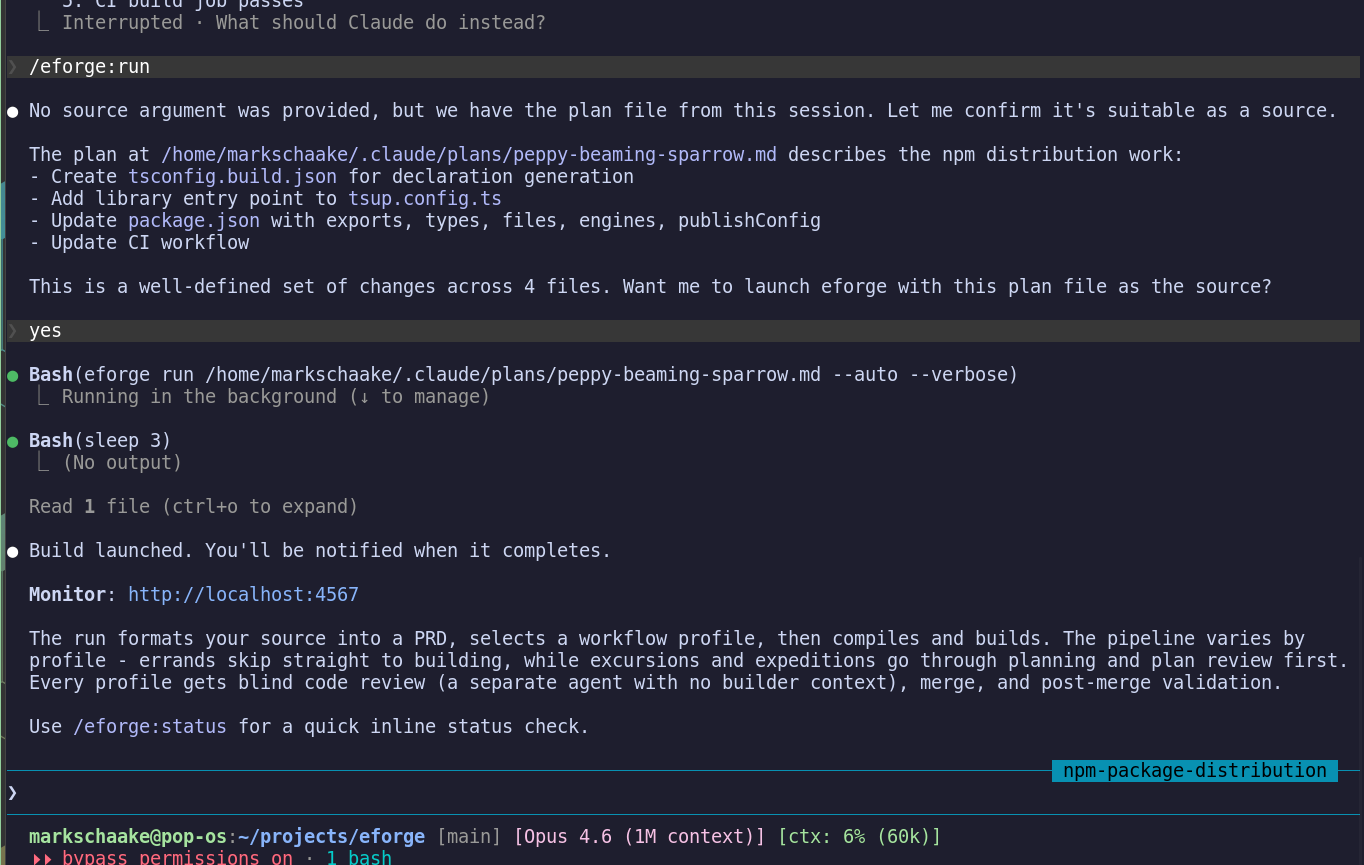
eforge also runs standalone. By default, eforge build enqueues and a daemon processes it. Use --foreground to run in the current process instead.
How It Works
Formatting and enqueue - eforge accepts normalized build source from direct prompts, rough notes, detailed PRD files, file paths, or optional producer surfaces. Autonomous-mode playbooks and session plans are reusable input artifacts compiled to ordinary build source via @eforge-build/input before reaching the engine queue. The first-party @eforge-build/eforge-playbooks extension owns playbook management actions, planning-mode handoff metadata, and autonomous queue handoff across project-local, project-team, and user scopes while using public input helpers for parsing, storage, validation, and compilation; the bundled session-planning workflow adapter owns the internal session-plan domain behavior while user-facing files remain project-local .eforge/session-plans/ Markdown artifacts. Planning-mode playbooks check the eforge.plan.planning-mode-playbook capability from the optional first-party eforge-plan extension and return generic planning entry metadata for the eforge-plan workstation, which owns investigation-first planning, session-plan drafting, revision, and handoff before a build is enqueued. The engine always receives normalized build source and does not know whether that source originated from a playbook, session plan, wrapper app, CLI prompt, or PRD file.
Build artifact kinds — three kinds of artifacts appear during a build, and it helps to keep them distinct:
- Session plans (
.eforge/session-plans/) — optional driver-side planning files created by the eforge-plan extension’s generic planning entry. These are local, gitignored, and private to the developer. They are not committed and are not the shared provenance mechanism. - Runtime queue files (
.eforge/queue/) — normalized PRDs waiting for daemon processing. Enqueue stores a validated, hidden canonical acceptance-criteria inventory with stableac-###IDs in each queued PRD. Queue files are gitignored, ephemeral runtime state only; queue mutations are filesystem operations that produce no git commits.eforge queue priority <prdId> <priority>mutates pending or waiting PRD frontmatter so lower numeric priority values dispatch earlier within each dependency wave; failed and skipped PRDs reject priority changes with a conflict until recovery or requeue makes them runnable. Queue hold state is stored as runtime-only PRD frontmatter (held,hold_reason,held_at) on pending or waiting items; held items keep their file location and ordering metadata but scheduler ticks do not dispatch them until they are unheld.eforge queue remove <prdId>deletes non-running pending, waiting, failed, or skipped queue files; failed removal also deletes matching.recovery.mdand.recovery.jsonsidecars. The daemon API also supports a targeted dependency override for pending or waiting PRDs: it removes onedepends_onid, and moves a waiting PRD back to the queue root when that was its final dependency. Running PRDs reject priority, hold, unhold, removal, and dependency override controls; daemon-owned cancellation requires live queue-lock and run/session ownership evidence. Removal still fails closed when live pending/waiting dependents exist; cascade remove/cancel flows are preview-then-apply operations that compare an expected affected token and require explicit dependent confirmation before mutating dependents. Failed enqueue attempts that never produce a runnable queue file are projected as durable Console attention rows keyed by run id; when source data is still available, Console can confirm a one-click re-enqueue, otherwise it shows the daemon-provided fallback command and disabled reason. After a successful mutation the daemon records the queue mutation; when the scheduler is not explicitly paused, it re-reads queue files before dispatch. - Committed build artifacts — at dispatch time the daemon writes a canonical PRD copy to
eforge/prds/{prdId}.mdand, during compile, writes plan files toeforge/plans/{planSet}/(includingorchestration.yamland compiled plan.mdfiles). These are committed to the artifact branch and are the shared, team-visible provenance record.
When build.cleanupPlanFiles: true (default), committed build artifacts are removed from HEAD during the pr or merge landing flows after a successful build. The same cleanup pass also strips temporary plan-ID eforge region marker comment lines from tracked JavaScript/TypeScript-family source files while leaving durable semantic markers and marked code intact. Build artifacts are not permanently lost — cleanup only removes them from the final tree. When the artifact branch is landed with a merge commit (eforge’s local merge action, or a GitHub PR merged via “Create a merge commit”), the commits that added those artifacts remain reachable in Git history. Use git show <sha>:<path> to recover any artifact using its commit-pinned reference. PR bodies include an Eforge provenance section with these references when artifact commits are found. Note: landing.action: leave skips the landing flow and leaves the artifact branch in place for manual inspection. When landing.action: pr is used, provenance durability depends on the repository’s chosen merge strategy — squash or rebase merges can collapse intermediate commits and make artifact references unreachable.
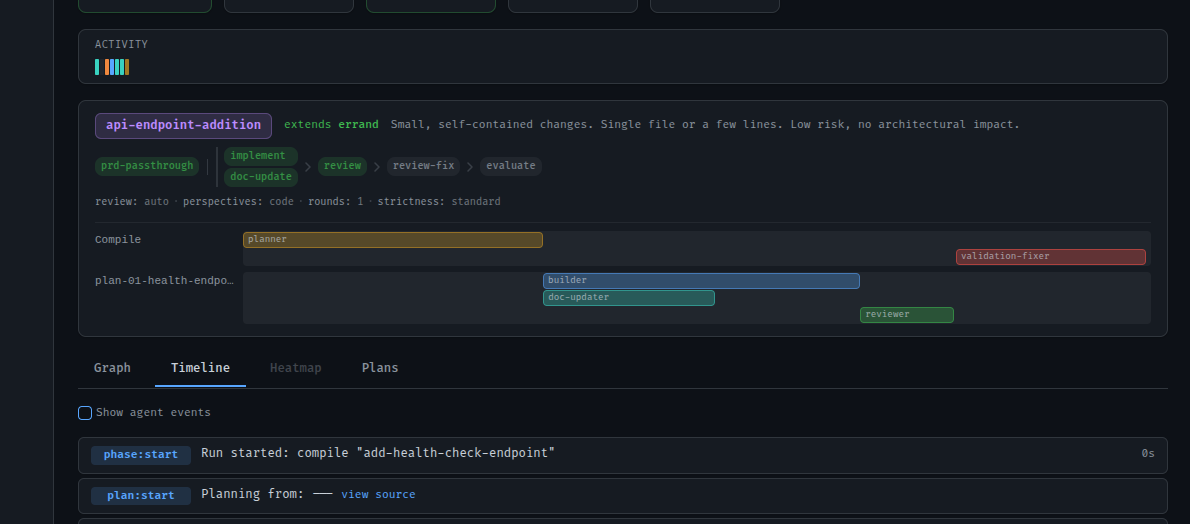
Workflow profiles - The planner assesses complexity and selects a profile:
- Errand - Small, self-contained changes. Passthrough compile, fast build.
- Excursion - Multi-file features. Planner writes a plan, blind review cycle, then build.
- Expedition - Large cross-cutting work. Architecture doc, module decomposition, cohesion review across plans, parallel builds in dependency order.
Blind review - The reviewer is an inferential sensor: an LLM judging output in a fresh context with no builder knowledge. Separating generation from evaluation dramatically improves quality - solo agents tend to approve their own work regardless. A fixer applies suggestions, then an evaluator accepts strict improvements while rejecting intent changes. The goal is fidelity to the plan - minimizing drift and slop so the code that lands is what was specified, not a reinterpretation.
Parallel orchestration - Each plan builds in an isolated git worktree. Expeditions run multiple plans in parallel, merging in topological dependency order. Post-merge validation runs with auto-fix. Build success requires both command validation (type-check, tests) and acceptance validation evidence from the PRD validator — either condition can be waived via explicit config with a reason string.
Canonical acceptance inventory - Enqueue canonicalizes acceptance criteria into a hidden queue artifact and rejects malformed, ungrounded, duplicate, low-confidence, bare-command, grouping-label, vague, manual-only, or visual-only criteria before writing the queue file. Manual verification details should be kept as non-gating Manual Verification Notes. The PRD validator then produces a per-criterion verdict (pass, fail, or unknown) for every persisted ac-### criterion. Missing or unparseable evidence is fail-closed: it becomes unknown, which fails the build. Builds with no acceptance criteria, an empty PRD validation diff, or no committed changes are not automatically treated as passing — each case requires its own explicit waiver with a non-empty reason string surfaced in Console: build.validation.allowNoAcceptanceCriteria plus noAcceptanceCriteriaReason for builds with no criteria, build.validation.allowEmptyPrdDiff plus emptyPrdDiffReason for builds where the implementation diff is empty, and build.validation.allowNoCommittedChanges plus noCommittedChangesReason for builds that produce no committed file changes. Waivers are policy overrides that declare an intentional exception; they are not substitutes for evidence.
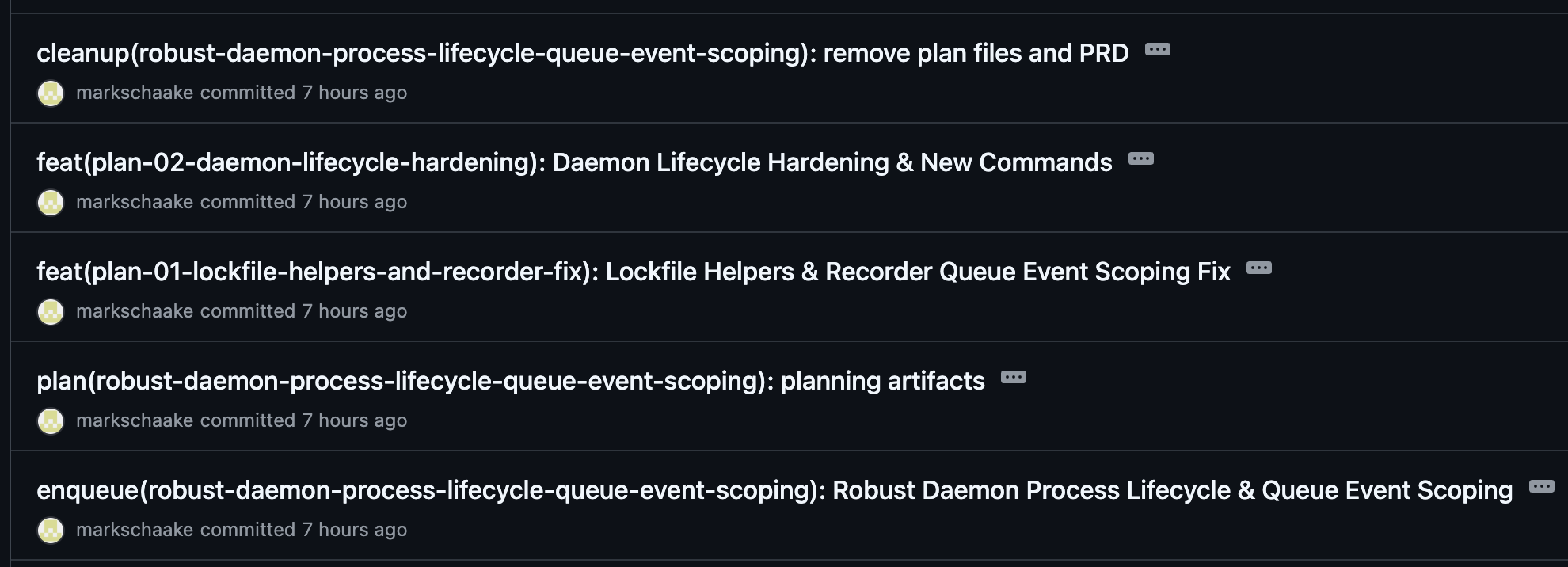
Queue and merge - Completed builds merge back to the base branch as merge commits via --no-ff, preserving the full branch history while keeping first-parent history clean. When landing.action: pr is used without stacking, eforge fetches the latest remote base, rebases the artifact branch before validation, and checks freshness again immediately before opening the PR. When the next build starts from the queue, the planner re-evaluates against the current codebase - so plans adapt to changes that landed since they were enqueued.
For a deeper look at the engine internals, see the architecture docs. For context on the workflow shift that motivated eforge, see The Handoff.
Install
Prerequisites: Node.js 22+, Pi, Claude Code, or an npm-capable shell, plus an LLM provider credential for your chosen runtime - a provider-specific API key or OAuth token for the recommended pi harness, or an Anthropic API key for the supported secondary claude-sdk harness. Starting June 15, 2026, Anthropic says Claude Agent SDK and claude -p usage no longer count toward Claude plan limits; eligible plans may receive a separate monthly Agent SDK credit, usage beyond that credit is billed at standard API rates when extra usage is enabled, otherwise requests stop, and API-key users remain pay-as-you-go. See https://support.claude.com/en/articles/15036540-use-the-claude-agent-sdk-with-your-claude-plan.
Pi package (recommended):
pi install npm:@eforge-build/pi-eforge
/eforge:init
Add -l to pi install if you want to write to project settings (.pi/settings.json) instead of your global Pi settings:
pi install -l npm:@eforge-build/pi-eforgeClaude Code plugin:
/plugin marketplace add eforge-build/eforge
/plugin install eforge@eforge
/eforge:init
The main @eforge-build/eforge npm package is the standalone CLI and daemon runtime. The Pi integration is published separately as @eforge-build/pi-eforge.
The /eforge:init command creates eforge/config.yaml with sensible defaults and adds .eforge/ to your .gitignore. If you already have user-scope profiles in ~/.config/eforge/profiles/, it offers to activate one of those instead of creating a new project profile. Otherwise it walks you through a Quick setup (one harness/provider with suggested tier models, including an optional separate implementation model) or a Mix-and-match flow (different harness, provider, or model per tier). In Claude Code, use the recommended Pi path when you want Claude Code as the host surface while builds execute through a Pi profile; choose claude-sdk only when you intentionally want the Anthropic Claude Agent SDK. In Pi the harness is pinned to pi and you pick from available providers and models. For further customization, run /eforge:config --edit.
The Pi package also provides native interactive commands for agent runtime profile management (/eforge:profile, /eforge:profile:new), config viewing (/eforge:config), status dashboards (/eforge:status), safe daemon restarts (/eforge:restart), build source review (/eforge:build), extension contribution browsing (/eforge:extensions list/show/invoke with compact list output), and playbook management (/eforge:playbook) with interactive TUI panels and selectors. Playbook host commands are compatibility surfaces over eforge-playbooks:* extension contributions; if eforge-playbooks is not installed, loaded, or trusted, hosts report unavailable-extension diagnostics and direct users to inspect, trust, install, or reload the extension. When the optional first-party eforge-plan extension is loaded/trusted, structured planning is exposed through generic eforge-plan contribution discovery/detail/invocation, workstation routing, and deep links before handing off to /eforge:build; use /eforge:extensions list or the extension docs to check availability. Both surfaces also expose /eforge:extend for assisted eforge TypeScript extension authoring and /eforge:playbook for creating, editing, running, and managing reusable automation playbooks that encode recurring workflows as named, version-controlled templates.
Standalone CLI:
npx @eforge-build/eforge build "Add rate limiting to the API"
npx @eforge-build/eforge build plans/my-feature-prd.md

# Deterministic handoff: enqueue a build that waits for an upstream build to finish
# Use --after <queue-id> to create an explicit dependency on an active build.
# Active upstream (pending/running/waiting): held until upstream completes.
# Completed upstream with artifact: enqueued immediately as an eligible dependent.
npx @eforge-build/eforge build "Add e2e tests for rate limiting" --after q-abc123

# Mutate queued runtime PRDs (filesystem-only under .eforge/queue/, no git commits)
# Lower numeric priority values dispatch earlier within each dependency wave.
npx @eforge-build/eforge queue priority <prdId> <priority>
# Removes non-running pending, waiting, failed, or skipped queue items.
npx @eforge-build/eforge queue remove <prdId>

# Run a saved playbook
npx @eforge-build/eforge play docs-sync

# Manage playbooks
npx @eforge-build/eforge playbook list
npx @eforge-build/eforge playbook run docs-sync --after q-abc
npx @eforge-build/eforge playbook promote tech-debt-sweep

# Discover, inspect, and invoke extension host contributions
npx @eforge-build/eforge extension contributions list --kind command --search planning --limit 20
npx @eforge-build/eforge extension contributions show <id> --kind command --include-schema
npx @eforge-build/eforge extension contributions invoke <id> --kind commandNote: Planning-mode playbooks require the
eforge.plan.planning-mode-playbookcapability from optional eforge-plan. Running one does not enqueue a build; it returns generic planning entry metadata foreforge_extension_contributionand the eforge-plan workstation, orplanning-unavailablediagnostics if eforge-plan is not loaded with the required capability.
Or install globally: npm install -g @eforge-build/eforge
For standalone use, run /eforge:init (in Claude Code or Pi) to create both eforge/config.yaml and an active agent runtime profile under eforge/profiles/<name>.yaml. A profile configures one harness, model, and effort level per build tier (planning → implementation → review → evaluation). A minimal Pi-first profile looks like:
# eforge/profiles/pi-openrouter.yaml
agents:
  tiers:
    planning:
      harness: pi
      model: anthropic/claude-opus-4-6
      effort: high
      pi:
        provider: openrouter
    implementation:
      harness: pi
      model: anthropic/claude-sonnet-4-6
      effort: medium
      pi:
        provider: openrouter
    review:
      harness: pi
      model: anthropic/claude-opus-4-6
      effort: high
      pi:
        provider: openrouter
    evaluation:
      harness: pi
      model: anthropic/claude-opus-4-6
      effort: high
      pi:
        provider: openrouter
Claude Code can still be the host surface while this Pi profile executes builds. For the supported secondary Claude Agent SDK path, set harness: claude-sdk and use Anthropic model IDs such as claude-opus-4-7 or claude-sonnet-4-6. Starting June 15, 2026, Anthropic says Claude Agent SDK and claude -p usage no longer count toward Claude plan limits; eligible plans may receive a separate monthly Agent SDK credit, usage beyond that credit is billed at standard API rates when extra usage is enabled, otherwise requests stop, and API-key users remain pay-as-you-go. See https://support.claude.com/en/articles/15036540-use-the-claude-agent-sdk-with-your-claude-plan, and see docs/config.md for the full schema.
Configuration
eforge supports three config tiers, merged lowest to highest priority:
| Tier | Path | Committed? | Purpose |
|---|---|---|---|
| User | ~/.config/eforge/config.yaml | No | Cross-project, personal |
| Project | eforge/config.yaml | Yes | Team-canonical |
| Project-local | .eforge/config.yaml | No (gitignored) | Dev-personal override, highest priority |
The project-local tier (.eforge/) is automatically gitignored by /eforge:init. Use it for personal tuning that should not be committed - it deep-merges over the project and user tiers. Agent runtime profiles, custom workflow profiles, hooks, MCP servers, plugins, and native eforge extensions are all configurable. Native extensions are TypeScript/JavaScript modules discovered from ~/.config/eforge/extensions/, eforge/extensions/, and .eforge/extensions/; they load in the daemon Node process without a sandbox, capture registration provenance, run onEvent handlers, apply per-run onAgentRun prompt/tool augmentation and availability tuning, dispatch registerProfileRouter selectors before queued builds, execute beforeQueueDispatch, beforePlanMerge, and beforeFinalMerge policy gates at runtime, and register typed actions, integration commands, and deep links for generic CLI/MCP/Pi host discovery, detail, and invocation, plus declarative Console contributions and sandboxed Console workstations for Console UI surfaces. Project/team extensions (eforge/extensions/) require an explicit per-extension local trust record in .eforge/extension-trust.json — created by eforge extension trust <name> — before loading; any code change invalidates the stored hash and blocks the extension until re-trusted. Use eforge extension new <name> to scaffold one, eforge extension list/show/validate/test to inspect and dry-run it, and eforge extension reload to refresh daemon discovery. Scope precedence and lookup behavior live in @eforge-build/scopes; reusable input artifact protocols (playbooks, session plans) live in @eforge-build/input. eforge-playbooks owns playbook management/run actions through generic extension contributions while using public input helpers; session-plan compatibility remains separate from the playbook extension boundary. The build-engine kernel consumes normalized build source and does not know whether the source originated from a playbook, session plan, wrapper app, CLI prompt, or PRD file. Agent runtime profiles follow the same three-tier pattern: eforge/profiles/ (project scope), ~/.config/eforge/profiles/ (user scope), and .eforge/profiles/ (project-local scope, highest precedence). Playbooks follow the same pattern using eforge/playbooks/, ~/.config/eforge/playbooks/, and .eforge/playbooks/ respectively - higher-precedence tiers shadow lower ones by name. Use eforge playbook list to see available playbooks with their source and shadow chain, eforge playbook run <name> (or the shortcut eforge play <name>) to run one — autonomous playbooks are optional workflow artifacts enqueued as build source; planning playbooks require the optional eforge-plan planning capability and return generic planning entry metadata for eforge_extension_contribution plus the eforge-plan workstation route, or planning-unavailable diagnostics when that capability is unavailable — and eforge playbook edit <name> to modify it in $EDITOR. eforge playbook promote moves a playbook from project-local to project scope (staged for commit); eforge playbook demote moves it back. See docs/config.md, docs/extensions.md, and docs/hooks.md.
Stacked PRs with git-spice
eforge supports stacked pull requests via git-spice. Enable it in eforge/config.yaml:
stacking:
  enabled: true

landing:
  action: pr
When enabled, root PRD artifact branches (eforge/<prd-id>) target trunk, while child PRD artifact branches normally target the parent artifact branch to form a linear stack of pull requests. PRD frontmatter fields stack_id (logical stack name) and stack_parent (parent PRD id) control the topology. For linear stacks with a single depends_on entry, stack_parent is inferred automatically. During landing, eforge can use trunk as the effective base for an initially untracked child, or retarget a child that is already tracked, when the missing parent artifact branch is proven integrated into current remote trunk; otherwise landing fails closed. Before submitting the PR, eforge runs provider repo sync, branch restack, and a remote-base freshness proof for the branch being submitted.
See docs/stacking.md for the full guide including git-spice setup, the branch-per-PR topology, stale-parent landing repair, landing-time sync/freshness, manual stack sync, and landing.action configuration.
Development
See CONTRIBUTING.md for the branch/PR workflow and docs/releasing.md for the maintainer release process.
pnpm build        # Bundle all workspace packages
pnpm test         # Run unit tests (vitest)
pnpm type-check   # Type check without emitting
npx convention
The eforge plugin uses npx -y @eforge-build/eforge to invoke the CLI. This ensures the plugin works for all users regardless of install method - global install, npx, or local development. The -y flag auto-confirms install prompts, which is required because the MCP server runs headless and cannot prompt interactively.
Developer workflow
When developing eforge locally, pnpm build compiles the CLI to dist/cli.js and makes eforge available on PATH via the bin entry in package.json. After making changes to the engine or CLI, rebuild with pnpm build so the daemon picks up the latest code.
To restart the daemon after a local rebuild, use /eforge:restart from Claude Code. This calls the daemon’s MCP tool to safely stop and restart, checking for active builds first.
For the eforge repository itself, the /eforge-daemon-restart project-local skill rebuilds from source and restarts the daemon in one step.
Evaluation
See eforge-build/eval for the end-to-end evaluation harness.
License
eforge is licensed under Apache-2.0.
Third-party harness licenses
eforge’s harness abstraction allows different AI providers. Each harness carries its own license terms:
-
Claude Agent SDK (
@anthropic-ai/claude-agent-sdk) is proprietary software owned by Anthropic PBC. By using eforge with this harness, you agree to Anthropic’s Commercial Terms (API users) or Consumer Terms (Free/Pro/Max users), plus the Acceptable Use Policy. See Anthropic’s legal page for details. Starting June 15, 2026, Anthropic says Claude Agent SDK andclaude -pusage no longer count toward Claude plan limits; eligible plans may receive a separate monthly Agent SDK credit, usage beyond that credit is billed at standard API rates when extra usage is enabled, otherwise requests stop, and API-key users remain pay-as-you-go. See https://support.claude.com/en/articles/15036540-use-the-claude-agent-sdk-with-your-claude-plan.Note: If you are building a product or service on top of eforge, Anthropic requires API key authentication through Claude Console - OAuth tokens from Free, Pro, or Max plans may not be used for third-party products.
-
Pi harness (
@earendil-works/pi-ai,@earendil-works/pi-agent-core,@earendil-works/pi-coding-agent) - a fully open-source harness alternative supporting 20+ LLM providers (OpenAI, Google, Mistral, Groq, xAI, Bedrock, Azure, OpenRouter, and more). All three packages are MIT licensed from the pi-mono monorepo.
eforge’s Apache 2.0 license applies to eforge’s own source code. It does not extend to or override the license terms of its dependencies.