oh-my-til
officialOh My TIL — Claude Code plugin for TIL learning workflow, with Obsidian integration
Oh My TIL



English | 한국어
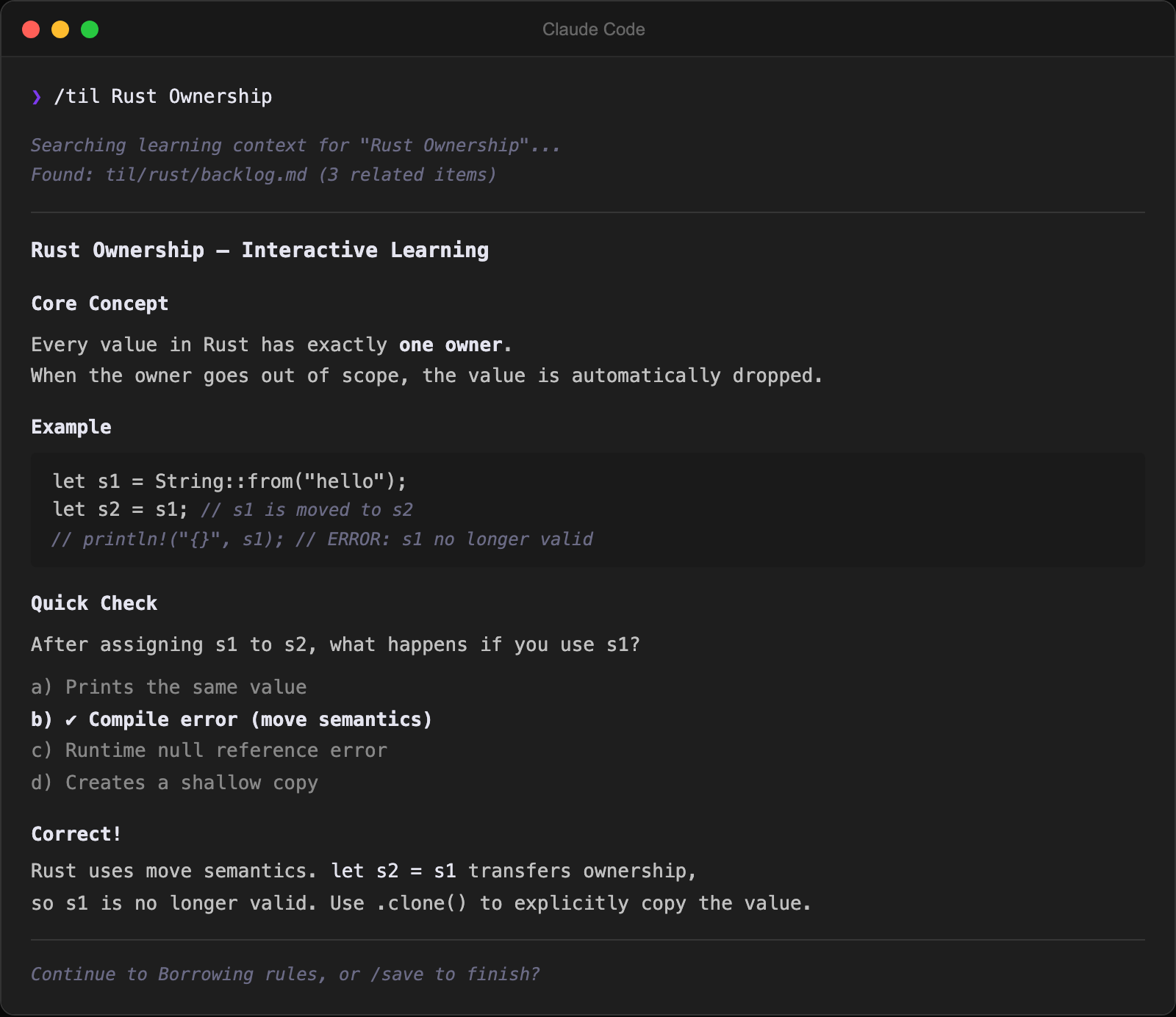
A Claude Code plugin for AI-powered TIL (Today I Learned) learning workflow. Works as a standalone CLI (npx oh-my-til) or as an Obsidian plugin with embedded Claude Code terminal.
Features
- Embedded Terminal — Claude Code terminal in Obsidian sidebar (xterm.js + node-pty)
- Built-in MCP Server — Claude Code can directly access your vault via HTTP
- Learning Dashboard — TIL statistics and category breakdown at a glance
- Auto-installed Skills —
/til,/research,/backlog,/save,/til-review,/til-lint,/dashboardcommands ready out of the box - Spaced Repetition (SRS) — SM-2 algorithm-based review scheduling for TIL notes
- Markdown Link Detection —
[text](path)links in terminal are clickable and open notes (CJK-aware) - Backlog-to-TIL Trigger — Click an empty backlog link to start a TIL session
- File Watcher — Newly created TIL files open automatically in the editor
How It Works
Command Palette → Open Terminal → Claude Code starts
→ Run /til, /backlog, /research, /save, /til-review, /til-lint, /dashboard skills
→ Claude researches → interactive learning → saves TIL markdown
→ New file detected → opens in editor
Installation
Option A: Claude Code Plugin (Recommended)
Install directly as a Claude Code plugin — skills, MCP server, and hooks are auto-registered.
Prerequisites: Node.js 18+ / Claude Code v1.0.33+
# Add marketplace (project scope recommended — only active in this TIL vault)
claude plugin marketplace add https://github.com/SongYunSeop/oh-my-til.git --scope project

# Install plugin
claude plugin install oh-my-til@oh-my-til --scope project
Skills are namespaced: /oh-my-til:til, /oh-my-til:research, /oh-my-til:backlog, etc.
Option B: Standalone CLI (without Obsidian)
Prerequisites: Node.js 18+ / Claude Code CLI (claude)
-
Install the Claude Code plugin (Option A above) — skills and MCP server are auto-registered.
-
Start Claude Code and use
/til,/research,/backlogskills right away:cd ~/my-til claude -
(Optional) Register MCP server — lets Claude Code query your TIL files (stdio mode, works with Claude Desktop):
claude mcp add oh-my-til -- npx oh-my-til mcp ~/my-til
Option C: Obsidian Plugin
Prerequisites: Obsidian v1.5.0+ / Node.js 18+ / Claude Code CLI (claude)
Using npx (Recommended)
Install the Obsidian plugin directly:
npx oh-my-til install-obsidian /path/to/your/vaultElectron version is auto-detected on macOS. To override:
ELECTRON_VERSION=37.10.2 npx oh-my-til install-obsidian /path/to/your/vaultTo find your Electron version, open Obsidian’s Developer Tools (Ctrl+Shift+I) and run
process.versions.electron.
Manual Installation (from source)
git clone https://github.com/SongYunSeop/oh-my-til.git
cd oh-my-til
npm install
ELECTRON_VERSION=<your-electron-version> npm run deploy -- /path/to/your/vault
After installation, restart Obsidian and enable Oh My TIL in Settings > Community plugins.
MCP Server Setup (Optional)
The plugin includes a built-in MCP server so Claude Code can access your vault directly:
claude mcp add --transport http oh-my-til http://localhost:22360/mcpConfiguration
| Setting | Default | Description |
|---|---|---|
| Shell Path | System default | Shell to use in the terminal |
| Auto Launch Claude | true | Run claude when terminal opens |
| Resume Last Session | false | Resume previous Claude session (--continue) |
| Font Size | 13 | Terminal font size (px) |
| Font Family | Menlo | Terminal font (Menlo, SF Mono, Fira Code, JetBrains Mono, etc.) |
| Line Height | 1.0 | Terminal line spacing (1.0 = default, up to 2.0) |
| TIL Path | til | TIL folder path. Skills follow it automatically (resolved CLI-first: --til-path → TIL_PATH env → oh-my-til.json → Obsidian setting → default) |
| Auto Open New TIL | true | Open new TIL files in editor automatically |
| Open Dashboard on Startup | false | Open learning dashboard when Obsidian starts |
| Claude Args | (empty) | Additional arguments passed to claude command |
MCP Tools
When the MCP server is connected, Claude Code can use these tools:
| Tool | Description |
|---|---|
til_list | List TIL files grouped by category (supports search filter) |
til_save_note | Save a TIL note with validated frontmatter and path conventions (auto backlog check) |
til_backlog_status | Backlog progress summary with checkbox counts |
til_backlog_check | Mark a backlog item as done by slug (standalone use) |
til_get_context | Get existing knowledge context for a topic (files, links, unresolved mentions) |
til_recent_context | Recent learning activity grouped by date |
til_dashboard | Learning statistics summary |
til_review_list | Due review cards list + stats (SRS, supports include_content) |
til_review_update | Record review result or remove from review |
til_get_path | Return the vault’s configured TIL folder path (fallback for environments without the SessionStart hook) |
Claude Skills
The plugin auto-installs these skills to .claude/skills/:
| Skill | Command | Description |
|---|---|---|
| til | /til <topic> [category] | Research a topic → interactive learning → save TIL |
| research | /research <topic> [category] | Research a topic and create a learning backlog |
| backlog | /backlog [category] | View learning backlog and progress |
| save | (auto-invoked by /til) | Save TIL markdown with MOC and backlog updates |
| til-review | /til-review [category] | SRS-based spaced repetition review session (SM-2 algorithm) |
| til-lint | /til-lint [category] | TIL wiki health-check — missing frontmatter, broken links, orphan TILs, unprocessed raw sources |
| dashboard | /dashboard | Learning dashboard — stats, activity heatmap, categories, backlog progress |
| omt-setup | /omt-setup [subcommand] | Unified setup — init, deploy, and manage oh-my-til |
| setup-obsidian | /setup-obsidian | Install the Obsidian desktop plugin in the current vault |
Development
npm run dev              # Watch mode (esbuild)
npm test                 # Run tests (vitest)
npm run rebuild-pty      # Rebuild node-pty for Obsidian's Electron
npm run deploy -- /path  # Deploy to vault
npm run deploy -- --refresh-skills /path  # Deploy with skill/rule refresh
Project Structure
src/
├── core/                    # Platform-independent pure logic
│   ├── backlog.ts           # Backlog parsing/formatting (pure functions)
│   ├── context.ts           # Learning context helpers (pure functions)
│   ├── stats.ts             # TIL statistics (pure functions)
│   ├── srs.ts               # Spaced repetition (SM-2 algorithm, review cards/stats)
│   ├── migrate-links.ts     # Wikilink [[]] → [](path) conversion (internal utility)
│   ├── keyboard.ts          # Shift+Enter → \n (multiline support)
│   ├── env.ts               # macOS PATH resolution (Homebrew)
│   ├── skills.ts            # Version comparison / placeholder substitution
│   ├── cli.ts               # CLI argument parsing (pure functions)
│   ├── config.ts            # Config file parsing/loading (pure functions)
│   ├── markdown.ts          # Markdown → HTML conversion (no external deps)
│   ├── profile.ts           # Static site page generation (profile, TIL pages, category index)
│   └── index.ts             # Barrel export
├── ports/                   # Adapter interfaces
│   ├── storage.ts           # FileStorage interface
│   └── metadata.ts          # MetadataProvider interface
├── adapters/                # Port implementations
│   ├── fs-adapter.ts        # node:fs based (standalone)
│   └── obsidian-adapter.ts  # Obsidian App based
├── mcp/                     # MCP server (port-dependent, Obsidian-free)
│   ├── context.ts           # Learning context tools (topic matching, category extraction)
│   └── tools.ts             # MCP tool definitions (FileStorage + MetadataProvider)
├── cli/                     # Standalone CLI entry point
│   ├── index.ts             # npx oh-my-til mcp / install-obsidian / deploy
│   └── obsidian-install.ts  # Auto-install Obsidian plugin (Electron detection, node-pty rebuild)
└── obsidian/                # Obsidian platform adapter
    ├── main.ts              # Plugin entry point
    ├── settings.ts          # Settings tab & interface
    ├── watcher.ts           # File watcher → open in editor
    ├── terminal/
    │   ├── TerminalView.ts  # Sidebar terminal (ItemView + xterm.js)
    │   ├── MarkdownLinkProvider.ts  # 3 ILinkProviders: Markdown, Filepath, OSC 8
    │   └── pty.ts           # PTY process manager (node-pty)
    └── dashboard/
        └── DashboardView.ts # Learning dashboard (ItemView)
Tech Stack
| Runtime | TypeScript, Obsidian Plugin API |
| Terminal | xterm.js, node-pty |
| MCP | @modelcontextprotocol/sdk |
| Build | esbuild |
| Test | vitest |
Roadmap
- Embedded Claude Code terminal
- Built-in MCP server
- Learning dashboard (basic stats)
- Standalone CLI (
npx oh-my-til) — use without Obsidian - Spaced Repetition (SRS) — SM-2 based review scheduling
- Backlog progress bars in dashboard
- Configurable TIL folder path
- Rich dashboard — recent TILs, streaks, weekly summary
- Dynamic code blocks (
til-moc) — auto-render TIL lists without Dataview - Multi-terminal tabs — run multiple Claude Code sessions
- Note linking — auto-insert backlinks to related notes
Acknowledgments
- claude-code-terminal — Original xterm.js + node-pty Obsidian integration pattern
- Obsidian Developer Docs
- MCP TypeScript SDK