paperbanana-skill
githubClaude Code skill for PaperBanana - Generate publication-quality academic diagrams with AI
PaperBanana Skills for Claude Code








One sentence in, publication-quality academic figure out.
Powered by a 5-agent pipeline that plans, styles, generates, and self-critiques your illustrations.
English | 中文
Gallery
Biology — Signal Pathway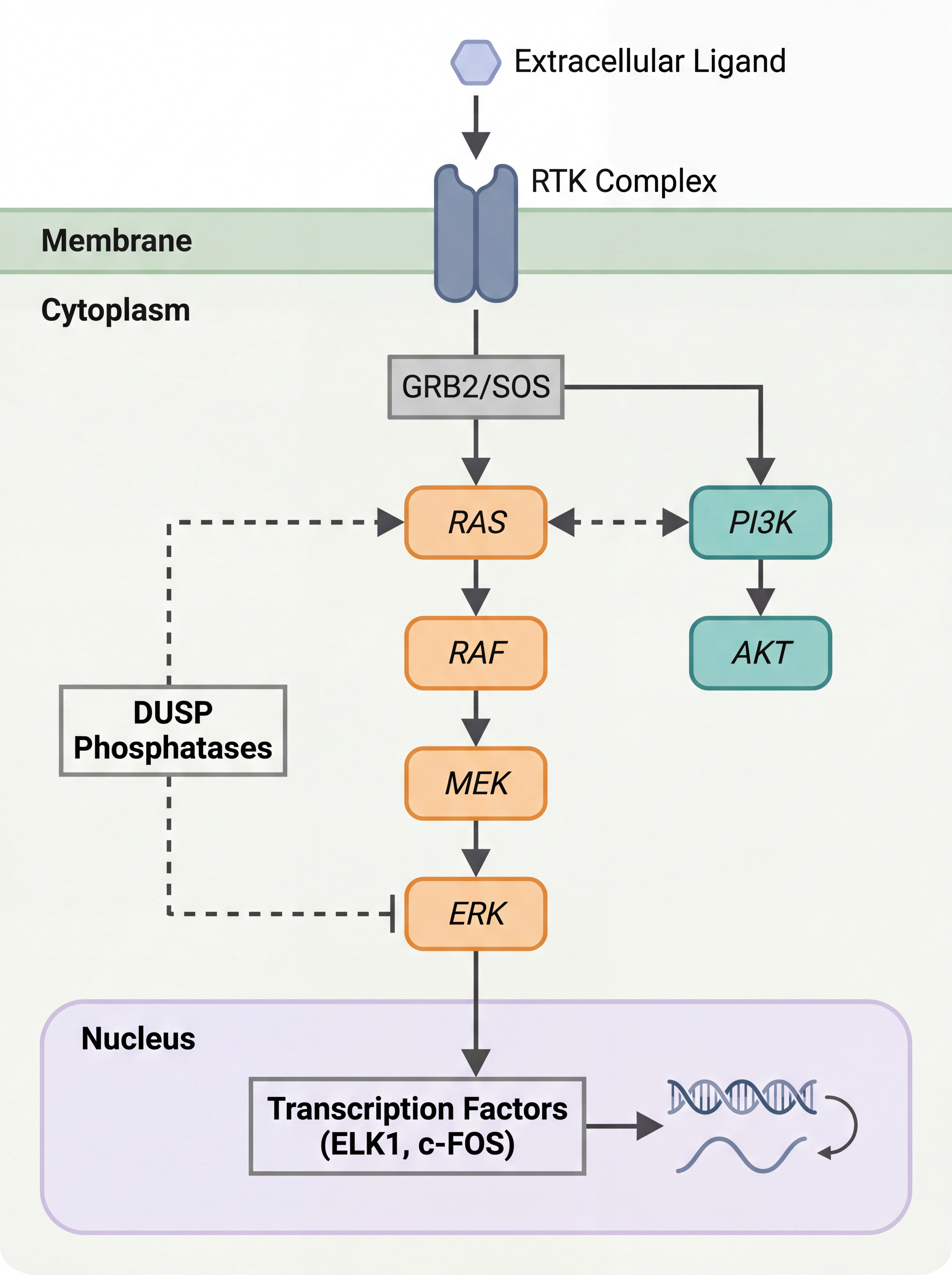 |
NLP — RAG Pipeline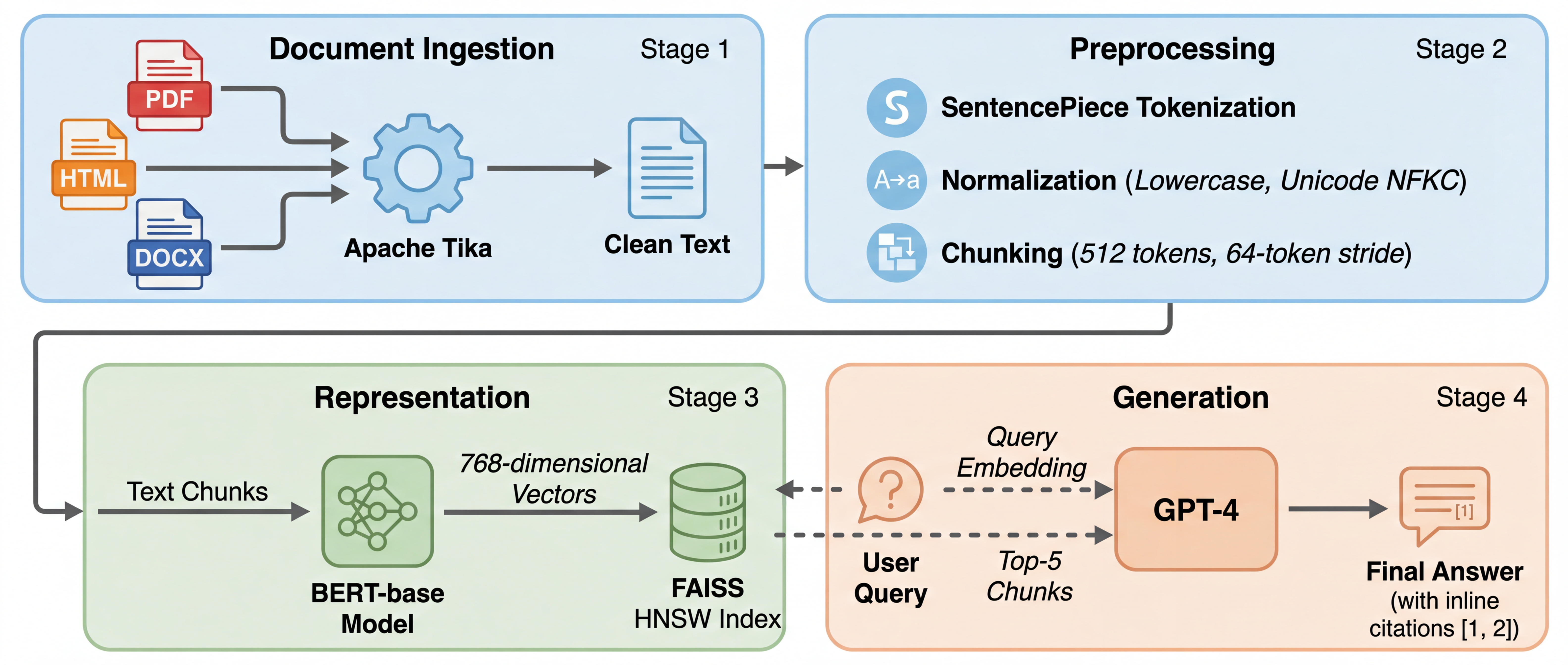 |
Data Engineering — Lakehouse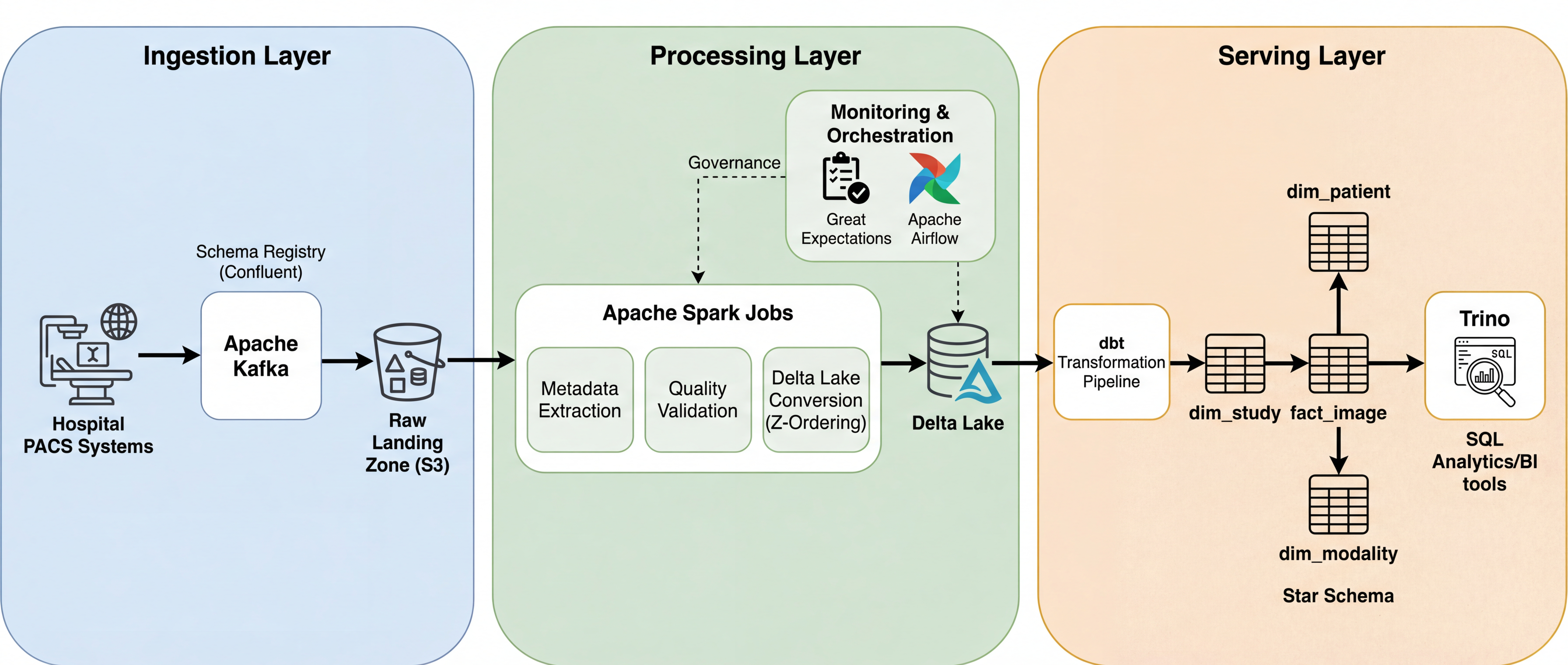 |
Medical AI — U-Net + Mamba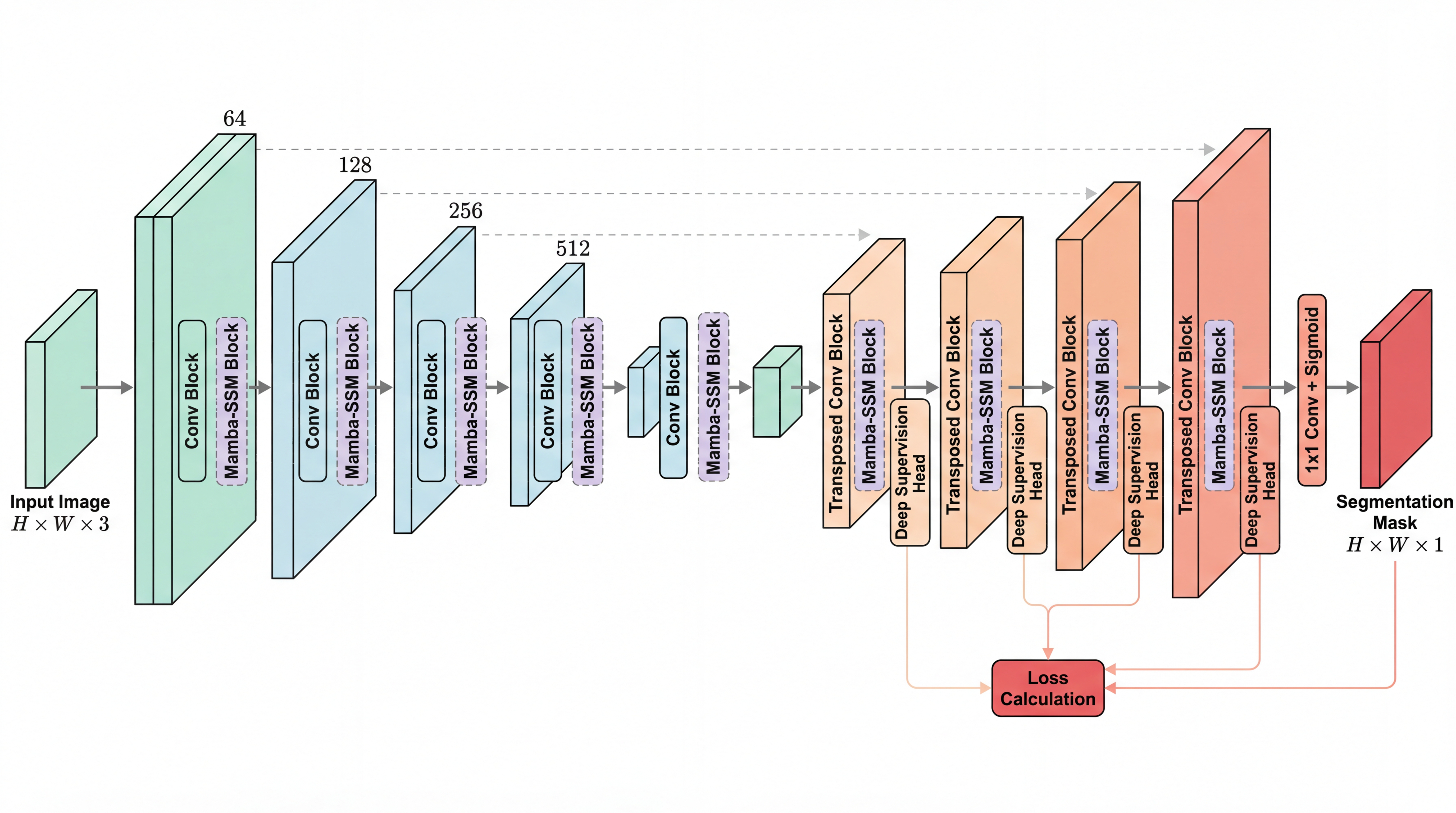 |
Medical Imaging — TextMamba3D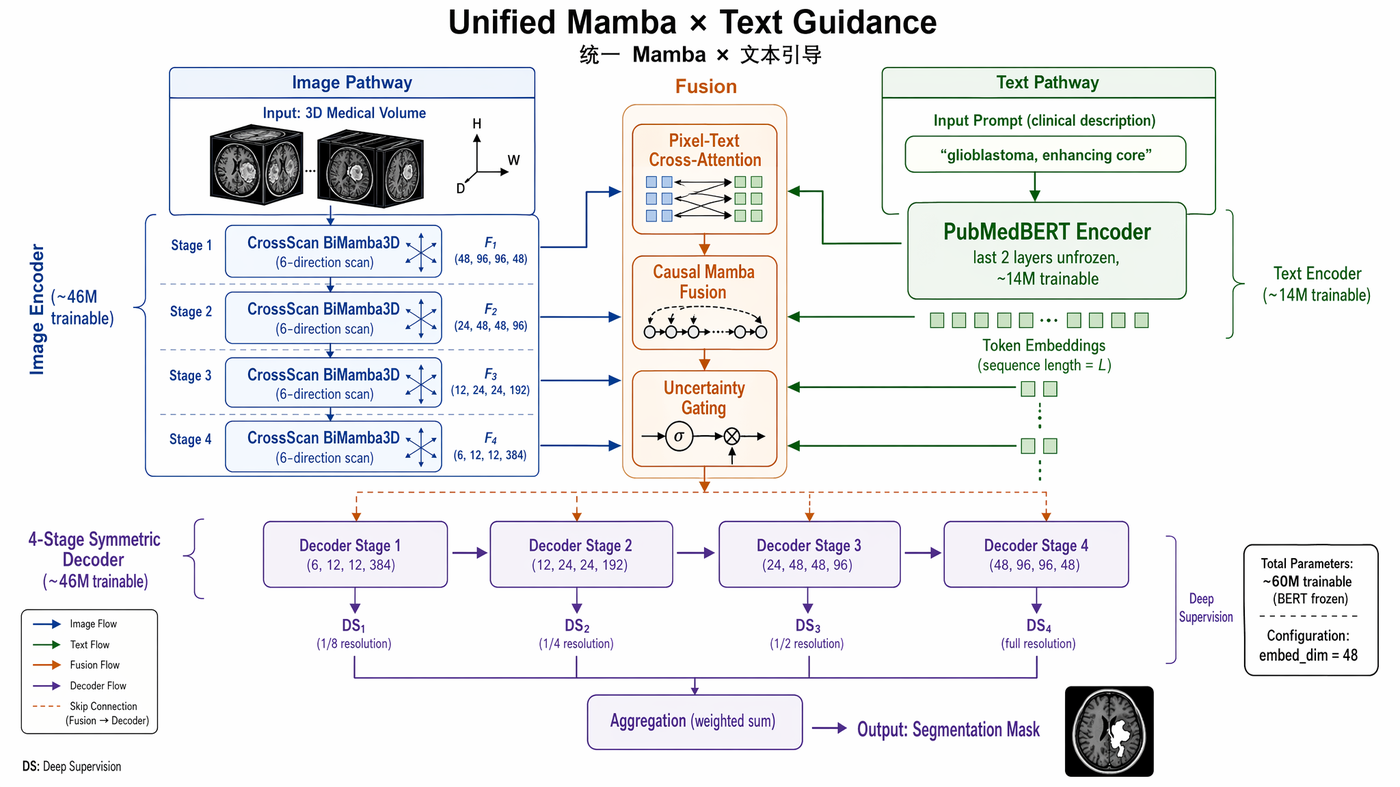 gpt-image-2 · paper-grade info density |
Game Theory — Influence Diagram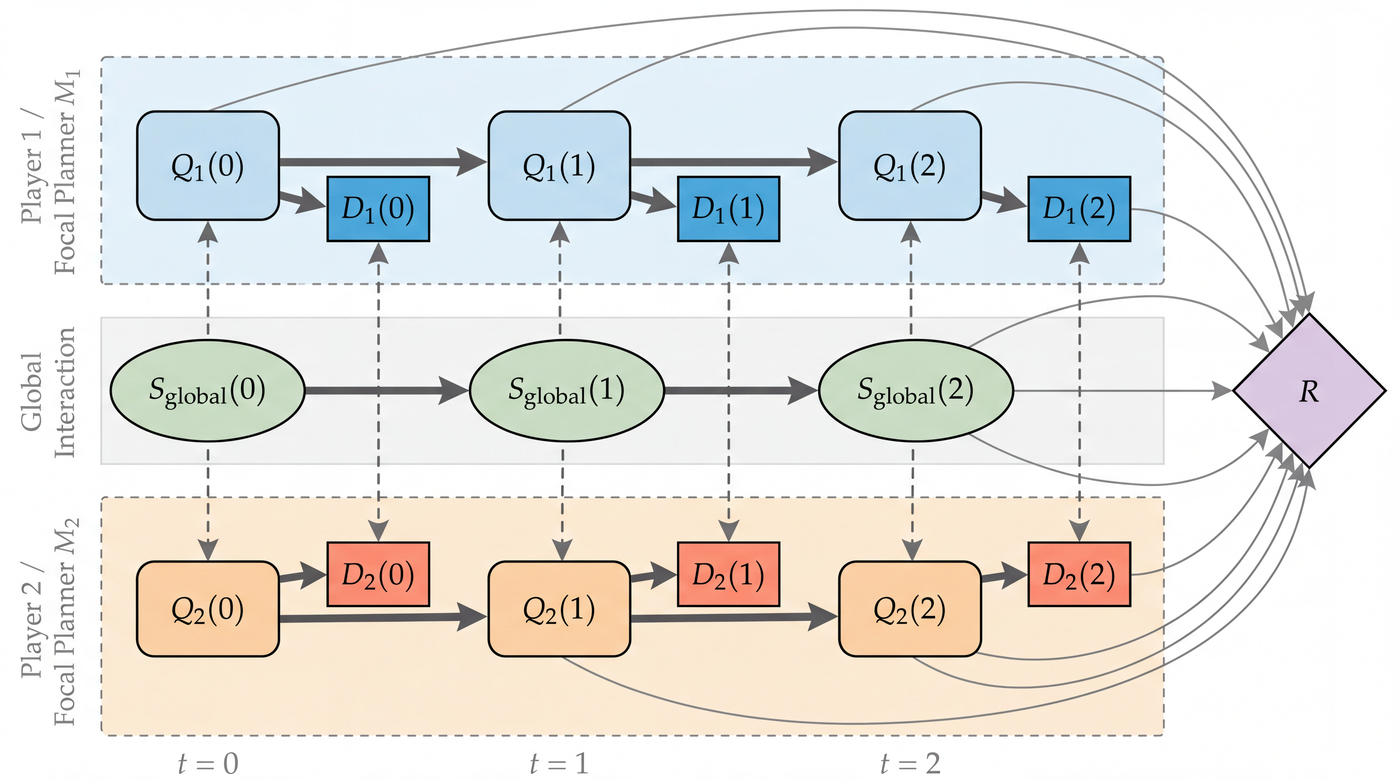 Gemini · soft pastel academic aesthetic |
Ablation Study — BraTS 2023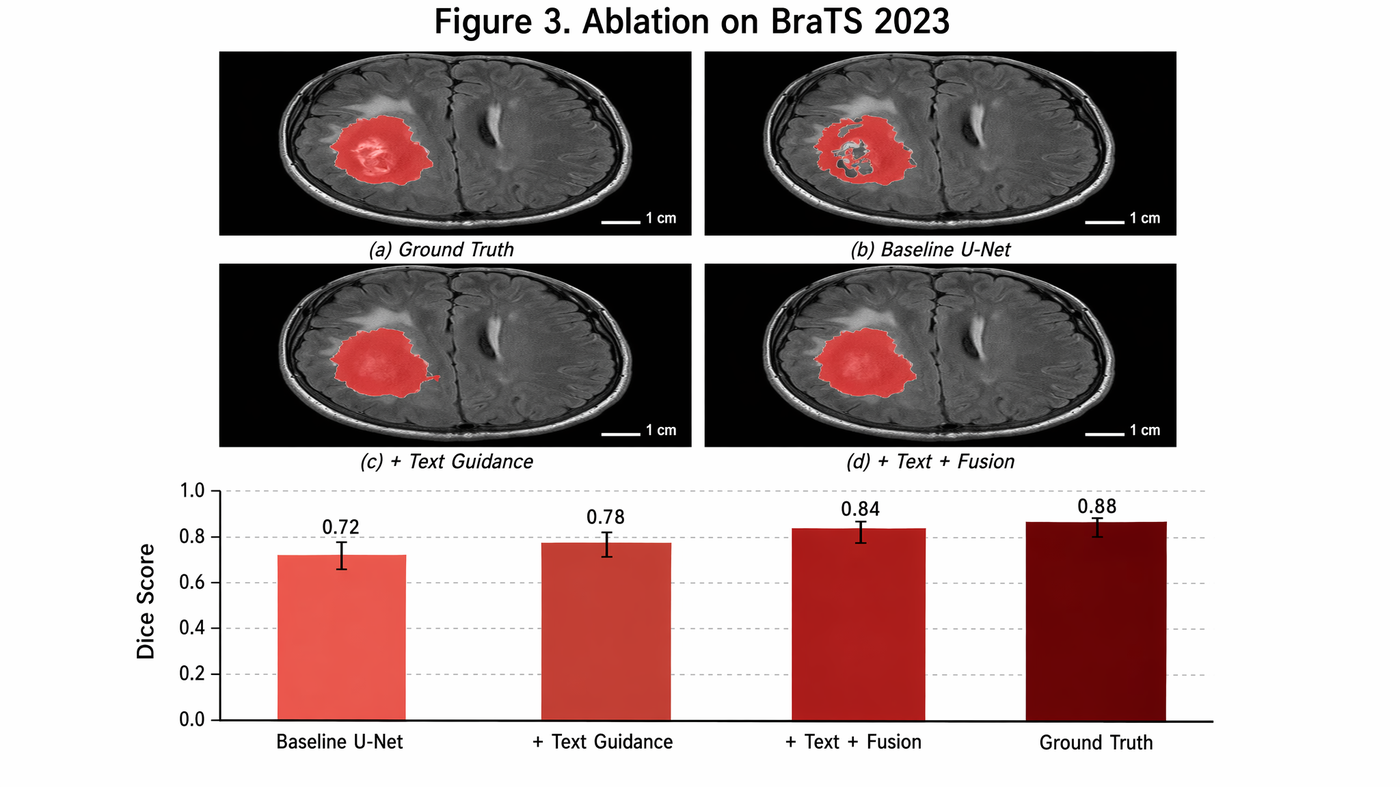 gpt-image-2 · 2×2 MRI panels + Dice bar chart |
Scientific Slide — scRNA-seq Workflow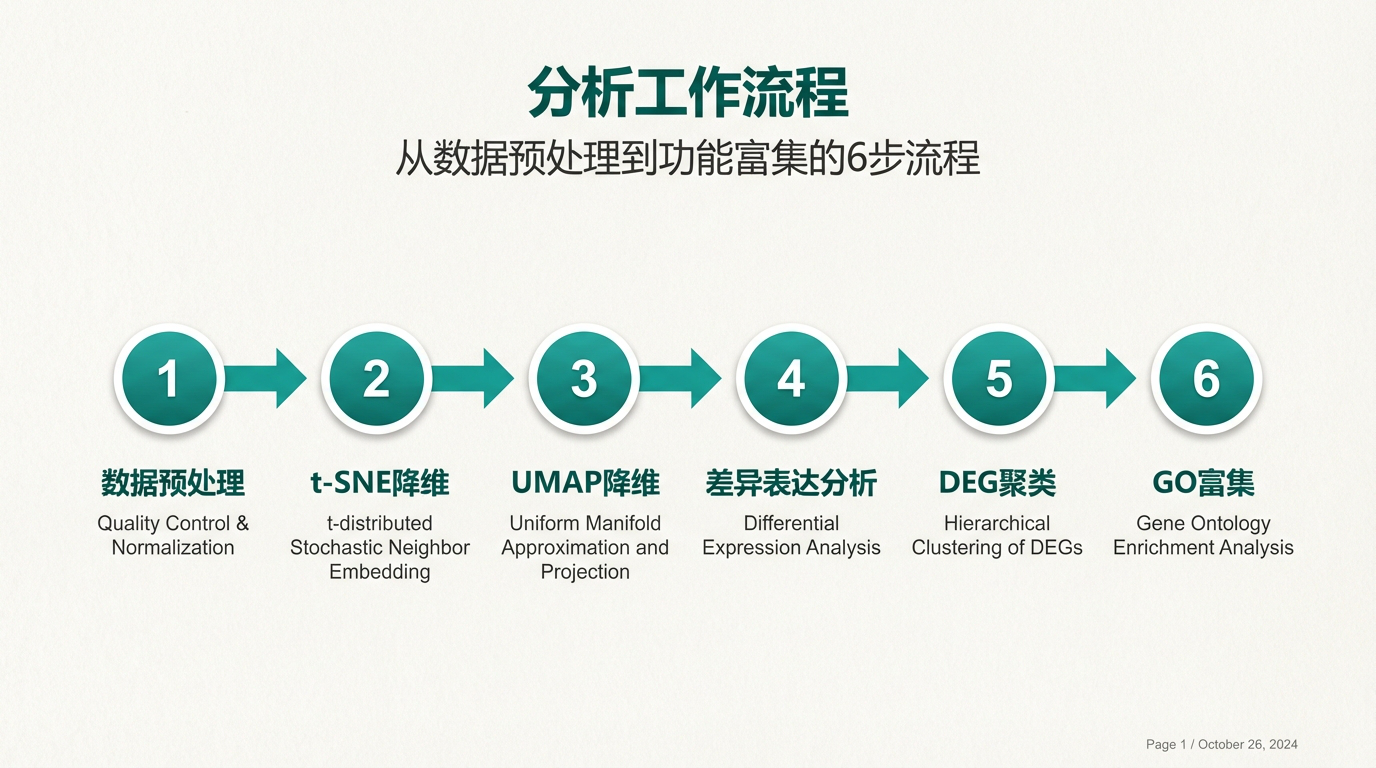 paperbanana-slide-deck · single-cell analysis pipeline |
All figures generated from plain text descriptions — zero manual drawing.
Slide Deck Showcase — “The Flywheel Learning Method”
A real 10-slide lecture deck built with paperbanana-slide-deck. Below: 4 selected slides showing set-wide style consistency (same warm off-white palette, sketch-notes hand-drawn typography, and gear motif across the whole deck).
Slide 1 — Cover |
Slide 4 — Flywheel Model |
Slide 7 — AI Tools Do's and Don'ts |
Slide 10 — Let the Flywheel Spin |
One command: paperbanana-slide-deck picks a style preset, plans the outline, drafts per-slide prompts, then generates all slides with consistent design tokens.
More Examples (architecture diagrams, traditional aesthetics)
Transformer Architecture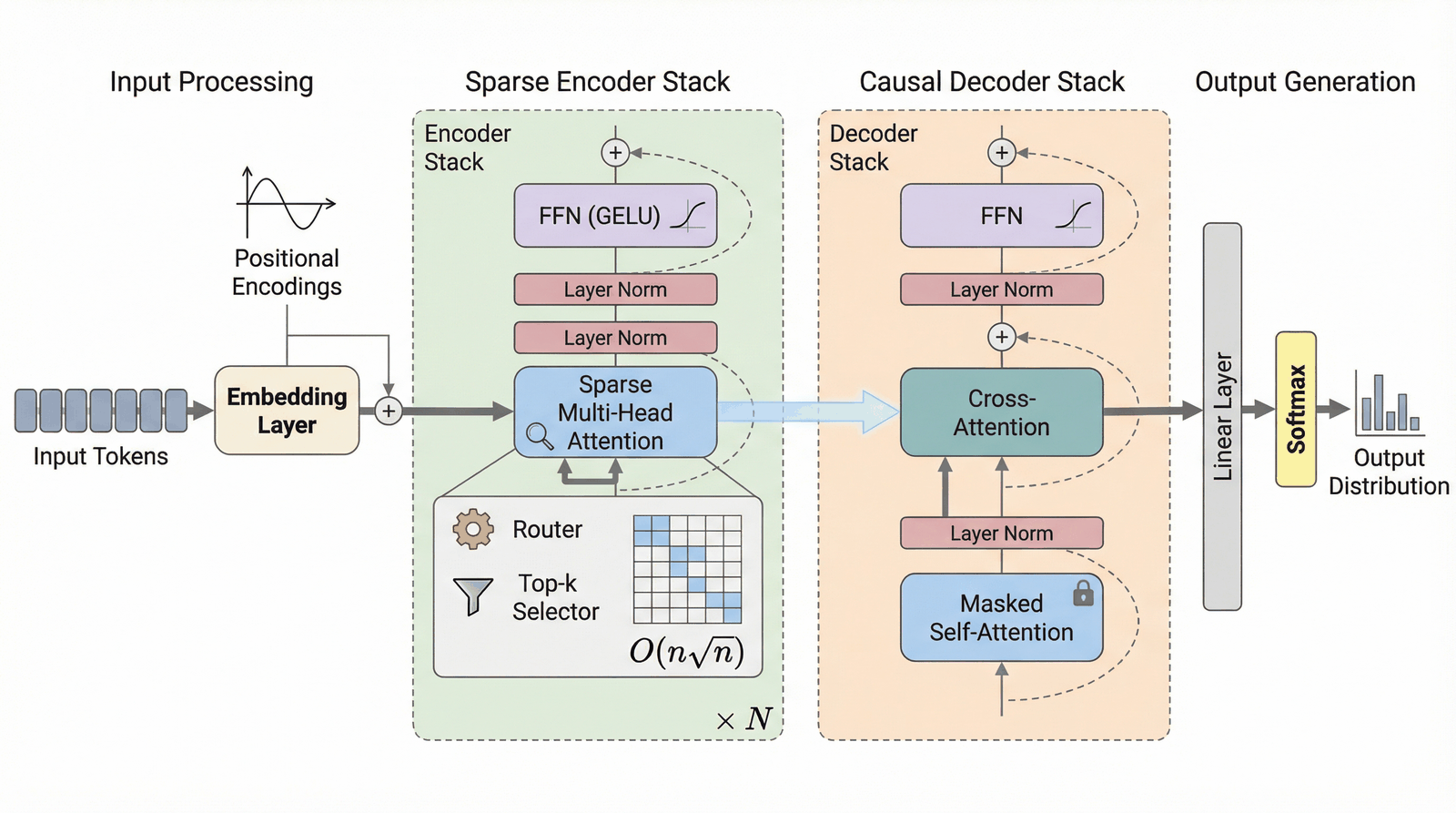 |
Mamba SSM Architecture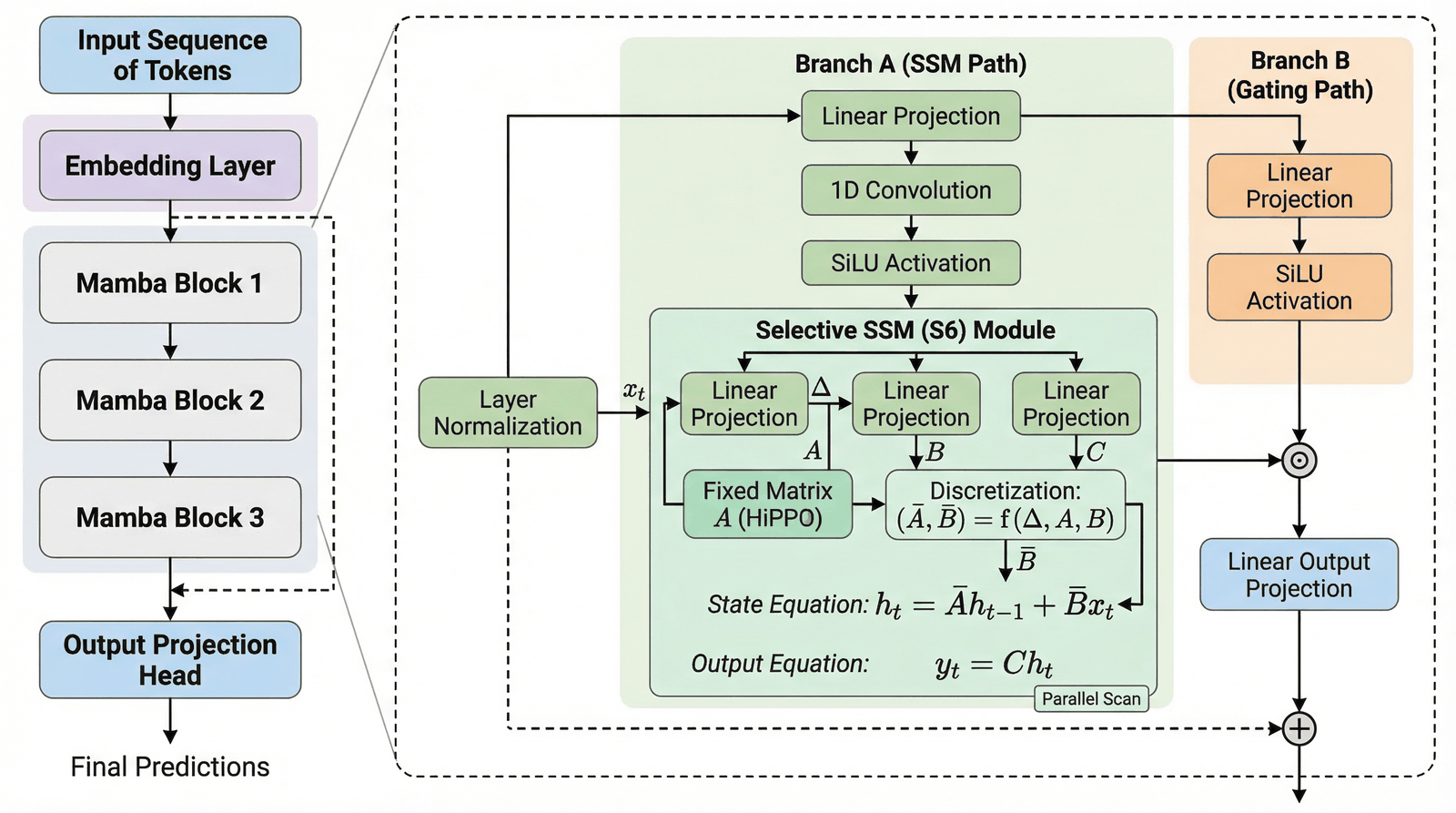 |
RAG Pipeline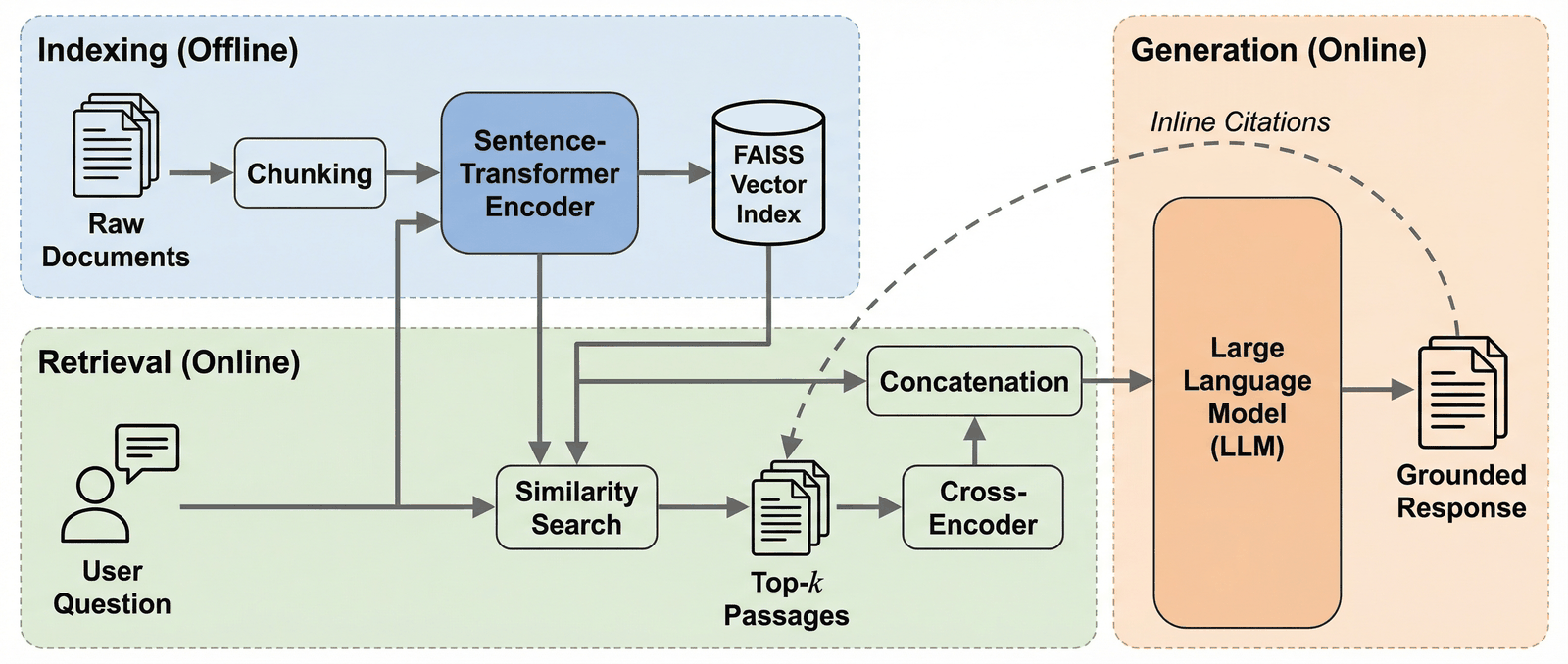 |
|
Chinese Calligraphy — 自律 (Self-Discipline)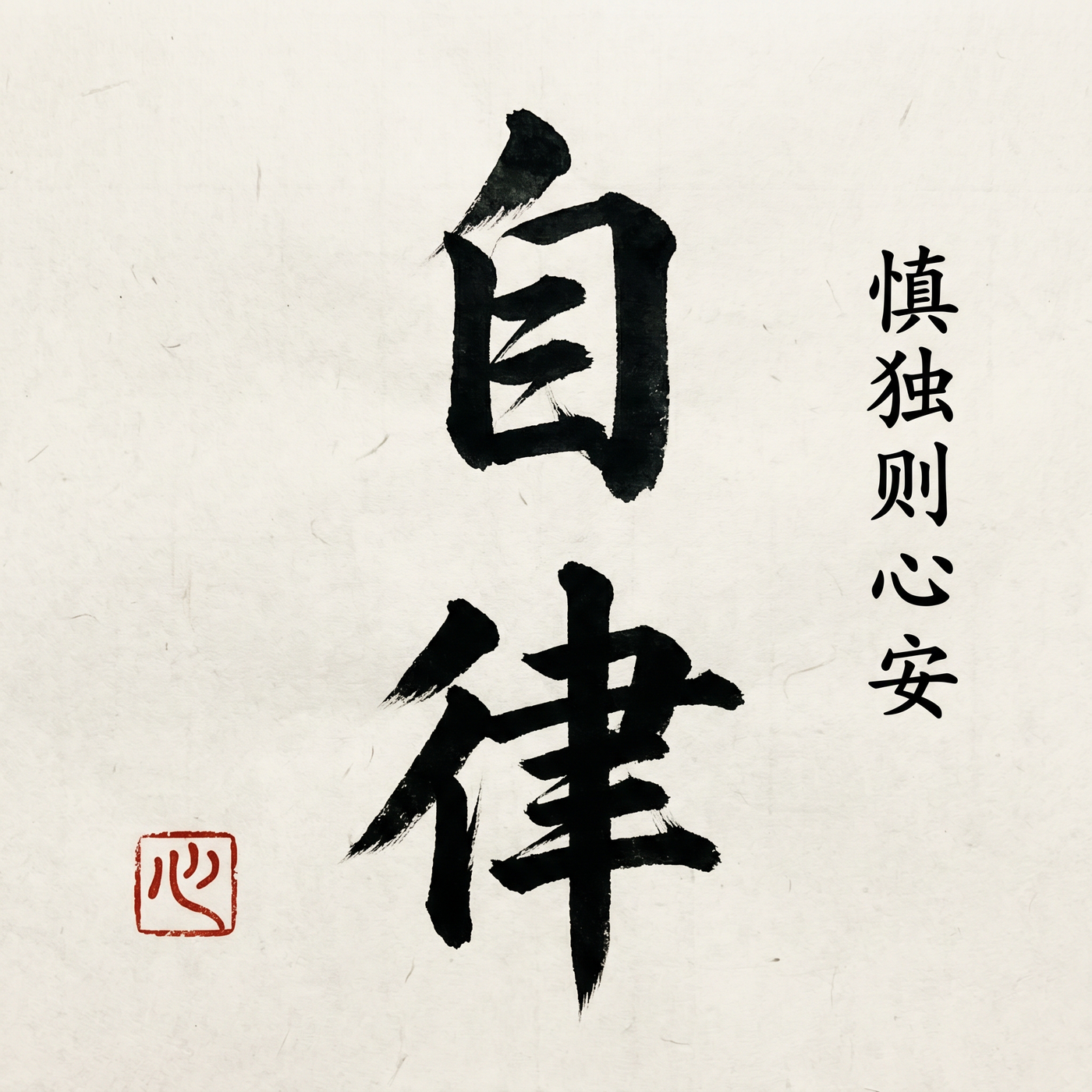 Gemini · bold expressive brushwork + 飞白 on xuan paper |
|
Skills in this Marketplace
| Skill | Scope | Description | Version |
|---|---|---|---|
| paperbanana | user | Academic diagrams, plots, slides, and quality evaluation | v4.0.0 |
| paperbanana-slide-deck | project | Full slide deck orchestration (RDIV workflow) + 150+ style presets | v1.1.0 |
Feature Matrix
| Capability | Status | Details |
|---|---|---|
| GPT Image 2 native support | ✅ v4.3 New | gpt-image-2 (2026-04-21) with true 16:9 up to 2048×1152, quality tier (low/medium/high), full RDIV pipeline + Critic |
| Smart provider routing | ✅ v4.3 New | Auto-pick openai vs gemini by scenario; explicit 用 GPT/用 Gemini/两路并行 override always respected |
| Methodology diagrams | ✅ | Text → publication-quality figure in 30s |
| Statistical plots | ✅ | CSV/JSON data → auto-styled academic plot |
| Presentation slides | ✅ | Markdown → 4K slide with 150+ style presets |
| Multi-venue styles | ✅ New | --venue neurips|icml|acl|ieee|custom |
| PDF input | ✅ New | --input paper.pdf --pages 3-5 |
| 6-item quality eval | ✅ New | Binary checklist: completeness, layout, annotation, color, legibility, hallucination |
| Autoresearch loop | ✅ New | Automated prompt self-optimization with keep/revert |
| Error handling | ✅ New | Critic UNREVIEWED status, provider fallback chains, retry filtering |
| 5 VLM providers | ✅ | Gemini, Claude, OpenAI, Bedrock, OpenRouter |
| Auto-refine | ✅ | --auto loops until Critic is satisfied |
| Run continuation | ✅ | --continue with --feedback for iterative refinement |
| Dynamic aspect ratio | ✅ | 8 Imagen ratios, Planner auto-recommends |
What’s New in v4.3 — GPT Image 2 First-Class Support
OpenAI released gpt-image-2 on 2026-04-21. PaperBanana v4.3 integrates it natively so the full Retriever → Planner → Stylist → Visualizer → Critic pipeline runs on gpt-image-2 outputs. You get quality-gated images at up to 2048×1152 without leaving paperbanana.
Adapter upgrade
| Feature | Before (v4.2) | After (v4.3) |
|---|---|---|
| Default OpenAI model | gpt-image-1.5 | gpt-image-1.5 — but gpt-image-2 is now fully wired in too |
| Output sizes | 1024×1024 / 1536×1024 / 1024×1536 (3 sizes) | Adds 2048×1152 (true 16:9), 1536×1536, 1792×1024, 1152×2048 |
quality=low|medium|high | ❌ rejected | ✅ auto-sent for gpt-image-2 |
| Supported ratios | 3 (1:1, 3:2, 2:3) | 8 (all paperbanana ratios; no more downgrade) |
| Critic loop | Only on Gemini | ✅ Runs on gpt-image-2 too — catches Chinese typo bugs, missing nodes |
Switching is a two-flag change:
python -m paperbanana.cli generate \
  --image-provider openai --image-model gpt-image-2 \
  --aspect-ratio 16:9 \
  --input prompt.txt --caption "..."
Auto routing by scenario
The skill picks the right provider based on your request’s signal:
| Scenario | Auto-routes to | Why |
|---|---|---|
User says 用 GPT / 用 Gemini / 两路并行 | That provider (or both) | Explicit intent always wins |
--purpose submission / “投稿用” | gpt-image-2 high | Rigor priority |
| Slide deck with Chinese titles | gpt-image-2 | Avoid Gemini’s duplicate-character bug (see below) |
| Edit with ≥ 2 reference images | gpt-image-2 | Avoid Gemini’s multi-image hallucination |
| Prompt mentions 山水 / 书法 / 古风 / 水墨 | gemini | Gemini dominates traditional East-Asian aesthetics |
generate with architecture / multi-stage / ablation keywords | gpt-image-2 high | GPT wins on dense multi-module figures |
| Everything else | gemini medium (default) | Faster, cheaper, prettier for general work |
Routing is calibrated from a 16-prompt controlled comparison (details: docs/superpowers/specs/2026-04-23-image-router-design.md in the companion repo).
Before / After — routing in action
These pairs come from the same prompt sent to both providers. The routing table exists because each model has specific strengths and specific bugs.
1. Chinese slide titles — GPT wins (Gemini has a duplicate-character bug)
Gemini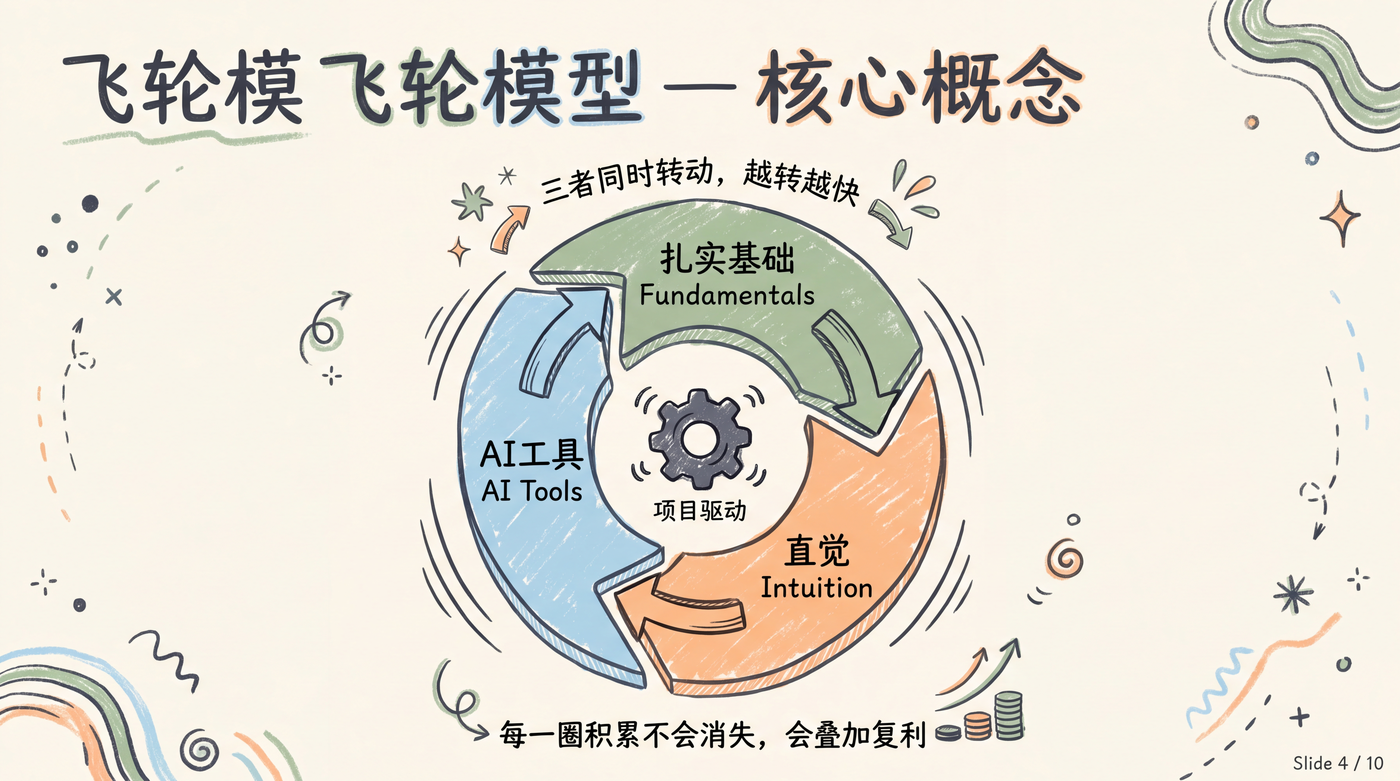 Title reads "飞轮模飞轮模型" — the prefix "飞轮模" is duplicated. Not viable for slide decks. |
gpt-image-2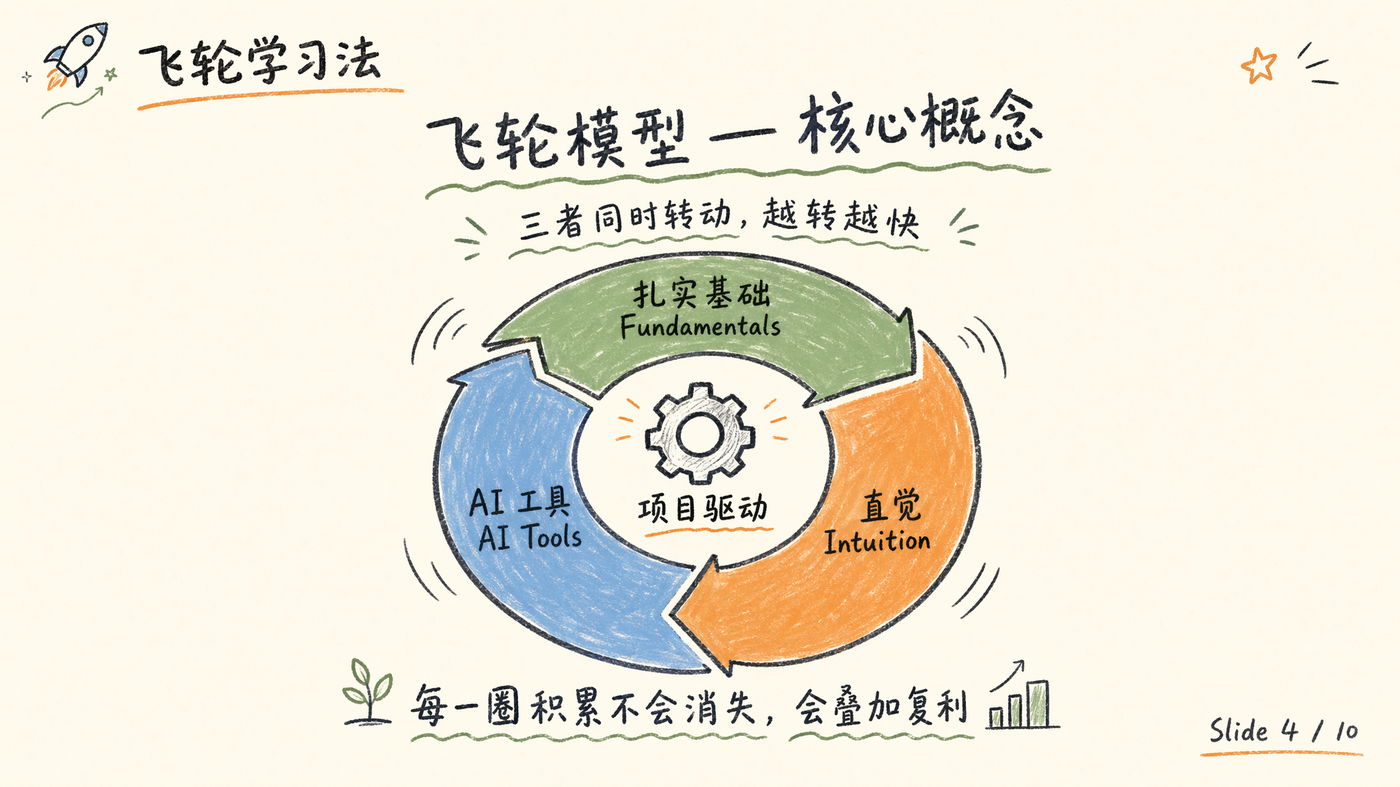 Title renders cleanly: "飞轮模型 — 核心概念". Routing sends Chinese slides here. |
2. Semantic correctness (diffusion process) — GPT wins
Gemini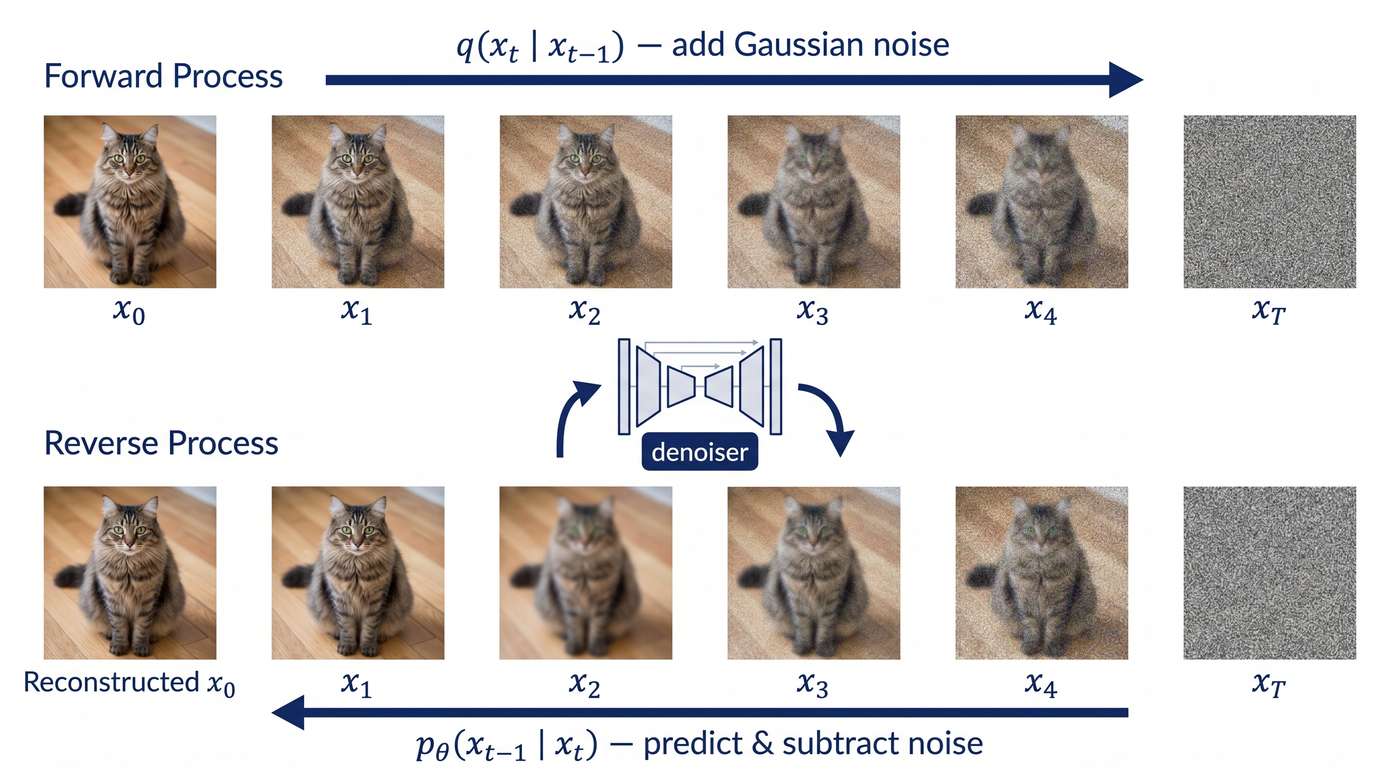 Cat images at x_0 through x_4 look identical; only x_T is noise. Semantics and visuals don't match. |
gpt-image-2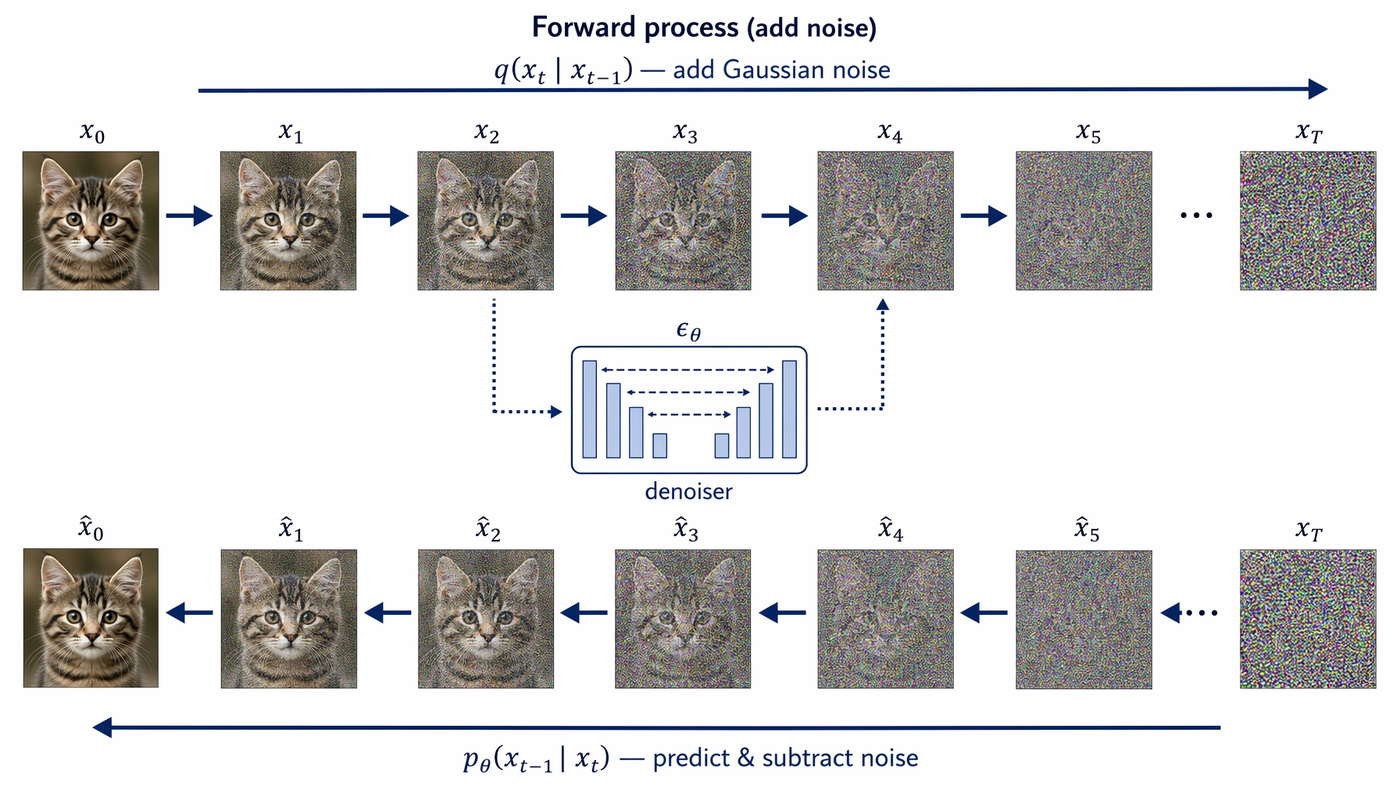 Cat actually degrades step-by-step — visually faithful to the diffusion process. |
3. Traditional Chinese calligraphy — Gemini wins (bolder brushwork)
Gemini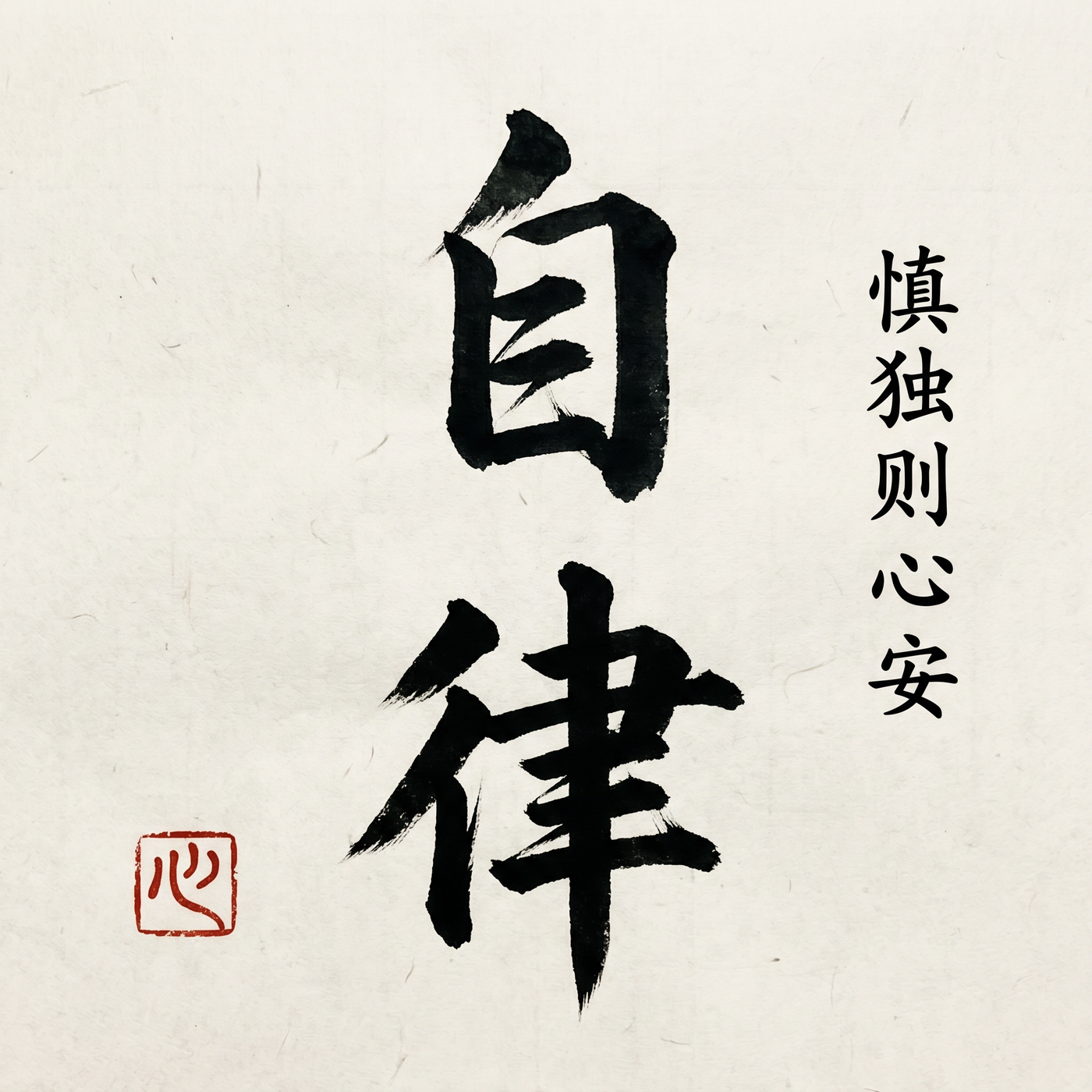 Bold expressive strokes with visible 飞白 and xuan-paper fiber — the prompt asked for "bold" and got it. |
gpt-image-2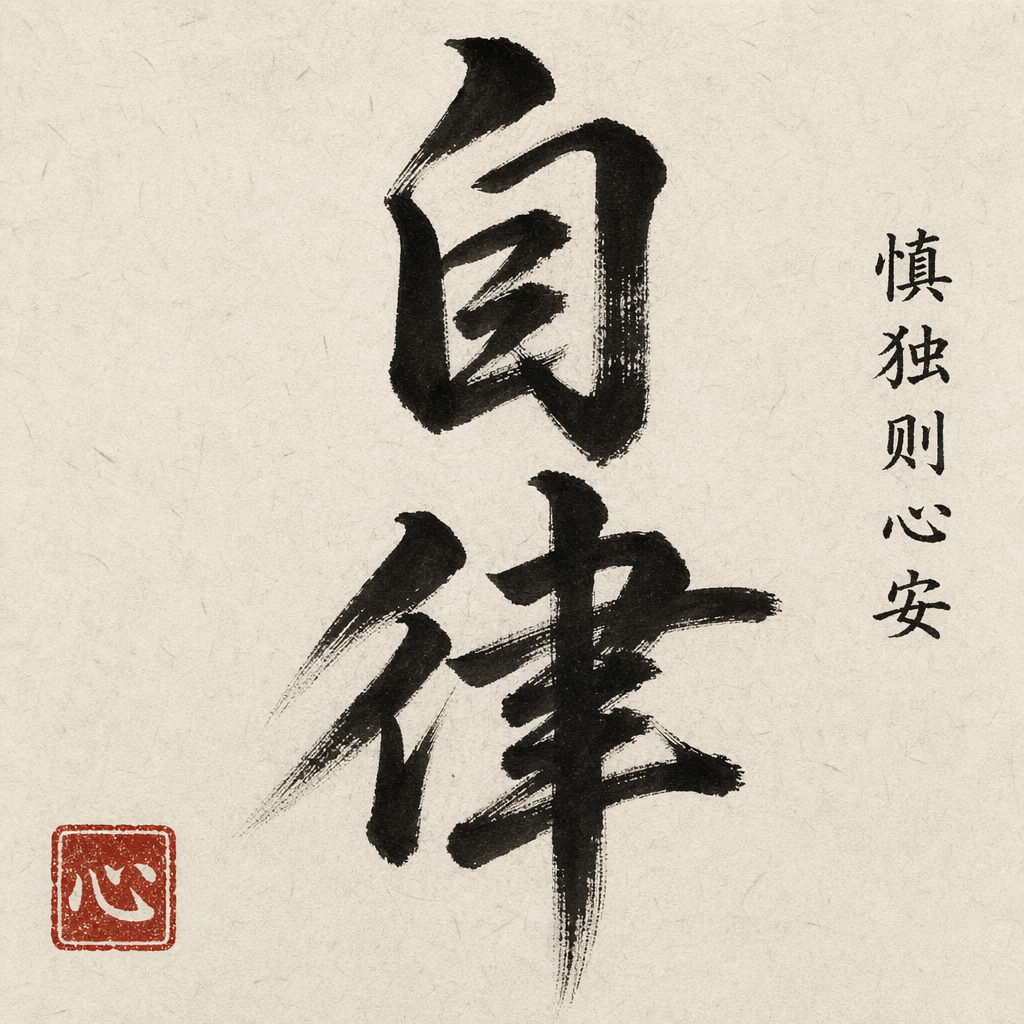 Technically correct characters but the stroke feels restrained. The routing sends 书法/山水/古风 prompts to Gemini. |
Verdict
You don’t need to know any of this — just ask for a figure and paperbanana picks. Or override with --image-provider openai|gemini|both. The Critic loop runs on whatever the pipeline picks, so quality stays gated regardless.
What’s New in v4.0
Eval-First Quality System
A 6-item binary checklist evaluator that measures academic figure quality without human reference images:
| Check | Question | Pass Criteria |
|---|---|---|
| Completeness | All input concepts represented? | Every key concept has a visual element |
| Layout | Logical flow direction? | Clear L→R, T→B, or radial flow |
| Annotation | All components labeled? | Every visual element has text |
| Color Restraint | ≤3 primary colors? | Academic palette discipline |
| Legibility | Readable at 50% zoom? | Text survives PDF column layout |
| No Hallucination | Zero unlabeled concepts? | Nothing invented beyond input |
Baseline: 76% → 100% after prompt optimization. Color restraint was the bottleneck (33% → 100%).
Autoresearch Self-Optimization
Automated prompt mutation loop inspired by Karpathy’s autoresearch:
Mutate prompt → Generate figures → Evaluate checklist → Keep or Revert → Repeat- One mutation per round (isolation principle)
- Targets weakest checklist dimension automatically
- Versioned prompt snapshots + JSONL changelog
- Stop condition: 3 consecutive rounds at 90%+ or 20 rounds max
Multi-Venue Academic Styles
/paperbanana generate method.txt "Architecture overview" --venue neuripsBuilt-in style guides for NeurIPS, ICML, ACL, IEEE — each with venue-specific color palettes, layout conventions, and typography.
Robust Error Handling
| Failure Type | Behavior |
|---|---|
| Image API failure | Retry 3× → fallback provider chain → report |
| Critic JSON parse failure | Never silently approve — mark UNREVIEWED, retry once |
| Rate limit (429) | Exponential backoff, skip non-transient errors |
| Plot code injection | AST-based import blocklist (os, subprocess, socket blocked) |
Quick Start
# 1. Install PaperBanana
git clone https://github.com/llmsresearch/paperbanana.git
cd paperbanana && pip install -e ".[google]"

# 2. Add the marketplace & install skills
claude plugin marketplace add PlutoLei/paperbanana-skill
claude plugin install paperbanana@paperbanana-skills
claude plugin install paperbanana-slide-deck@paperbanana-skills --scope project  # optional

# 3. Generate your first figure
# /paperbanana A 4-layer CNN with batch normalization for image classification
Note: This repository contains Claude Code skill definitions (SKILL.md files). The underlying Python package lives at llmsresearch/paperbanana.
Why PaperBanana?
| Pain Point | Traditional | With PaperBanana |
|---|---|---|
| Methodology figures | Hours in PowerPoint / TikZ | One sentence, 30 seconds |
| Statistical plots | matplotlib boilerplate | Describe your intent, auto-styled |
| Style consistency | Manual effort per figure | Critic agent enforces palette |
| Quality assurance | Eyeball it | 6-item binary checklist, automated |
| Venue compliance | Read style guide, guess | --venue neurips handles it |
Pipeline Architecture
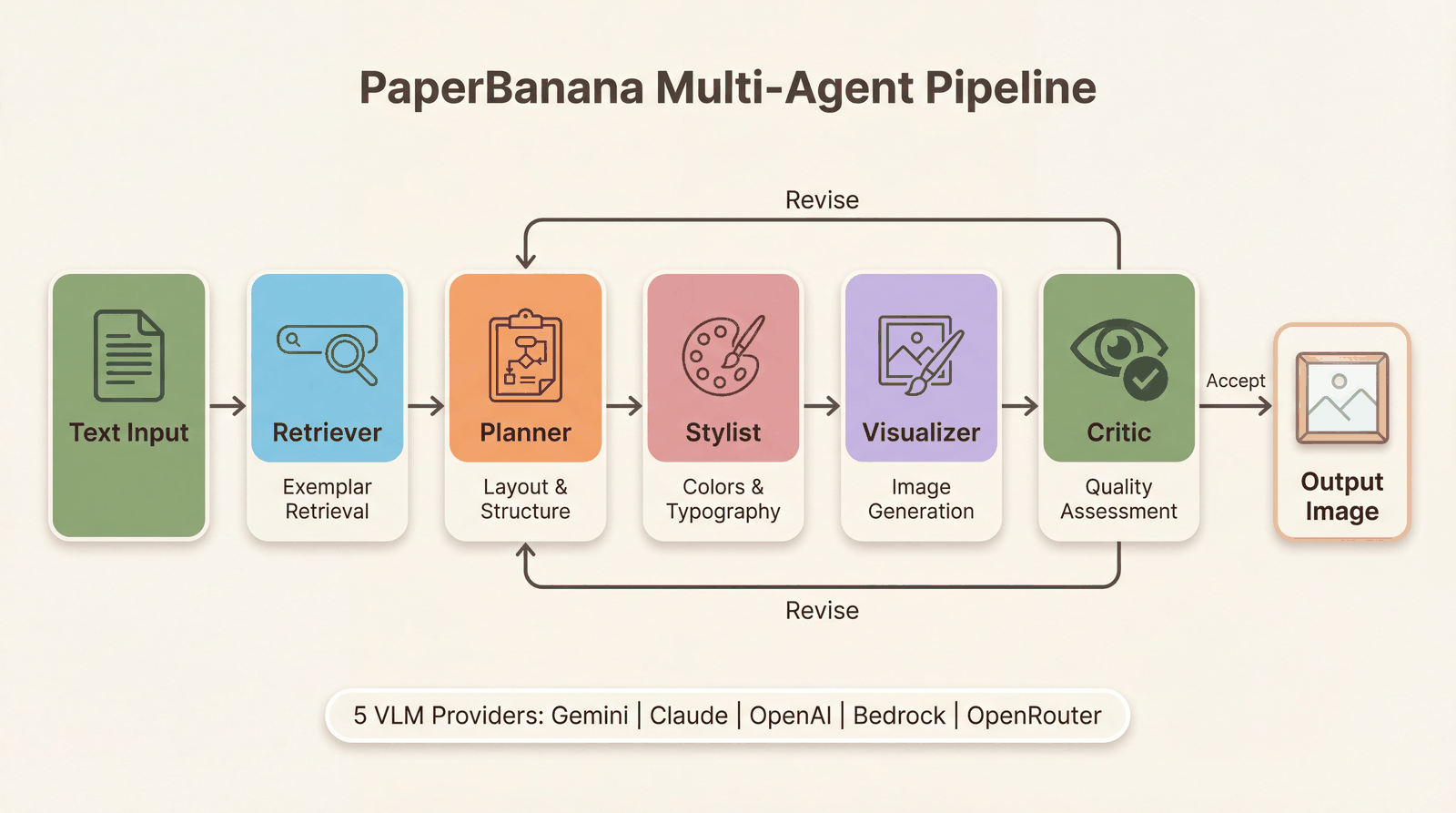
The pipeline runs iteratively: the Critic evaluates each output against academic quality criteria and either accepts it or sends revision instructions back to the Planner. Parse failures are handled safely — never silently approved.
Slide Deck Orchestrator
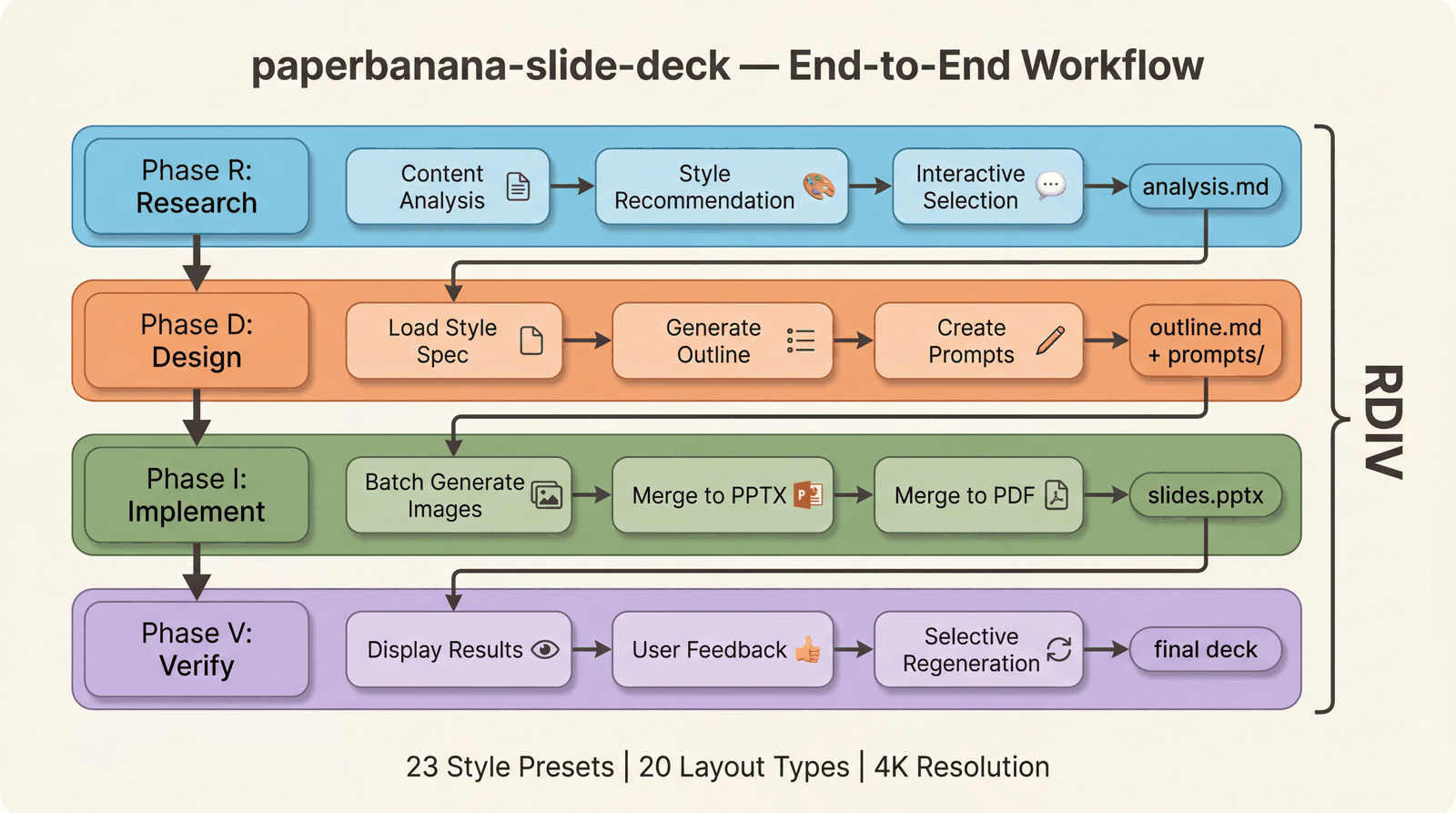
End-to-end presentation creation: analyze content → select from 23 visual styles → generate outlines → batch-generate 4K slides → merge to PPTX/PDF.
Commands
| Command | Purpose | Example |
|---|---|---|
generate | Methodology diagrams | /paperbanana A transformer with sparse attention |
plot | Statistical plots | /paperbanana plot results.csv Bar chart of accuracy |
slide | Presentation slides | /paperbanana slide prompt.md |
slide-batch | Batch slides | /paperbanana slide-batch prompts/ |
evaluate | Compare gen vs reference | /paperbanana evaluate gen.png ref.png |
data | Manage datasets | /paperbanana data download |
setup | Setup wizard | /paperbanana setup |
Command Examples
# Generate with venue-specific style
/paperbanana generate method.txt "Overview of the proposed framework" --venue neurips --optimize

# Generate from PDF
/paperbanana generate paper.pdf "Architecture diagram" --pages 3-5

# Auto-refine until Critic is satisfied
/paperbanana generate method.txt "Pipeline overview" --auto

# Continue with feedback
/paperbanana generate --continue --feedback "Make the arrows thicker and add color coding"

# Custom provider and aspect ratio
/paperbanana generate method.txt "Wide pipeline" --vlm-provider anthropic --aspect-ratio 16:9

# Batch generate slides with style
/paperbanana slide-batch prompts/ --resolution 4k --style ml-ai --iterations 3
Supported Providers
| Provider | VLM | Image Generation | Setup |
|---|---|---|---|
| Google Gemini | Flash / Pro | Imagen 3 | GOOGLE_API_KEY |
| Anthropic Claude | Claude 4 | — | ANTHROPIC_API_KEY |
| OpenAI | GPT-4o | DALL-E 3 | OPENAI_API_KEY |
| AWS Bedrock | Claude / Nova | Nova Canvas | AWS credentials |
| OpenRouter | Various | Various | OPENROUTER_API_KEY |
Retry policy: Transient errors (429, 5xx) retry with exponential backoff. Auth errors (401, 403) fail immediately — no wasted retries.
Installation
Option A: Plugin marketplace (recommended)
claude plugin marketplace add PlutoLei/paperbanana-skill
claude plugin install paperbanana@paperbanana-skills
claude plugin install paperbanana-slide-deck@paperbanana-skills --scope project  # optional
Option B: Manual install
# paperbanana skill (user-level)
mkdir -p ~/.claude/skills/paperbanana
curl -o ~/.claude/skills/paperbanana/SKILL.md \
  https://raw.githubusercontent.com/PlutoLei/paperbanana-skill/master/plugins/paperbanana/skills/paperbanana/SKILL.md

# paperbanana-slide-deck skill (project-level, optional)
mkdir -p .claude/skills/paperbanana-slide-deck
curl -o .claude/skills/paperbanana-slide-deck/SKILL.md \
  https://raw.githubusercontent.com/PlutoLei/paperbanana-skill/master/plugins/paperbanana-slide-deck/skills/paperbanana-slide-deck/SKILL.md
PaperBanana package setup
git clone https://github.com/llmsresearch/paperbanana.git
cd paperbanana
pip install -e ".[google]"          # Gemini (default, free tier available)
# pip install -e ".[all]"           # All providers
python -m paperbanana.cli setup     # Interactive API key configuration
Style Presets (23 available)
Use --style <name> with slide or slide-batch.
| Category | Styles |
|---|---|
| Academic | scientific, biotech, neuroscience, ml-ai, environmental |
| Professional | corporate, minimal, notion, bold-editorial |
| Creative | watercolor, sketch-notes, pixel-art, fantasy-animation |
| Premium | tech-keynote, creative-bold, financial-elite |
| Specialized | blueprint, chalkboard, dark-atmospheric, vintage, editorial-infographic, vector-illustration, intuition-machine |
Evaluation Infrastructure
PaperBanana v4.0 includes a complete evaluation system for measuring and improving figure quality:
evaluation/
├── checklist.py          # 6-item binary pass/fail evaluator
├── judge.py              # VLM-as-Judge comparative evaluation
├── benchmark.py          # End-to-end benchmark harness
└── prompt_ablation.py    # A/B prompt comparison runner

scripts/
├── run_checklist_baseline.py   # Run checklist on existing outputs
└── autoresearch_loop.py        # Automated prompt optimization
Run your own baseline:
python scripts/run_checklist_baseline.py --output-dir outputs/ --report baseline.jsonRun autoresearch optimization:
python scripts/autoresearch_loop.py --test-inputs data/checklist_test_set --max-rounds 10 --target 90Troubleshooting
| Problem | Solution |
|---|---|
| ”API key not found” | Run setup or check .env in paperbanana directory |
| ”Image generation failed” | Check provider supports image gen (Claude VLM does not) |
| “Critic parse error” | v4.0 marks output as UNREVIEWED instead of silent approval |
| Output marked UNREVIEWED | Critic couldn’t evaluate — review the figure manually |
| Windows Unicode errors | Upgrade PaperBanana (git pull in project directory) |
| Slow generation | Use --venue to skip Retriever, or reduce --iterations |
Contributing
Contributions welcome! See the Contributing Guide.
License
MIT