swift-code-reviewer-skill
officialClaude Code skill for comprehensive Swift/SwiftUI code reviews with multi-layer analysis
Swift Code Reviewer Agent Skill


Multi-layer Swift/SwiftUI code review for Claude Code, OpenAI Codex CLI, Google Gemini CLI, and Kiro — with spec adherence, agent loop feedback, and project-standards validation.
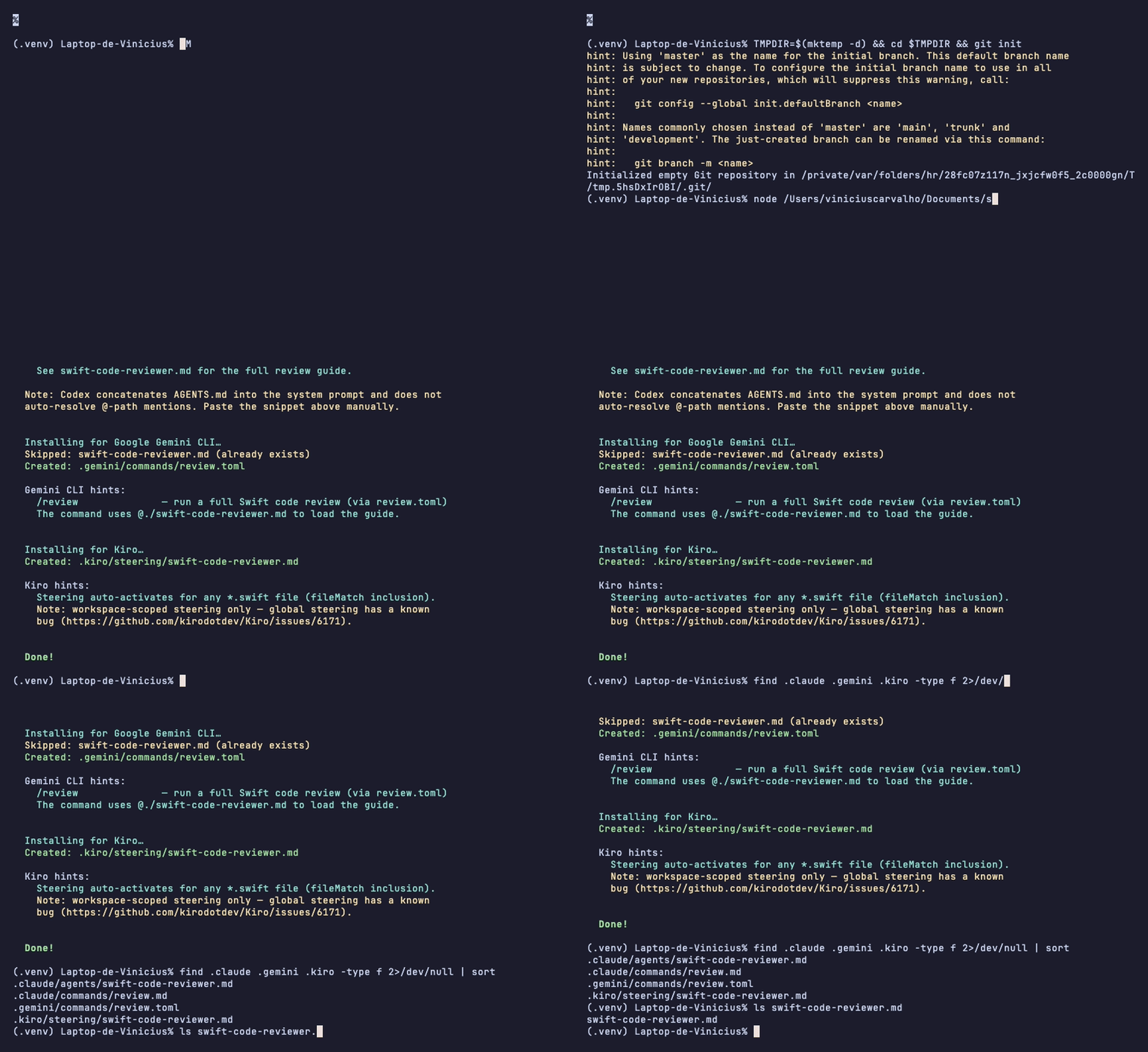
Quick Start
1. Install the skill (global, once)
npx skills add Viniciuscarvalho/swift-code-reviewer-skill2. Scaffold the review agent into your project
cd ~/Projects/YourApp
npx swift-code-reviewer-skill init
The interactive prompt lets you choose which agent(s) to install:
? Which agent(s) should the review guide be installed for?
 ◉ Claude Code  (.claude/agents/ + .claude/commands/)
 ○ OpenAI Codex CLI  (swift-code-reviewer.md at repo root)
 ○ Google Gemini CLI  (swift-code-reviewer.md + .gemini/commands/review.toml)
 ○ Kiro  (.kiro/steering/swift-code-reviewer.md, fileMatch: **/*.swift)
CI / scripted install (no prompt)
npx swift-code-reviewer-skill init --agent claude          # Claude only (default in non-TTY)
npx swift-code-reviewer-skill init --all                   # all agents at once
npx swift-code-reviewer-skill init --agent codex,gemini    # specific subset
npx swift-code-reviewer-skill init --dry-run               # preview without writing files
3. Run a review
/review                      # Claude: staged + unstaged Swift changes
@swift-code-reviewer         # Claude: invoke agent directly
For Gemini: /review (via .gemini/commands/review.toml).
For Codex and Kiro: ask the agent to review your Swift changes directly.
Choose Your Agent
| Agent | Install target | /review command | Auto-activates | Project standards file |
|---|---|---|---|---|
| Claude Code | .claude/agents/swift-code-reviewer.md | ✅ | — | .claude/CLAUDE.md |
| Codex CLI | swift-code-reviewer.md (root) | ❌ | — | AGENTS.md |
| Gemini CLI | swift-code-reviewer.md (root) | ✅ | — | GEMINI.md |
| Kiro | .kiro/steering/swift-code-reviewer.md | — | ✅ **/*.swift | .kiro/steering/project-standards.md |
Capability Matrix
| Feature | Claude | Codex | Gemini | Kiro |
|---|---|---|---|---|
| Phase 0 — Spec adherence | ✅ | ✅ | ✅ | ✅ |
| Phase 1 — Swift quality | ✅ | ✅ | ✅ | ✅ |
| Phase 2 — SwiftUI patterns | ✅ | ✅ | ✅ | ✅ |
| Phase 3 — Performance | ✅ | ✅ | ✅ | ✅ |
| Phase 4 — Security | ✅ | ✅ | ✅ | ✅ |
| Phase 5 — Architecture | ✅ | ✅ | ✅ | ✅ |
| Phase 6 — Project standards | ✅ | ✅ | ✅ | ✅ |
| Phase 2.5 — Agent loop feedback | ✅ | ✅ | ✅ | ✅ |
| Companion skill cross-refs | ✅ full | ⚡ inlined | ⚡ inlined | ⚡ inlined |
/review slash command | ✅ | ❌ | ✅ | — |
| Auto-activates on Swift files | — | — | — | ✅ |
Highlights
- Seven-layer analysis — spec adherence, Swift 6+ concurrency, SwiftUI patterns, performance, security, architecture, and project standards
- Agent loop feedback — detects recurring patterns and drafts
.claude/CLAUDE.mdrules to prevent them in future AI-generated code - Spec-first — validates every acceptance criterion in the PR description against the actual diff; flags scope creep and missing implementations
- Project-aware — reads your project’s standards file (
.claude/CLAUDE.md,AGENTS.md, orGEMINI.md) and flags violations - Four agents, one install — interactive
initscaffolds the right files for each agent with idempotent, non-destructive writes
How It Works
Phase 1  Context Gathering
  → gh pr view / glab mr view + git diff + project standards file

Phase 2  Analysis (per category)
  0. Spec Adherence     — requirement coverage table, scope creep, missing work
  1. Swift Quality      — concurrency, optionals, typed throws, naming
  2. SwiftUI Patterns   — @Observable, NavigationStack, .task, accessibility
  3. Performance        — ForEach identity, Equatable, lazy loading, GeometryReader
  4. Security           — Keychain, HTTPS, no secrets in logs
  5. Architecture       — MVVM/TCA, DI, testability
  6. Project Standards  — custom rules from your project standards file

Phase 2.5  Pattern Detection
  → group findings by rule; flag any rule firing ≥2 times as a recurring pattern
  → draft directives for your project standards file to prevent recurrence

Phase 3  Report
  → grouped by file, sorted by severity (Critical → High → Medium → Low)
  → prioritized action items + agent loop feedback
Example Output
The following is a representative excerpt from examples/claude-tca-review.md, generated
against pointfreeco/swift-composable-architecture
at commit d9f965e.
# Code Review — FeatureReducer.swift, FeatureView.swift

## Summary

Files: 2 | Critical: 0 | High: 2 | Medium: 1 | Low: 1

## Spec Adherence

**Source**: inferred from diff

| Requirement                         | Status                                      | Location                |
| ----------------------------------- | ------------------------------------------- | ----------------------- |
| State mutations isolated to Reducer | ✅ Implemented                              | FeatureReducer.swift:34 |
| View reads only from store          | ⚠️ Partial — direct URLSession call in body | FeatureView.swift:78    |

---

## FeatureView.swift

High **SwiftUI Patterns** (line 78)
Current: `URLSession.shared.dataTask(with: url) { ... }.resume()`
Fix: Move network call into the Reducer's Effect. Views in TCA must be
pure transformations of State — side effects belong in Effects returned
by the Reducer, not in the view body.

High **SwiftUI Patterns** (line 12)
Current: `NavigationView { ... }`
Fix: Replace with `NavigationStack`. NavigationView is deprecated as of iOS 16.

## Positive Observations

FeatureReducer.swift correctly uses typed throws and @Sendable closures throughout.

## Prioritized Action Items

- [Must fix] Move URLSession call from view body into Reducer Effect (FeatureView.swift:78)
- [Should fix] Replace NavigationView with NavigationStack (FeatureView.swift:12)
- [Consider] Add Equatable conformance to FeatureView for diffing (FeatureView.swift:1)

---

## Agent Loop Feedback

### Pattern: NavigationView (2 occurrences)

**Files**: FeatureView.swift:12, SettingsView.swift:44
**Suggested rule for .claude/CLAUDE.md**:

> Use `NavigationStack` exclusively. `NavigationView` is deprecated as of iOS 16.
See examples/ for three full review reports against real OSS projects.
Installation
Primary (recommended)
npx skills add Viniciuscarvalho/swift-code-reviewer-skill
npx swift-code-reviewer-skill init
NPX installer (skill only, no init)
npx swift-code-reviewer-skillClone (for offline or development use)
git clone https://github.com/Viniciuscarvalho/swift-code-reviewer-skill.git \
  ~/.claude/skills/swift-code-reviewer-skill
Update
npx swift-code-reviewer-skill@latestUninstall
npx swift-code-reviewer-skill uninstallCLI Reference
npx swift-code-reviewer-skill [command] [options]

Commands:
  (none)     Install the skill to ~/.claude/skills/
  init       Scaffold review agent into the current project
  uninstall  Remove the skill from ~/.claude/skills/
  help       Show help

Options for init:
  --agent <name[,name]>   Target specific agent(s): claude, codex, gemini, kiro
  --all                   Install for all supported agents
  --force                 Overwrite existing files
  --dry-run               Preview writes without touching the filesystem
Configuration
The skill validates your code against a project-specific standards file. The file path differs by agent:
| Agent | Standards file |
|---|---|
| Claude Code | .claude/CLAUDE.md |
| Codex CLI | AGENTS.md |
| Gemini CLI | GEMINI.md |
| Kiro | .kiro/steering/project-standards.md |
The file is optional — if absent, the skill falls back to Apple’s official Swift API Design Guidelines.
Example .claude/CLAUDE.md:
# MyApp Standards

## Architecture

- ViewModels MUST use @Observable (iOS 17+)
- All dependencies MUST be injected via constructor
- Views MUST NOT contain business logic

## Design System

- Use AppColors enum ONLY
- Use AppFonts enum ONLY

## Testing

- Minimum coverage: 80%
- All ViewModels MUST have unit tests
Companion Skills (Claude)
When installed via npx skills add, Claude can read supplementary reference files from the
bundled companion skills for deeper context on specific topics:
skills/
├── README.md                    ← full index + attribution
├── swiftui-expert-skill/        ← SwiftUI state, Liquid Glass, macOS patterns
├── swift-concurrency/           ← actors, Sendable, Swift 6 migration
├── swift-testing/               ← Swift Testing framework, doubles, snapshots
├── swift-expert/                ← Swift 6+ specialist: protocols, memory, architecture
└── swiftui-ui-patterns/         ← 32 component references (nav, sheets, grids…)
For Codex, Gemini, and Kiro, the must-load excerpts from these skills are inlined directly into the respective wrapper templates — no separate install step needed.
Thanks to the original authors
| Author | GitHub |
|---|---|
| Antoine van der Lee | @AvdLee |
| Thomas Ricouard | @Dimillian |
| Eduardo Bocato | @bocato |
Each skill folder contains a NOTICE.md with attribution details. If you are an original
author and want attribution updated or content removed, please
open an issue.
Per-Agent Quirks & Limitations
Claude Code
- Full companion-skill cross-references resolve automatically from
~/.claude/skills/swift-*/ /reviewslash command available afterinit
OpenAI Codex CLI
-
No
/reviewslash command — Codex CLI does not support custom slash commands -
@-path mentions inAGENTS.mdare not auto-resolved; Codex concatenatesAGENTS.mdverbatim into the system prompt. Afterinit, paste this into yourAGENTS.mdmanually:## Swift code review See swift-code-reviewer.md for the full review guide. -
Companion skill excerpts are inlined into
swift-code-reviewer.md; no external files needed
Google Gemini CLI
/reviewavailable via.gemini/commands/review.toml— the TOMLpromptfield uses@./swift-code-reviewer.mdwhich Gemini does resolve at command invocation time- Companion skill excerpts are inlined; no external files needed
Kiro
- Steering is workspace-scoped (
inclusion: fileMatch,fileMatchPattern: "**/*.swift") — the guide activates automatically whenever you open or edit a Swift file - Known bug: Kiro global steering has a bug (kirodotdev/Kiro#6171) — workspace-scoped steering is the recommended path until it is resolved
- No dedicated slash command — ask Kiro directly to review your Swift changes
Project Layout
swift-code-reviewer-skill/
├── core/
│   └── swift-code-reviewer.core.md  ← canonical agent-agnostic source of truth
├── templates/
│   ├── agents/
│   │   ├── claude/swift-code-reviewer.md
│   │   ├── codex/swift-code-reviewer.md
│   │   ├── gemini/swift-code-reviewer.md
│   │   └── kiro/swift-code-reviewer.md
│   └── commands/
│       ├── claude/review.md
│       └── gemini/review.toml
├── references/                       ← detailed review checklists (agent-agnostic)
│   ├── review-workflow.md
│   ├── swift-quality-checklist.md
│   ├── swiftui-review-checklist.md
│   ├── performance-review.md
│   ├── security-checklist.md
│   ├── architecture-patterns.md
│   ├── feedback-templates.md
│   ├── spec-adherence.md
│   ├── agent-loop-feedback.md
│   └── custom-guidelines.md
├── skills/                           ← bundled companion skills
├── examples/                         ← real review reports (3 OSS projects)
├── assets/
│   ├── demo.png
│   └── init-demo.tape                ← VHS script for init-demo.gif
├── bin/
│   ├── install.js                    ← CLI entry point
│   └── lib/
│       ├── agents.js                 ← per-agent install functions
│       └── prompt.js                 ← TTY-aware agent selector
├── __tests__/
│   └── installer.test.js
└── SKILL.md                          ← Claude Code skill descriptor
Development
git clone https://github.com/Viniciuscarvalho/swift-code-reviewer-skill.git
cd swift-code-reviewer-skill
npm install

# Run installer tests
node --test __tests__/installer.test.js

# Preview init in a sandbox
cd "$(mktemp -d)" && git init
node /path/to/swift-code-reviewer-skill/bin/install.js init --dry-run
node /path/to/swift-code-reviewer-skill/bin/install.js init --all
node /path/to/swift-code-reviewer-skill/bin/install.js init  # interactive

# Regenerate the demo GIF (requires vhs)
brew install vhs
vhs /path/to/swift-code-reviewer-skill/assets/init-demo.tape
Contributing
See CONTRIBUTING.md for the full guide, including the Adding a new agent target checklist.
- Edit
SKILL.mdorcore/swift-code-reviewer.core.mdfor review logic - Update
references/for specific checklists - Add/modify per-agent templates in
templates/ - Add tests in
__tests__/installer.test.js - Submit a pull request
License
MIT — see LICENSE.
Made with care for the Swift community
Issues · Discussions · Sponsor